A Step-by-Step Guide to Building an Agent with ModelScope x OceanBase MCP
Preface
Now that AI’s time has come, does database management still have to rely on complex SQL statements and command-line operations?
OceanBase and ModelScope jointly introduce a new paradigm of “AI-driven intelligent database management.” Through MCP (Model Context Protocol) technology, we upgrade the interaction between developers and databases from “typing commands” to “conversation.”
No need to memorize commands or write scripts — just ask in natural language to create, run, manage, diagnose, and analyze an OceanBase database cluster.
This project is built on the ModelScope Studio platform, combining a large language model (LLM) with a database toolchain to achieve true “conversation as operation.” Whether you’re a database novice or a seasoned DBA, you can gain an unprecedentedly efficient experience.
Feature Overview
MCP Servers
This project currently supports OBShell, OBServer, and obdiag, corresponding to the three stages of creating, running, and managing a database cluster. Backed by these three tools, users can complete the full lifecycle of an OceanBase database cluster without typing a single line of code or a single command — simply by conversing with the Agent.
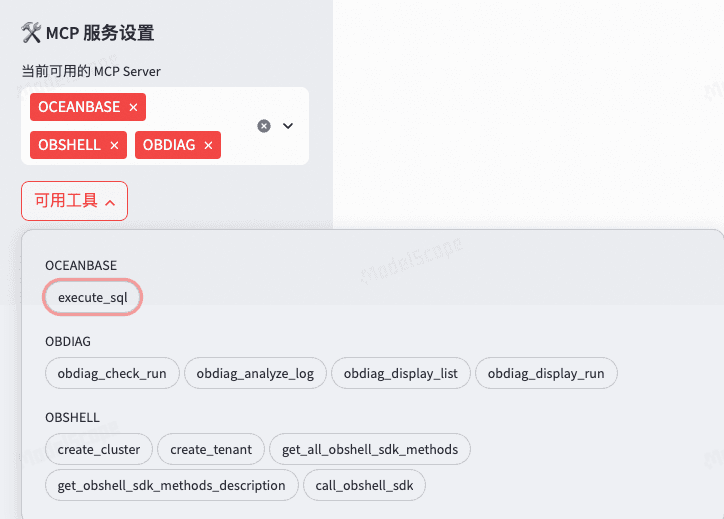
All MCP services, and many more extensions, can be found in the open-source repository. Explore away!
https://github.com/oceanbase/mcp-oceanbase
About OBShell MCP
OBShell can significantly improve database management efficiency, covering cluster management, tenant management, backup and recovery, permission management, monitoring and maintenance, and more. OBShell currently supports six tool calls:
- create_cluster: create a new OceanBase cluster. Users can deploy quickly with the default configuration, or specify detailed cluster parameters to deploy a custom cluster.
- create_tenant: create a new OceanBase tenant. An OceanBase cluster can contain multiple tenants, and an OceanBase tenant can contain multiple database users. Users can quickly create a tenant with the default configuration, or specify detailed tenant parameters for a custom deployment.
- get_all_obshell_sdk_methods: get all methods supported by OBShell. This adds more call support on top of create_cluster and create_tenant.
- get_obshell_sdk_methods_description: get the description of an OBShell SDK method by method name.
- call_obshell_sdk: call an OBShell SDK method.
About OBServer MCP
Through OBServer MCP, the Agent can perform CRUD operations on database data.
- execute_sql: execute a SQL statement. This includes, but is not limited to, queries, getting a table’s schema, and adding an index to a table.
About OBDiag MCP
Through OBDiag, users can perform inspections, diagnostics, and information queries on a database cluster.
- obdiag_check_run: inspect the cluster and return an inspection report.
- obdiag_analyze_log: analyze cluster logs to find error messages that have occurred and return them.
- obdiag_display_list: obdiag’s cluster information query feature, which returns the list of supported commands.
- obdiag_display_run: obdiag’s cluster information query feature, which executes the obtained command list; this requires the output returned by obdiag_display_list.
How the Agent Works
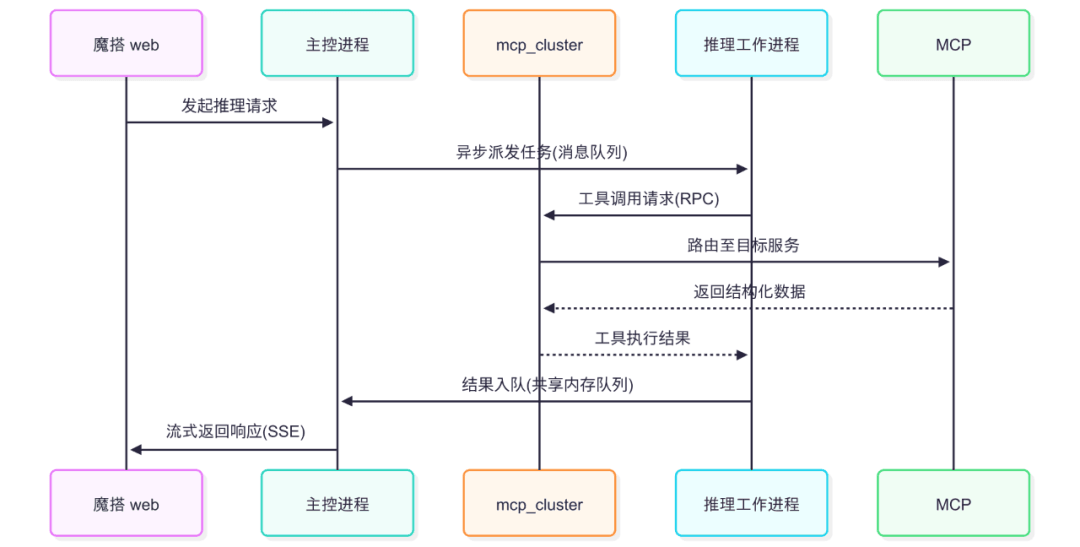
The mcp_cluster manages the metadata of the OceanBase MCP servers and manages the MCP servers themselves. During AI inference, a new asynchronous process is spawned to run the inference; tool calls during inference go through mcp_cluster, and the inference results are returned to the main process via inter-process communication (a queue), which then prints them to the ModelScope web page.
Experience Your Own AI Workshop on ModelScope Studio
Requirements:
- Try not to use the Safari browser, as it may prevent you from uploading the data-import dataset.
- Register a ModelScope account in advance. If you want to use ModelScope’s free API, bind your Alibaba Cloud account.
Note: If an incorrect operation causes the environment to malfunction, just restart it by following the steps in the appendix “Environment Recovery.”
Copy the AI Workshop Studio
Go to OceanBase’s official studio and copy your own studio.
https://modelscope.cn/studios/OceanBase/Oceanbase-AI_Workshop-Public/summary
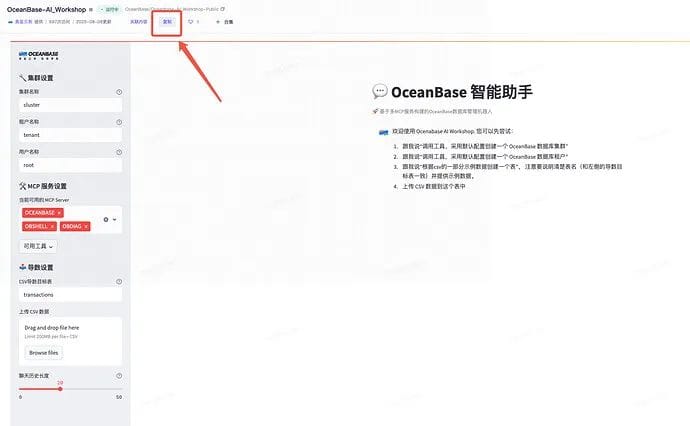
Studio configuration:
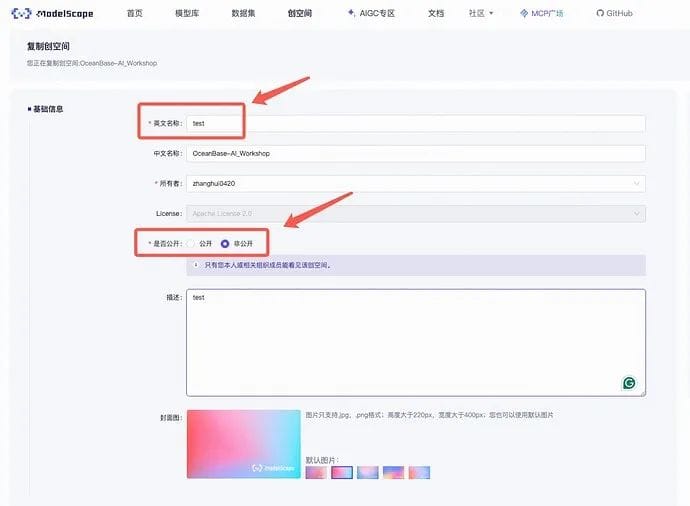
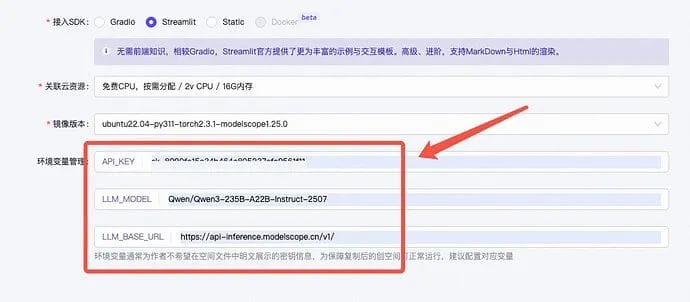
There are three main configuration items to pay attention to:
- “English name”: change it to a name you like.
- “Public or not”: choose “Private.” This avoids outside users abusing your private studio’s API_KEY quota.
- Environment variable configuration — API_KEY: you can use the free API_KEY provided by ModelScope. To get it: bind your Alibaba Cloud account:
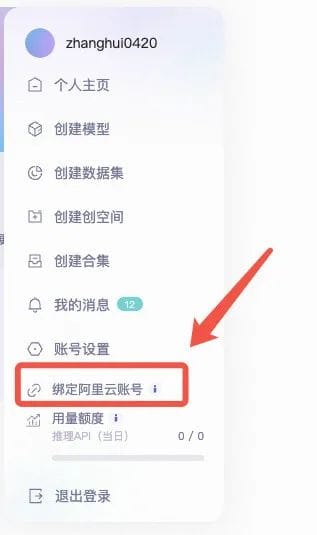
Open https://modelscope.cn/my/myaccesstoken to view your API_KEY (i.e., your access token).
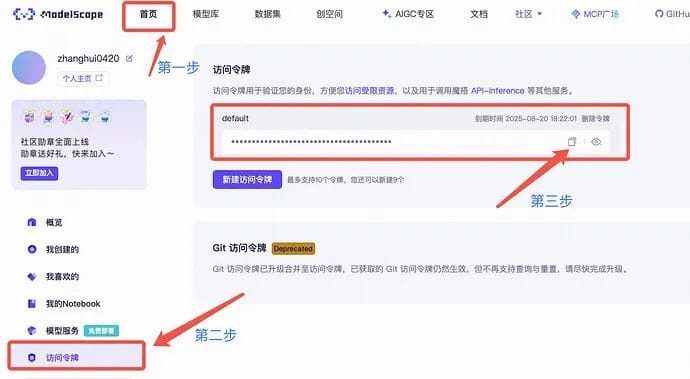
- LLM_MODEL: the model name. The demo uses
Qwen/Qwen3-235B-A22B-Instruct-2507
- LLM_BASE_URL: the URL for the model API calls. If you use ModelScope’s API_KEY, enter: https://api-inference.modelscope.cn/v1/
1 | API_KEY = <your-api-key> # Register a ModelScope account to get a large free API_KEY quota |
- Leave the other configuration items at their initial defaults.
After filling in the configuration, click the Copy Studio button to get your own studio. Then wait for the studio to finish initializing. The first time you use a studio, initialization takes a while, so please be patient.
Deploy the Database Cluster
Create an OceanBase cluster:
1 | Call the tool to create an OceanBase database cluster using the default configuration |
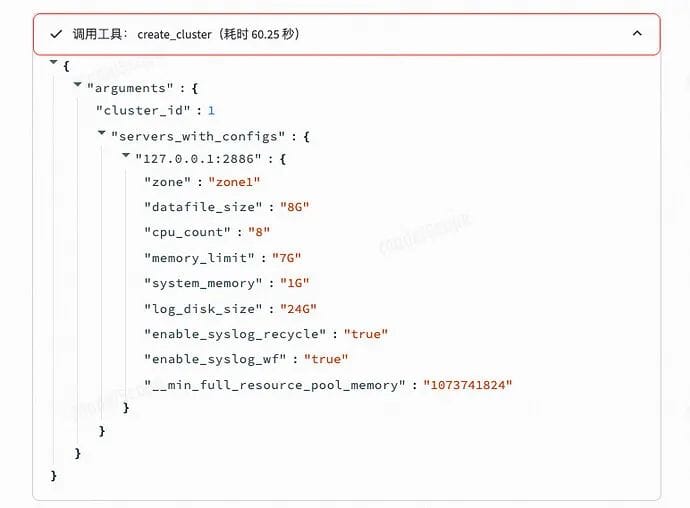
Create an OceanBase tenant:
1 | Call the tool to create an OceanBase database tenant using the default configuration |
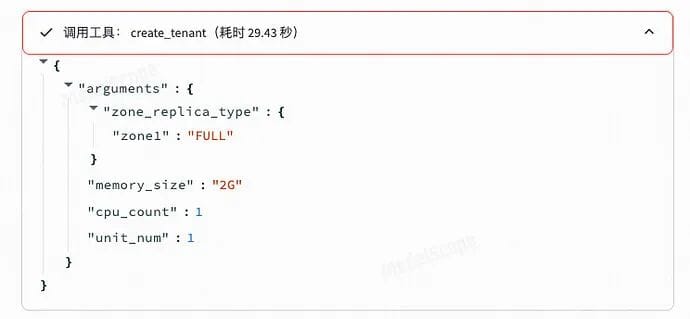
Create the Target Table for Data Import
Test data: 📎See the file on the forum
https://ask.oceanbase.com/t/topic/35629341
For the dataset we provide, we recommend using this prompt to have the assistant create the database table.
1 | Based on the sample data, call the tool to create a table in the database (the default table name is transactions): |
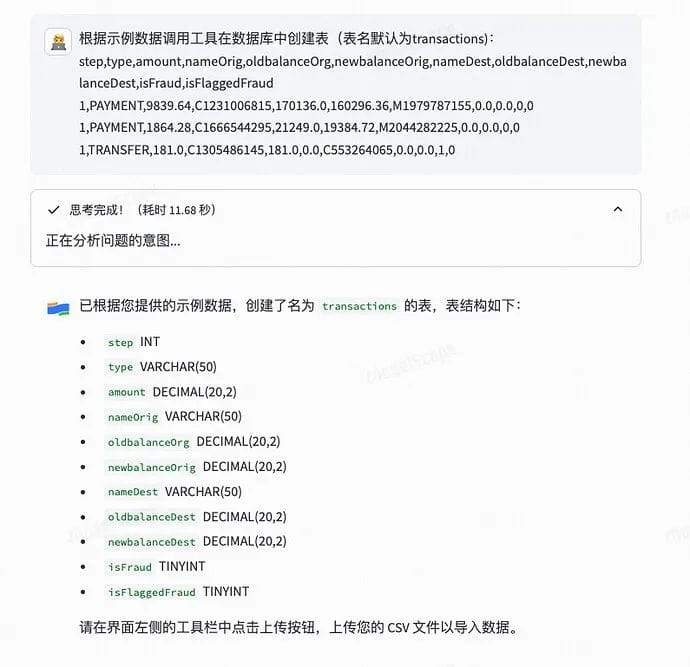
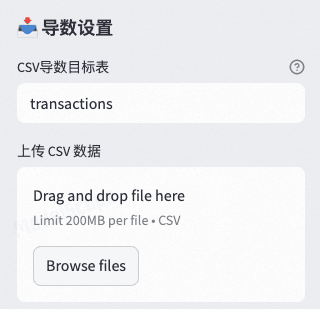
Import the Data
Import the data using the tool on the left:
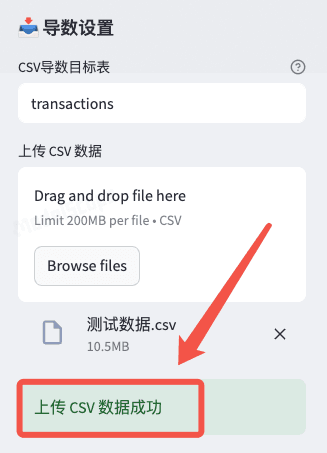
The result after a successful import is shown below:
Query the Data
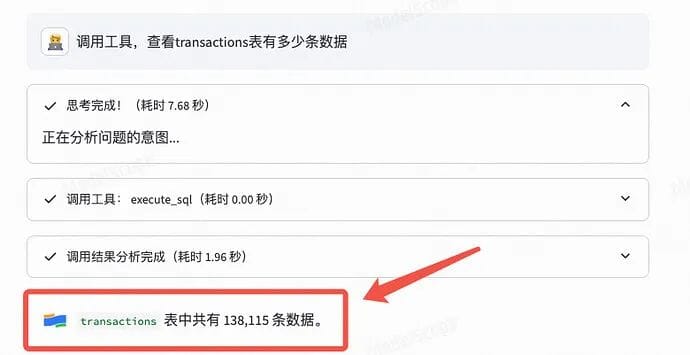
1 | Call the tool to see how many rows are in the transactions table |
1 | Call the tool to query how many transaction records have an amount between 10000 and 20000 |
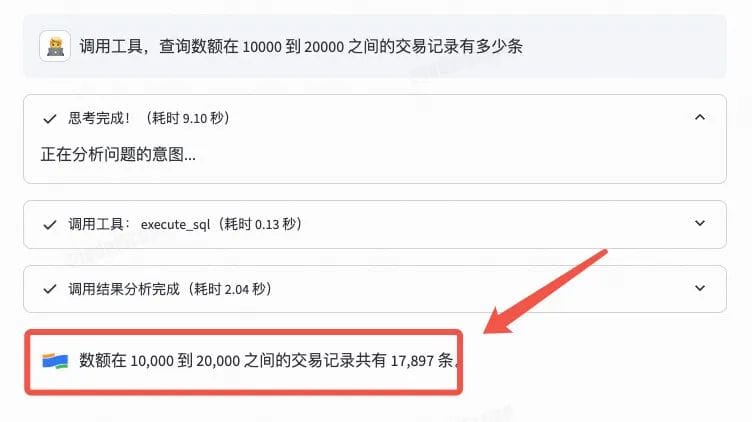
Next, you can call OceanBase MCP to analyze the database data. The execute_sql tool supports almost all OceanBase SQL statements, so feel free to keep exploring.
Database Diagnostics
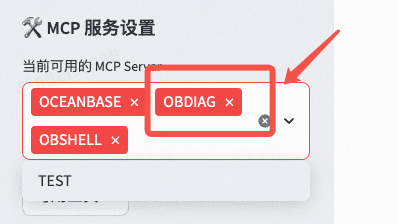
Add the obdiag MCP service on the left:
Cluster Inspection
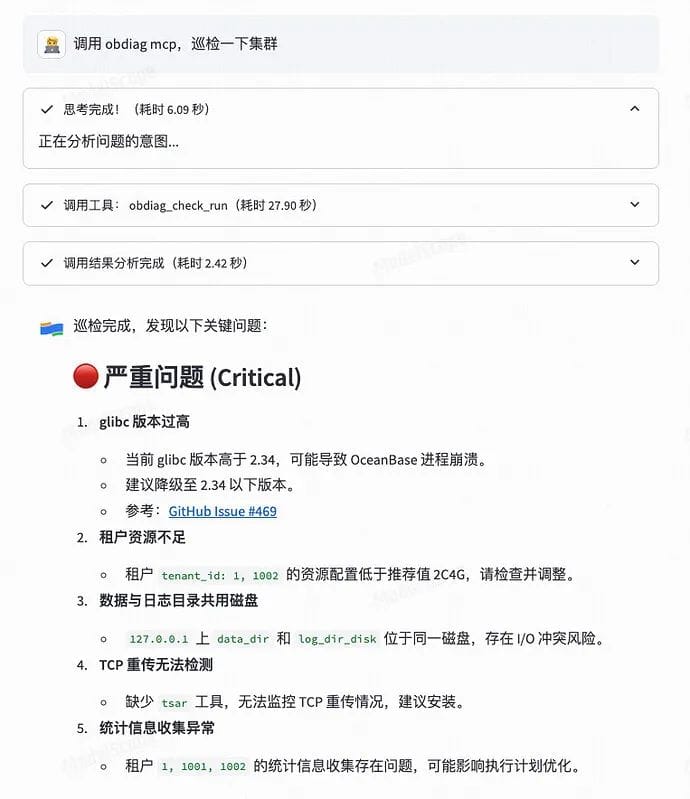
1 | Call the tool to inspect the cluster with OBDiag |
(This studio is still in the Demo stage with limited capabilities. In the current version, if you try to have the Agent fix the problems found during inspection, unexpected behavior may occur, so please don’t try it lightly. The ability to fix inspection issues will be added in the future.)
View the Analysis Scenarios Supported by obdiag
1 | Call the tool to view the analysis scenarios supported by obdiag_display_list |
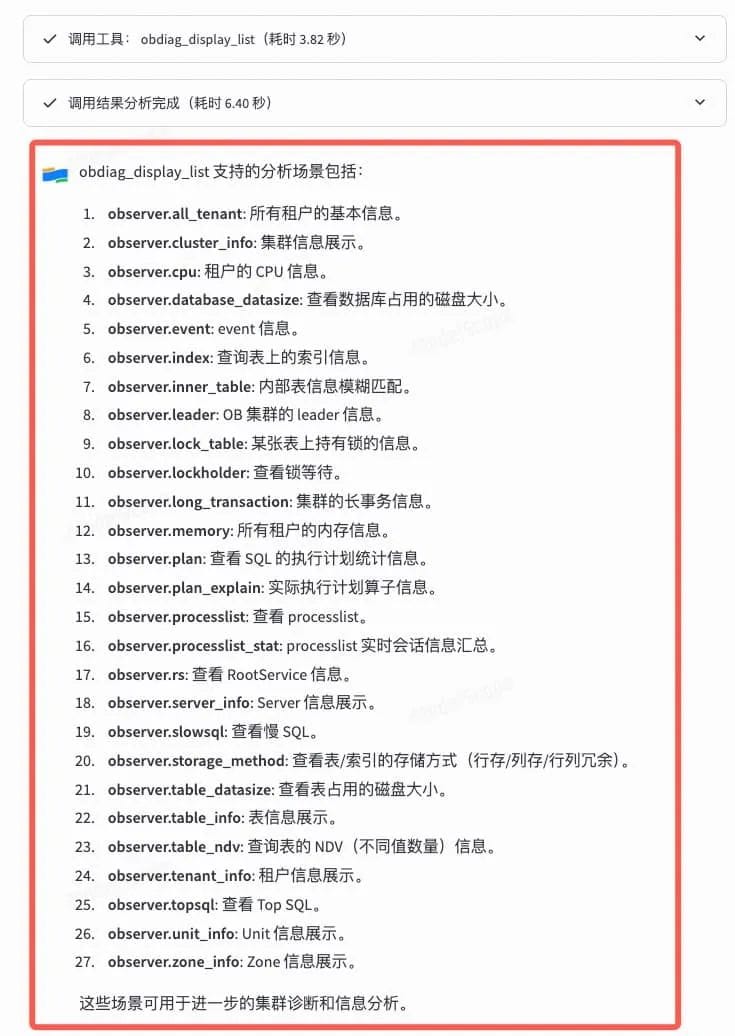
Pick a few scenarios we’re interested in and ask:
1 | Call the tool to display observer.all_tenant and observer.serverinfo |
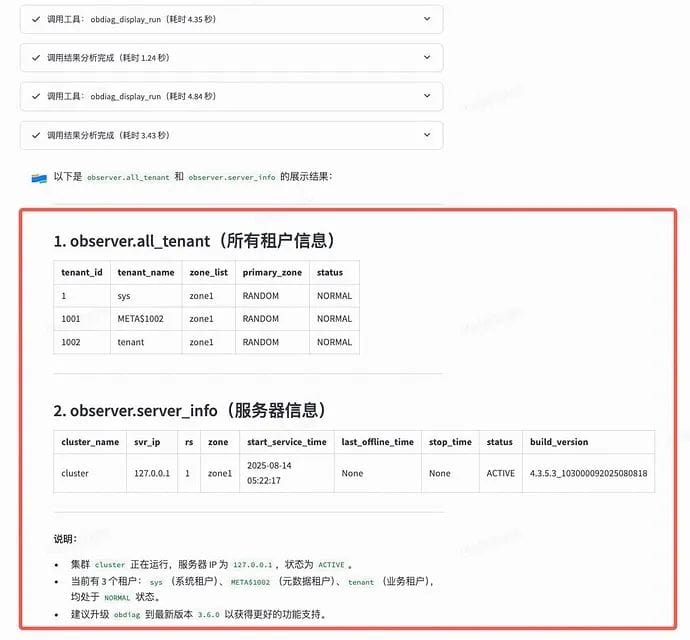
Summary
Through the hands-on AI Workshop above, you’ve surely felt the convenience that combining MCP with OceanBase brings to full-lifecycle database management. We welcome everyone to join the ModelScope and OceanBase communities to explore the broad prospects of AI & databases together.
⏰ This Saturday at the OceanBase Hangzhou Meetup, we’ll demo the Agent above live — come and try it out!
The OceanBase × ModelScope “SQL Meets AI” City Meetup in Hangzhou is about to kick off!