Say Goodbye to Tedious Manual Analysis—OceanBase Agent Makes Database Operations Easy!
01. Introduction
OceanBase Agent is an AI product for OceanBase developed by a developer for learning purposes. Its main goal is to leverage the power of large models to simplify the tedious operations of daily maintenance scenarios, letting DBAs build their own Agent without writing a single line of code—just by writing SQL.
It offers the following capabilities:
- A Chatbot designed for databases, which is more suitable for databases than other general-purpose Chatbots;
- 70+ built-in SQL-based Tools that can be called directly;
- Support for adding your own SQL as a Tool;
- Support for writing Playbooks that call multiple Tools to complete complex operations tasks;
- Support for the MCP protocol to extend external Tools.
Project address: https://github.com/davidzhangbj/agent
It is modified from the upstream project (focused on PG): GitHub - xataio/agent: AI agent expert in PostgreSQL.
02. Concept Introduction
Tools: Configure Common SQL as Tools
It has 72 built-in commonly used Tool SQLs, and you can add your own SQL. When using one, click the run button to execute it in one click and have the large model analyze and return the results.
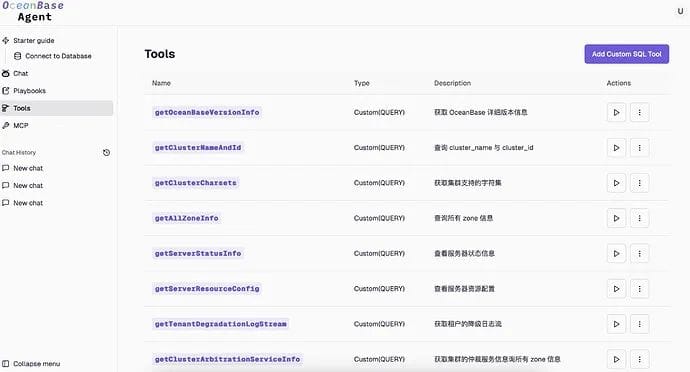
Playbooks: Defining Agent Task Flows
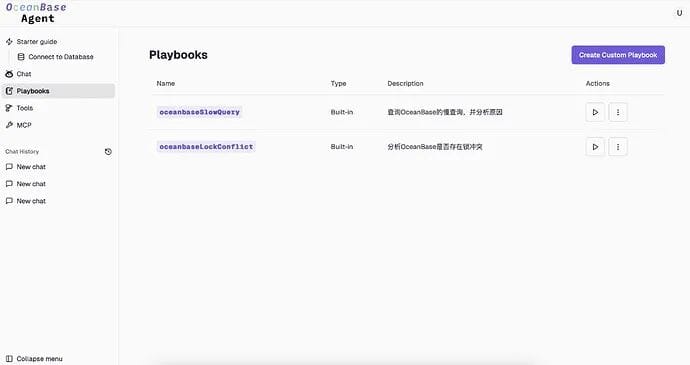
Daily tasks usually can’t be solved by querying a single SQL statement. A Playbook lets you describe the entire task process in natural language; based on the workflow description, the large model can call the appropriate Tools for analysis and decide the direction of the task.
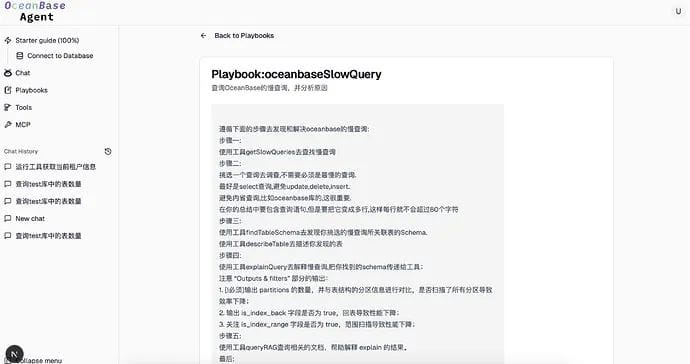
This is an example of a built-in Playbook. In this example, I used a fairly rigorous approach, writing out the name of the tool to be called at each step one by one to improve the success rate.
In fact, explicitly writing out tool names isn’t necessary—the large model will choose the appropriate tool based on the task’s needs and the tool descriptions. However, due to the limitations of the large model’s own ability, it may occasionally pick the wrong one. So whether to spell things out in detail can be assessed yourself based on complexity and model capability.
Chat: Conversation
Similar to a common SQL Client, the scope of the conversation can be set to a particular Database, so it easily supports adding multiple databases and isolating them from one another.
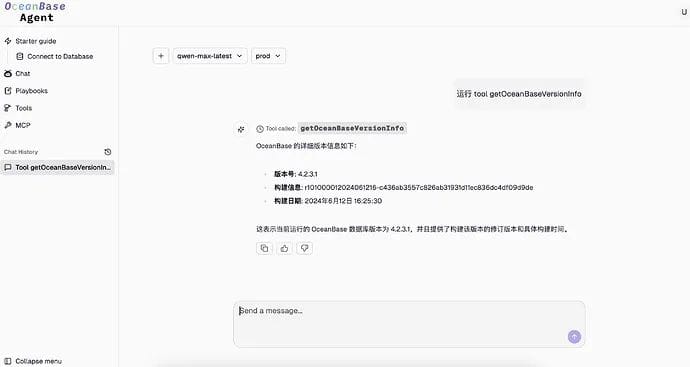
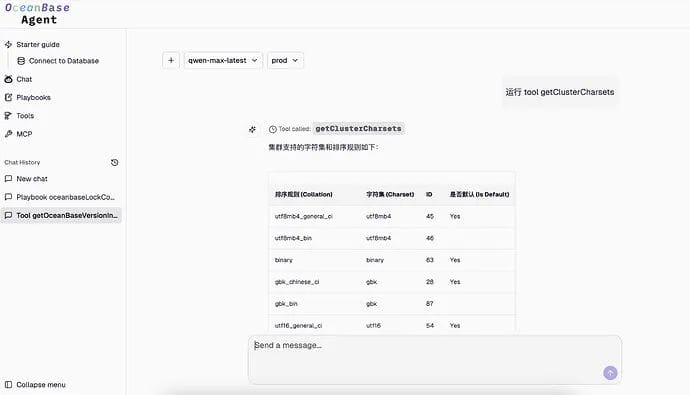
It supports running a tool through natural language in Chat, which has the same effect as clicking the run button in the Tools interface—for example, entering “run tool getClusterCharsets.”
MCP: Adding Extra Tools via MCP
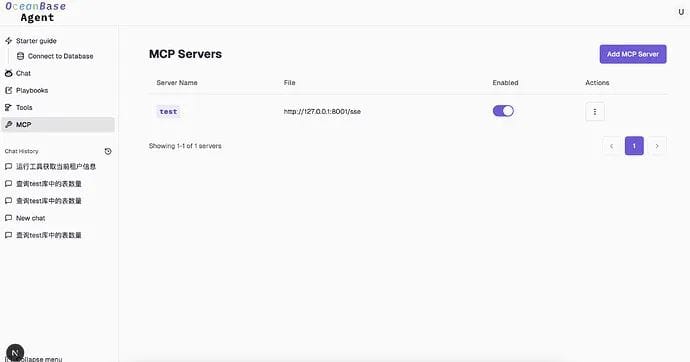
It supports adding MCP Servers (SSE only) to extend more Tools. MCP Tools and SQL Tools are on the same level, so when executing a task the large model treats them equally, choosing the appropriate Tool to execute.
03. What Problems Does This Tool Solve?
It can manage multiple databases at once, fitting database usage habits better than a regular Chatbot.
“Couldn’t I achieve the same effect by writing my own web project that stores these SQLs and displays the results on a page after calling them?” In most cases, the returned field names and counts of each SQL are different, while a web page’s table is generally fixed and can’t display them well. Large models excel at handling text—they can help you summarize and also display things dynamically.
Often we don’t just want the results; we also want a preliminary analysis. After a SQL executes, tell the large model your question, and it can give you the answer directly.
04. How Do You Get Started?
Just run the docker command below.
1 | docker run -d \ |
Here, CUSTOM_BASE_URL, CUSTOM_API_KEY, and CUSTOM_CHAT_MODEL_NAME must be configured with the API address, KEY, and model name of the large model you use.
Configuration example for CUSTOM_BASE_URL, CUSTOM_API_KEY, and CUSTOM_CHAT_MODEL_NAME:
1 | docker run -d \ |
How to access it after starting: http://ip:8000. You can adjust the default port in the docker start command, e.g. -p 9000:8000.
⚠️ Note: After starting, first configure the OceanBase connection; it’s best to log in as the root user of the sys tenant, because many SQLs can only be executed under that tenant.
If you’re interested in the source code, visit https://github.com/davidzhangbj/agent, the OceanBase branch.
Finally, we’d like to recommend the WeChat account of Lao Ji, the head of OceanBase open source: “Lao Ji’s Tech Talk.” It continuously publishes all kinds of technical content related to #Database, #AI, and #Tech Architecture. If you’re interested, feel free to follow!
“Lao Ji’s Tech Talk” not only hopes to keep bringing you valuable technical sharing, but also hopes to contribute to the open-source community together with everyone. If you recognize the value of the OceanBase open-source community, light up a little star ✨! Every Star you give is the motivation behind our efforts.