Hybrid Query Methods for Vector Indexes — Did You Pick the Right One?
A pure approximate nearest neighbor (ANN) vector query often can’t meet real business needs. Users typically need to combine vector retrieval with scalar conditions for filtering — for example, by data creation time or knowledge base ID. Another common need is to fuse and rank the results of full-text or multiple vector index queries. This article explains the principles, usage, and product roadmap of hybrid queries on OceanBase vector indexes.
I. Hybrid Queries over Scalar and Vector Indexes
Before formally introducing hybrid queries over scalar and vector indexes, let’s start with an example scenario. For instance: find the best-reviewed, affordable shops in Nanshan District, Shenzhen, with a rating above 4.5. This query contains a scalar condition (rating above 4.5), a geographic constraint, and an approximate nearest neighbor vector query based on the semantics of “best-reviewed, affordable.”
The database table schema is defined as:
- id: shop ID
- score: rating
- position: the geographic coordinates of the shop
- comment_vector: the vector corresponding to user reviews. A vector index is created on the vector column, and a spatial index is created on the Geometry column.
1 | create table t1( |
The corresponding query SQL is as follows:
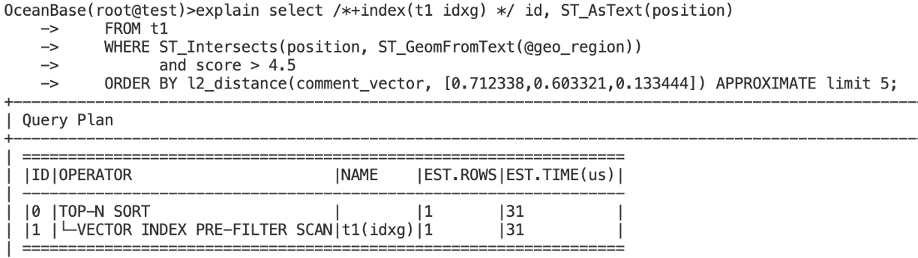
When performing this kind of hybrid query, attaching scalar conditions is no different from ordinary SQL — just put the conditions after where. But using a vector index has syntax requirements: you need an order by using the distance expression corresponding to the vector index, followed by the approximate keyword. If you omit the approximate keyword, a full table scan is performed for an exact query, and the vector index is not used.
In the SQL above, we added a Hint (i.e., /*+index(t1 idxg) */) to specify using the spatial index during vector retrieval — which leads us to the first scalar-filtered query method: Pre-filtering.
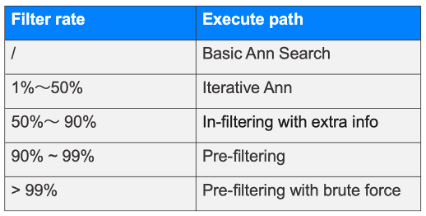
In practice, unless there’s a special requirement, you don’t need to specify a hint; OceanBase automatically selects the most appropriate scalar index and query method based on statistics.
Query Method 1: Pre-filtering
Pre-filtering refers to a query method that performs scalar filtering first.
For example, in the case above, we use a hint to specify that before vector retrieval, we first query the spatial index to obtain all data satisfying the st_intersects condition. Each vector corresponds to a unique ID as its identifier, and these unique IDs are used to construct a bitmap. The bitmap then serves as the context for vector retrieval. During vector retrieval, each time a candidate vector is found, its ID is checked against the bitmap; if it’s not in the bitmap, it doesn’t satisfy the scalar filter condition, so we continue searching for the next candidate vector until we find limit K results.
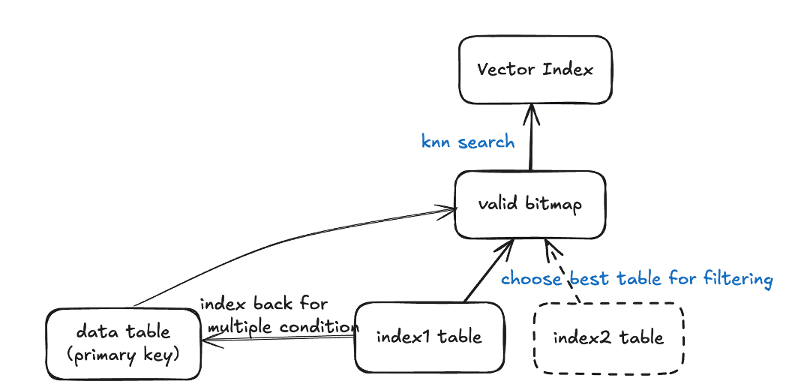
The advantage of Pre-filtering is that when the filter rate is high, the scalar index filters out most of the data, reducing the subsequent vector computation cost. However, when the scalar filtering selectivity isn’t very good, Pre-filtering is no longer the most appropriate method. For example, with 1 million rows of data where the filter condition can only screen out 50% of them, the cost of scanning the index table and constructing the bitmap is still very large. Of course, in some specific scenarios — for instance, when the filter condition is a simple range — there are some optimizations. In addition, if the filter condition is very complex and there is no scalar index available, doing scalar filtering as Pre-filtering is equivalent to a full table scan on the primary table, and a filter-condition expression must also be evaluated for each row, leading to poor performance.
Query Method 2: In-filtering with extra info
To solve the problem of the high cost of constructing a bitmap, OceanBase introduced In-filtering, which checks the scalar conditions during the vector indexing process. This method requires adding the filter fields into the vector index, i.e., as extra info attached to each vector.
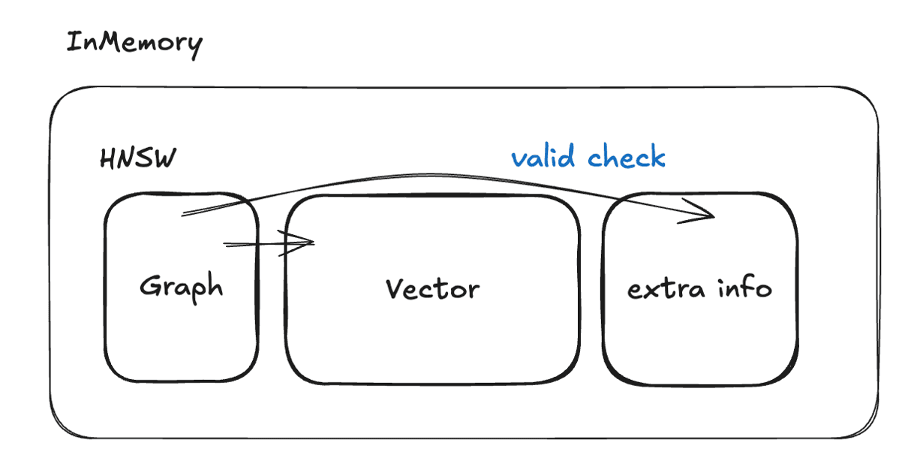
The advantage of In-filtering with extra info is that there’s no need to construct a bitmap first, so there’s no extra I/O overhead. It’s suitable for medium-to-high filter rates. But this method consumes extra memory, has a higher usage cost, and also requires the filter conditions to be relatively simple.
Query Method 3: Iterative-Ann
To handle cases where the previous two approaches don’t apply, OceanBase also implemented an iterative filtering query method: Iterative-Ann. This method uses multiple iterations to complete the query. Each iteration returns a batch of data closest by vector distance, then checks the scalar conditions and filters out the data that doesn’t qualify. Based on how much data is still missing, it estimates the number of ANN results to return in the next iteration, adjusts the parameters, and performs another round of querying until limit K results are returned. To this end, we reworked the traditional post-filtering implementation: we record the context during the vector index query, so that after the previous iteration, if there isn’t enough data satisfying the filter conditions, we can continue searching from the context and iterate out the next batch of data.
This query method is suitable for medium-to-low filter rates and complex filter conditions. In such scenarios, Iterative-Ann actually has the least computation and better performance, and it avoids the missing-data problem of traditional post-filtering methods.
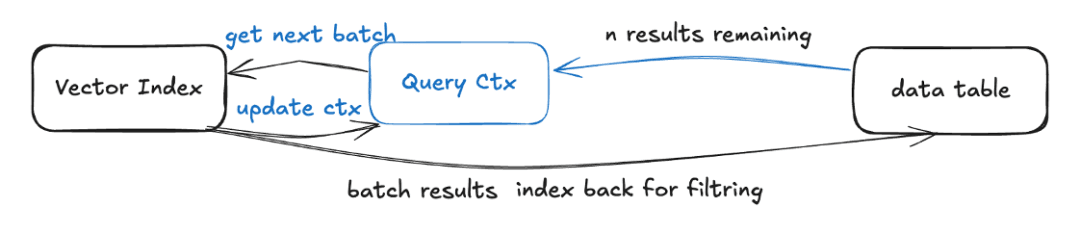
Iterative-Ann is not suitable for high filter rates. When selectivity is very good — for example, when out of 1 million rows only 100 may satisfy the filter condition — using Iterative-Ann may require many iterations, possibly even computing most of the vectors before finding ones that satisfy the filter condition, because the vector index only cares about vector-distance similarity.
How to Choose the Right Query Method?
The three query methods above each suit different use cases, so how should you choose the right filtering method?
In early OceanBase versions, you could only choose the method by adding a Hint. OceanBase V4.3.5_bp2 implemented fairly complete cost-based path selection. The figure below is a Vectordbbench performance comparison between OceanBase V4.3.5_bp2 and Milvus 2.5.11. The test measures performance under different filter conditions via automatic plan selection, on the Cohere 768D 1-million-row dataset, with top 100 and recall 98%.
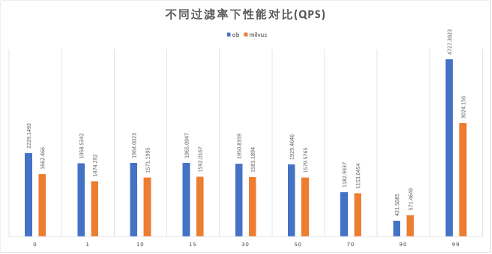
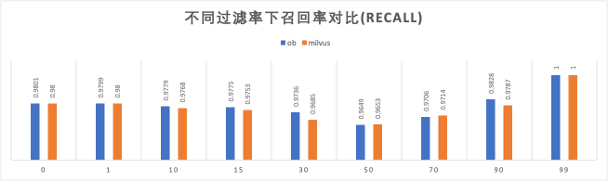
In the figures above, the vertical axis is QPS or RECALL (recall rate), and the horizontal axis is the filter rate, where 0 means a filter rate of 0% (no filter condition) and 99 means filtering out 99% of the data. As you can see, in both performance and recall, OceanBase performs better.
Likewise, compared with other vector databases, OceanBase holds its own. The figure below shows the results of performance-testing several mainstream open-source vector databases with the open-source vector database benchmarking tool Vectordbbench, on a 16C64G AWS server. The test datasets were: a 768-dimensional, 1-million-row dataset, and a 1536-dimensional, 500,000-row dataset.
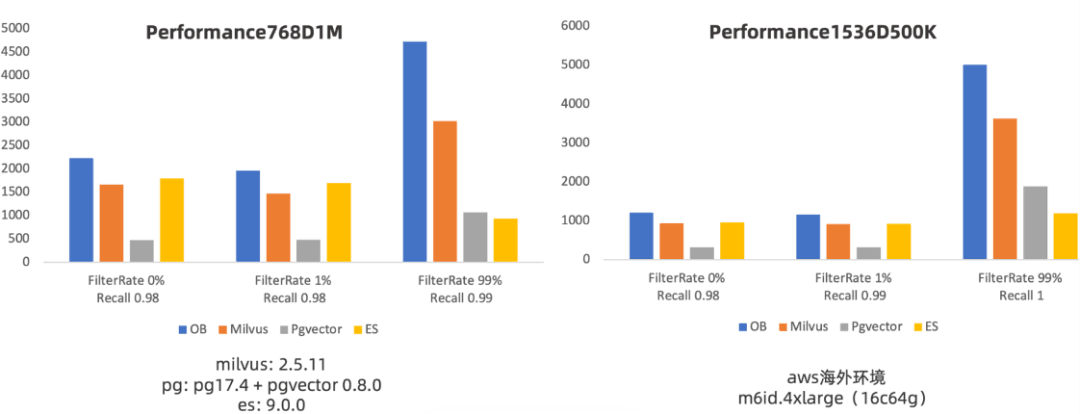
In the figure, the horizontal axis represents recall and the vertical axis represents QPS. As you can see, at the same recall, OceanBase still performs excellently, already reaching a leading level among open-source vector databases.
OceanBase has plan caching, which can reduce the overhead of SQL hard parsing by reusing previously generated execution plans. But if the filter condition’s parameters change significantly, the cached plan that gets hit may not be appropriate. As shown below, suppose column c1 has an index: when c1<10, very little data satisfies the filter condition, so a pre-filter plan is generated. But when the filter parameter changes to c1<100000, hitting the pre-filter plan is clearly inappropriate, because very little data is filtered out, and the cost of scanning the index table and generating the bitmap becomes large.
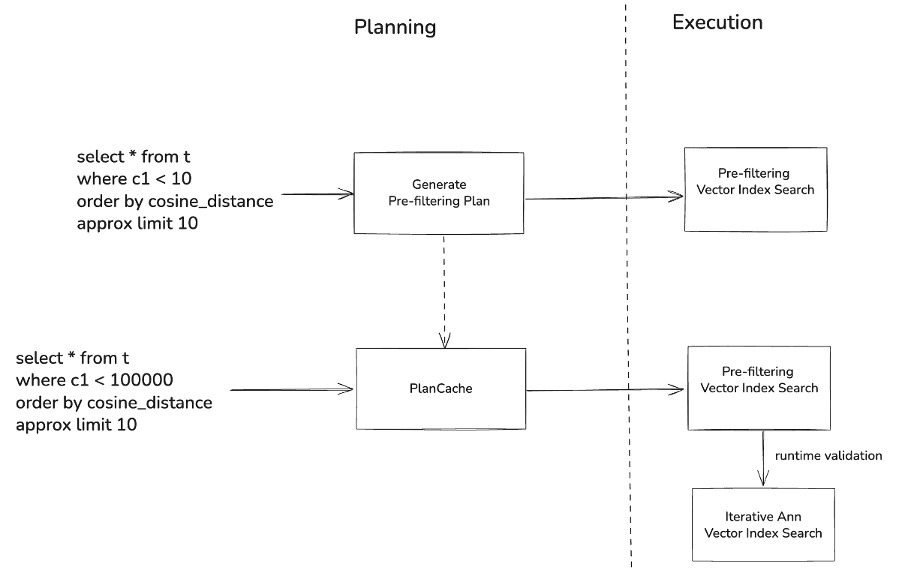
Therefore, in OceanBase V4.3.5_bp3 we implemented runtime adaptive method selection. For example, in the case above where the original plan was pre-filtering, after the condition changes it will first try pre-filtering, but during execution, if it finds that the elapsed time and expected row count have already exceeded the pre-filter threshold, OceanBase terminates early and automatically switches to iterative filtering, thereby ensuring relatively good performance. We also implemented runtime statistics: if a plan always switches from pre-filtering to iterative filtering, the plan’s preference is changed to iterative filtering, achieving an overall optimal query.
OceanBase V4.3.5_bp3 has stronger performance than V4.3.5_bp2. As shown below, we compared the two in a local environment:
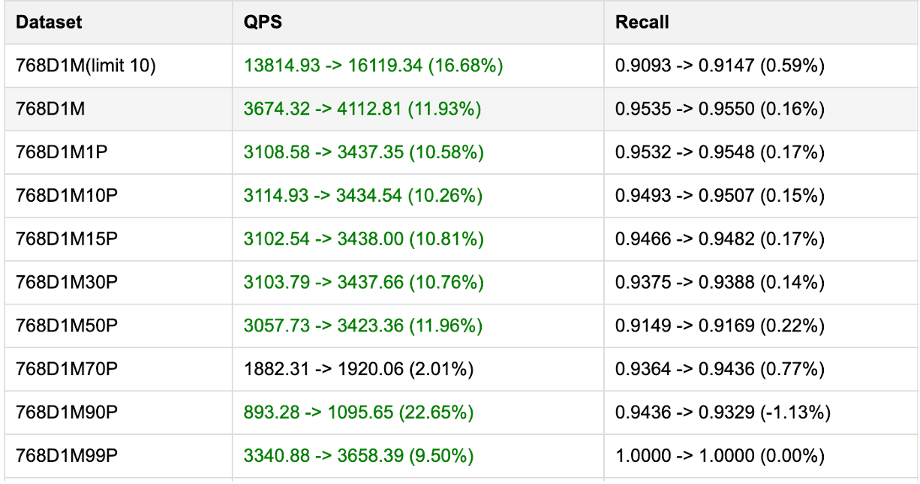
OceanBase V4.3.5_bp3 not only improves overall performance by 10%, but also avoids the problem where, under different filter rates, you had to clear the PlanCache to regenerate the optimal execution plan.
II. Hybrid Queries over Full-text and Vector
Full-text Indexes and Vector Indexes
Full-text indexes and vector indexes excel at different scenarios, and the two are not substitutes for each other.
Take the query condition “day trips in and around Guangzhou, good for photos but not crowded” as an example. A full-text index can guarantee that the matched results contain the specified tokens, such as “day trip.” But for the condition “good for photos but not crowded,” because the query doesn’t contain wording like “undeveloped commercially,” a full-text index can’t match content that is similar in meaning but completely different in wording, so its results for “good for photos but not crowded” aren’t precise enough. A vector index, on the other hand, can match content like “undeveloped commercially” and “pristine landscape” based on the meaning of “good for photos but not crowded,” but because a vector can’t necessarily express numbers precisely, it can’t guarantee the results contain only “day trip.” It’s similar in scenarios with certain technical terms.
This gives rise to the need to combine full-text and vector indexes. One problem with full-text-and-vector hybrid queries is how to do fusion ranking: each vector distance algorithm has a different value range — for example, Cosine distance ranges over [0, 2], while IP and L2 may be relatively large numbers — and the relevance score range of the full-text BM25 index is also uncertain.
Methods for Comprehensive Ranking Across Different Indexes (rerank)
OceanBase plans to provide three ranking methods: Reciprocal Rank Fusion, Weighted Sum, and Rerank-model-based ranking. These three ranking methods each suit different scenarios.
Reciprocal Rank Fusion
If the user has no relevant prior knowledge, they can directly use the reciprocal-rank method. The reciprocal-rank method scores results based only on their ranking within the result set, with no need for score normalization. Of course, this ranking method can also specify the weight of each retrieval path.

For example:
Result A: term-match rank: 1 → score = 1/(1+60)≈0.0164; semantic-search rank: 3 → score = 1/(3+60)≈0.01593; total score = 0.0164+0.0159=0.0323
Result B: …
Weighted Sum
Weighted Sum requires normalizing the results of each index query separately, then performing the weighted calculation. It requires the user to have some prior knowledge of the data in order to set appropriate weights.

For example, a vector weight of 0.7 and a full-text weight of 0.3.
Using a Rerank Model
Using a Rerank model is currently the method with the best ranking quality. But because model calls are relatively slow and costly, it’s suitable for small Top-K scenarios and not for scenarios with relatively large result sets.
How to Use Hybrid Queries
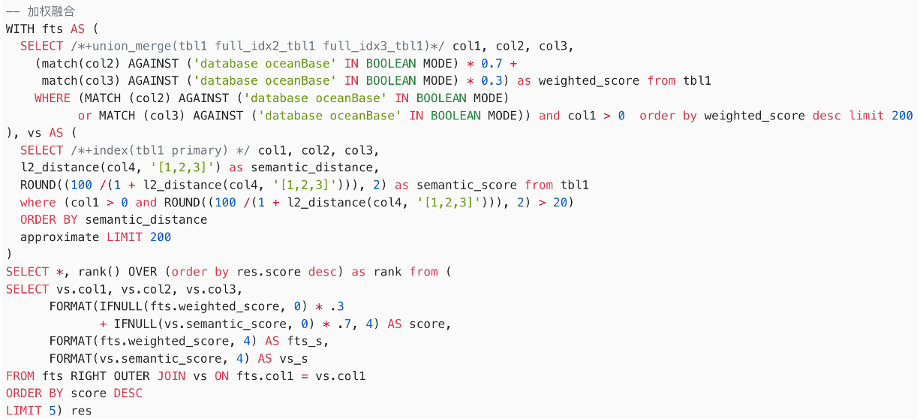
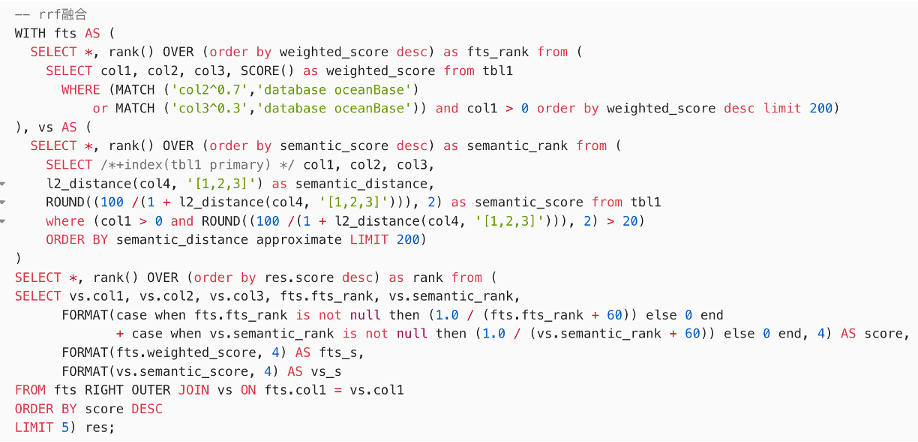
In the current OceanBase version, hybrid queries are used as shown below: you need to treat each full-text or vector path as a subquery, then perform a weighted calculation on the scores, or a reciprocal-rank calculation.
OceanBase V4.4.1 plans to provide a more complete and easier-to-use fusion query interface, so users won’t need to manually write complex subquery syntax or perform score calculations.
Future Product Roadmap
In the future, we will continue to optimize the functionality, usability, and performance of scalar/full-text/multi-vector hybrid queries.
- Full-text and multi-vector hybrid queries.
- Functional completeness: prioritize RAG scenarios and benchmark against Elasticsearch’s hybrid search capabilities.
- Usability: provide a new, easier-to-use hybrid query syntax.
- Performance optimization: optimize the performance of full-text and sparse-vector queries.
- Scalar and vector hybrid queries.
- Functional completeness: support full-text indexes or multiple scalar indexes as pre-filtering conditions.
- Usability: support similarity-threshold queries, so you no longer need to convert using vector distances.
- Performance optimization: further optimize the performance of vector index queries with scalar conditions.
If you have any questions or feedback about OceanBase’s vector capabilities, or capabilities you’d like to see implemented, feel free to leave a comment.
Finally, I’d like to recommend the WeChat official account “Lao Ji’s Tech Talk,” run by Lao Ji, the OceanBase open source lead. It continuously publishes all kinds of technical content related to #databases, #AI, and #tech architecture. Friends who are interested are welcome to follow!
“Lao Ji’s Tech Talk” hopes not only to keep bringing you valuable technical insights, but also to contribute to the open source community together with you. If you appreciate the OceanBase open source community, please light up a little star ✨! Every Star you give is motivation for our efforts.