Exploring How AI Reshapes Database Products — obloader agent and OceanBase Agent
01 obloader agent
Difficulties in Using Data-Loading Tools
In the actual process of importing data with data-loading tools, users commonly face the following four core problems:
- Text files come in many formats, making parsing errors common
Text files provided by upstream systems often lack a uniform standard and have complex, variable formats. Common problems include:
- Delimiters that are unclear or change frequently (such as spaces, tabs, and invisible characters).
- Field content embedding characters identical to the delimiter, making field boundaries hard to identify.
- Users having to repeatedly use trial and error (such as manually specifying the delimiter) to find the correct parsing approach — inefficient.
- Special characters are hard to identify and handle
Some files contain invisible characters, abnormally encoded characters, or look-alike symbols (such as full-width/half-width spaces, or a mix of Chinese and English punctuation). These characters are hard to distinguish in a manual preview and easily cause parsing failures or data misalignment. Although a hex editor can help with the analysis, the barrier to entry is high, and ordinary users struggle to master it.
- The automatic-inference failure rate is relatively high
Existing tools’ “automatic inference” feature works reasonably well on standardized files (such as CSV files), but its recognition accuracy drops significantly on non-standard files (such as files with string-type fields, no header, or abnormal delimiters). Because the tool cannot rely on data characteristics (such as numeric or date-type fields) for semantic inference, it struggles to automatically establish the column mapping between the source file and the target table, still requiring human intervention.
- With 80+ command-line parameters, the learning cost is high
To adapt to diverse business scenarios, data-loading tools keep expanding their features, causing the number of command-line parameters to balloon to over 80. Although the parameters offer comprehensive coverage, users must memorize a large number of options (such as encoding formats, escaping rules, and error-handling strategies), significantly raising the barrier to use. Such a design resembles a “remote control with 100 buttons” — powerful, but complex to operate, violating the principle of “ease of use.”
Introduction to AIChat
Recently, during our research, we discovered AIChat, which is suited to black-screen command lines. AIChat is an overseas open-source LLM command-line tool that integrates a Shell assistant, command mode (CMD) and interactive mode (REPL), retrieval-augmented generation (RAG), AI tools and agents, and more, with support for additional extension features. From its command-line design to the hands-on experience, it is very smooth and fluid.
- GitHub: https://github.com/sigoden/aichat
- Related project: https://github.com/sigoden/llm-functions
Among these, the aichat project is the main body, and llm-functions is a separate extraction of the Agent and Function parts for easy extension.
Nowadays we usually use AI through various chatbots and combine it with applications via Function Call or MCP. Data-loading tools (obloader/obdumper) are black-screen command-line tools, and customers’ environments may not be able to use a white-screen chatbot. Moreover, data-loading tools have many commands, so improving usability with AI is very necessary.
We therefore tried using the open-source AIChat project to build a simple agent in combination with the data-loading tools.
AIChat + obloader Example
After the environment is initialized, the user simply enters the aicat command on the command line to invoke the .agent obloader application and complete the data-import task. On first run, the agent starts a lightweight RAG service to provide knowledge-base support for subsequent operations, and opens a session to retain context for easy subsequent iteration and optimization. The user only needs to provide three pieces of required information: the path of the CSV file to be imported, the target database connection string, and the target table name. The agent then automatically completes the following steps according to preset rules:
- Check whether the Java version meets the requirements;
- Read the CSV file as a sample to automatically determine the delimiter, qualifier, header, and other format details;
- Automatically generate the obloader command;
- Look up parameter descriptions.
Throughout the process, the user does not need to master any data-loading parameters or learn how to use the tool — they simply describe their needs in natural language, and the agent automatically completes the subsequent steps. If the requirement changes — for example, switching from importing a single file into one table to importing all files in an entire directory — the agent instantly rewrites the command, for instance by appending regex matching or adjusting parameters.
This demo aims to show the leap in form when AI is combined with existing products: the user only needs to describe the business goal, with no need to learn how to use the tool. Product interaction shifts from “learn first, then use” to “say it and use it,” significantly lowering the learning cost.
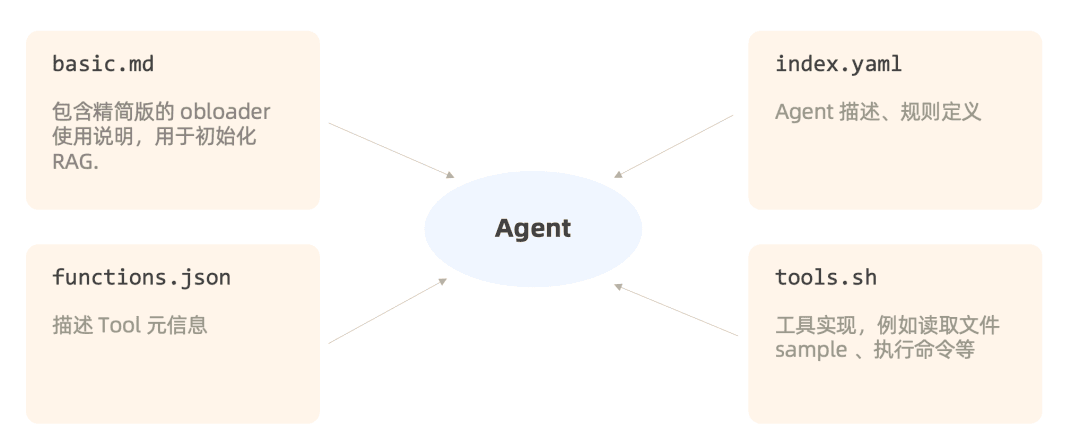
Breaking Down the Agent’s Structure
The agent’s core consists of just four files, making it very low-cost to implement — lightweight and easy to use.
basic.md: the basic knowledge base, containing core obloader knowledge, used to initialize the RAG.
index.yaml: contains the agent’s description and rule prompts.
functions.json: describes the tool meta-information, sent to the LLM for selection.
tools.sh: the toolset, for example reading a file sample or executing commands. The command to check the Java version mentioned above is a function provided in this file.
Prompt Example
1 | name: obloader |
02 OceanBase Agent
The Main Problem to Solve: General-Purpose MCP Clients Are Not Designed for Databases
Current general-purpose MCP clients are not designed for database scenarios, which leads to the following pain points:
- Insufficient multi-database support
Every time you add a database, you must start a separate MCP Server and re-enter the environment variables, and the tool list grows accordingly, making it hard for the LLM to tell the tools apart. Take Cherry Studio as an example: you have to manually fill in the database connection’s environment variables in the tool’s MCP configuration interface before it can detect the tools the MCP Server provides — such as the execute_sql tool for running SQL, the get_ob_ash_report tool for obtaining an ash_report, and so on — which can then be called to execute directly in the database. But if there are multiple databases — for example, if you need to add two databases — the MCP Server does not support it; you can only do so by adding two MCP Servers, which means filling in two database addresses. At that point there are two copies of the tools, and facing two identical tool lists can be very confusing for the LLM.
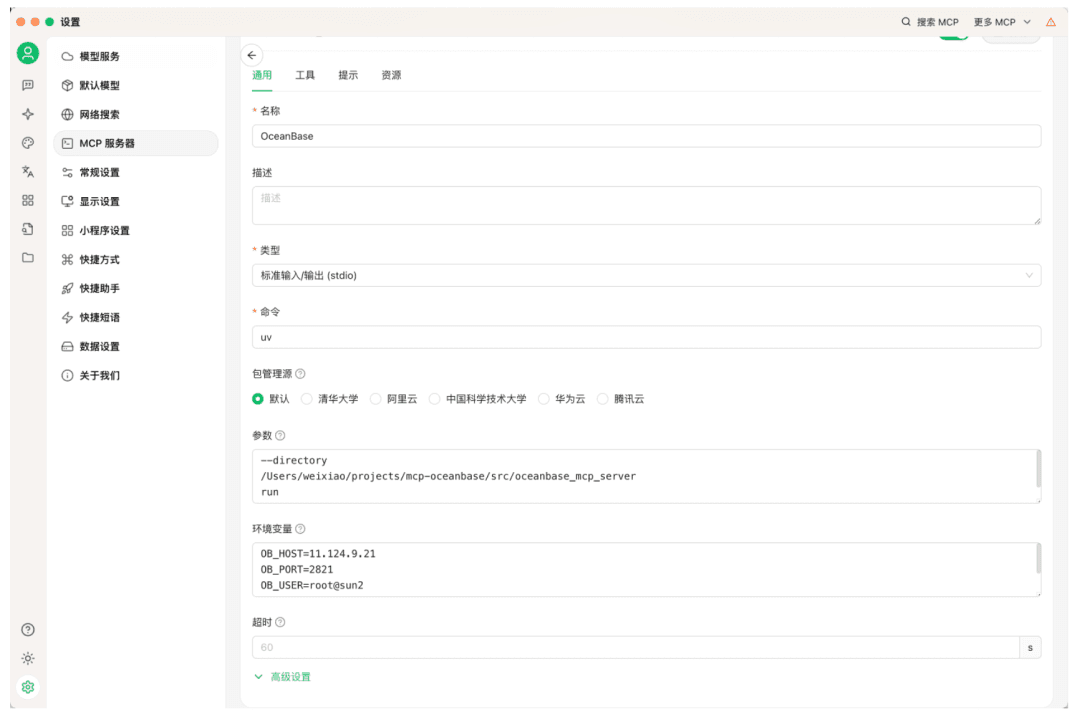
- Opaque connection information
The database connection parameters reside at the MCP layer and are invisible to the LLM, making it hard to precisely determine which MCP Server’s execute_sql to call when running SQL.
The root cause of the above problems is that general-purpose MCP clients are not designed specifically for databases, leading to compatibility issues in how they are used. We built the OceanBase Agent (an unofficial community project) at low cost, with the goal of managing any number of OceanBase instances through natural-language interaction, significantly reducing the DBA’s workload.
Core Capabilities
- Unified management of multiple databases and data sources
Add multiple databases at once via connection strings (such as a business tenant and the sys tenant), and the agent switches between them dynamically within a session, with no need for repeated configuration.
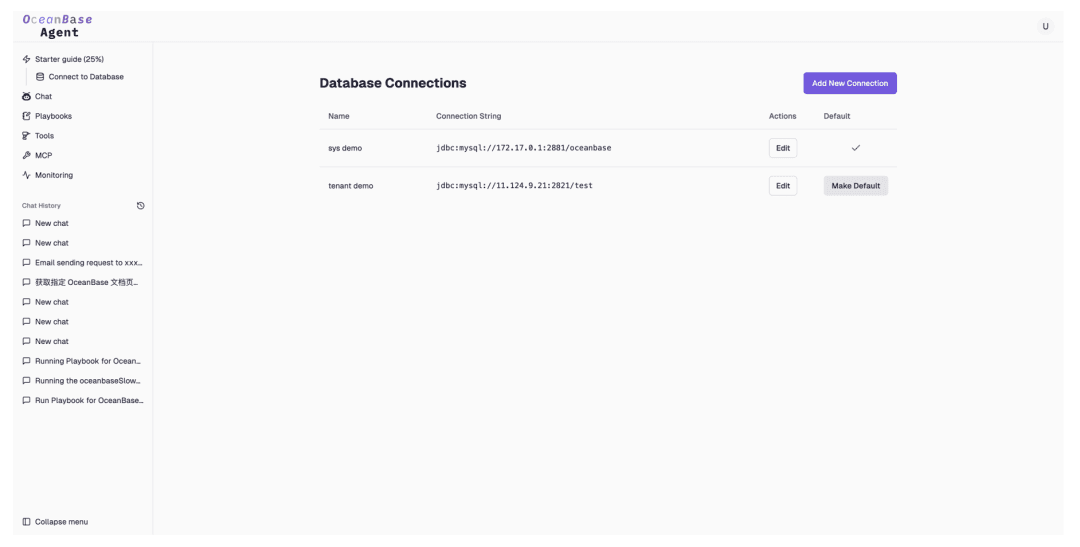
Creating multiple data sources
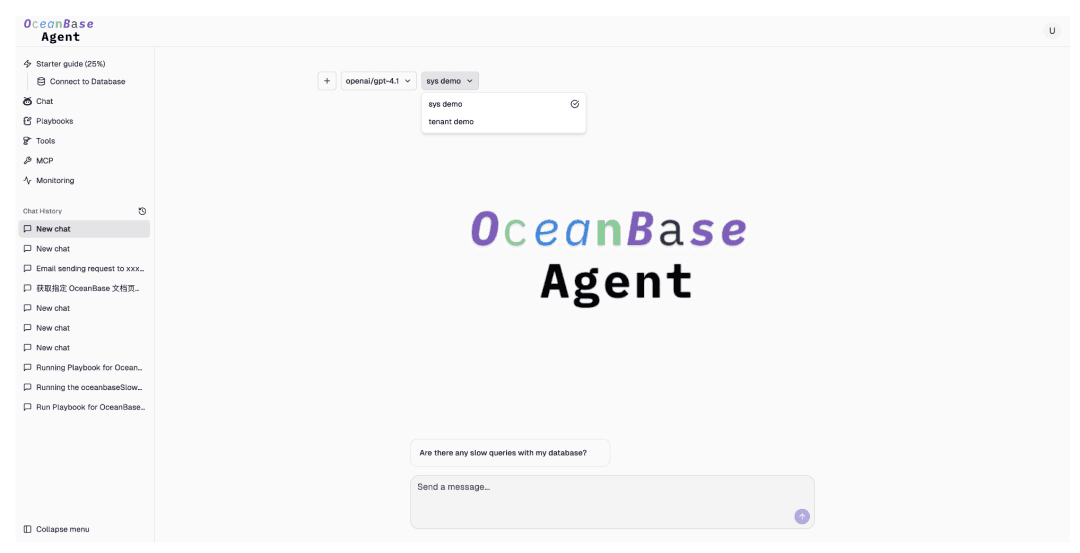
Selecting a data source in the conversation
Atomic tools
Over 70 common SQL statements are preset and wrapped as callable functions, so individual tools can be invoked in chat. For example, the getOceanBaseVersionInfo tool for obtaining the version corresponds to the SQL statement:SHOW VARIABLES LIKE '%version_comment%';Combining tools into Agent application Playbooks
The user only needs to describe the task in natural language, and the system executes it automatically. For example, “Query OceanBase’s slow queries and analyze the causes.” You can specify the name of each tool to improve the success rate.Flexible extension
Supports custom-written Playbooks. The conversational interface automatically handles context retention, parameter completion, and command generation — intuitive interaction that enables personalized operational scenarios.
Demo
For example, when writing a daily inspection tool, you can click Generate Content to use AI assistance for writing, generating it automatically.

Creating a Playbook
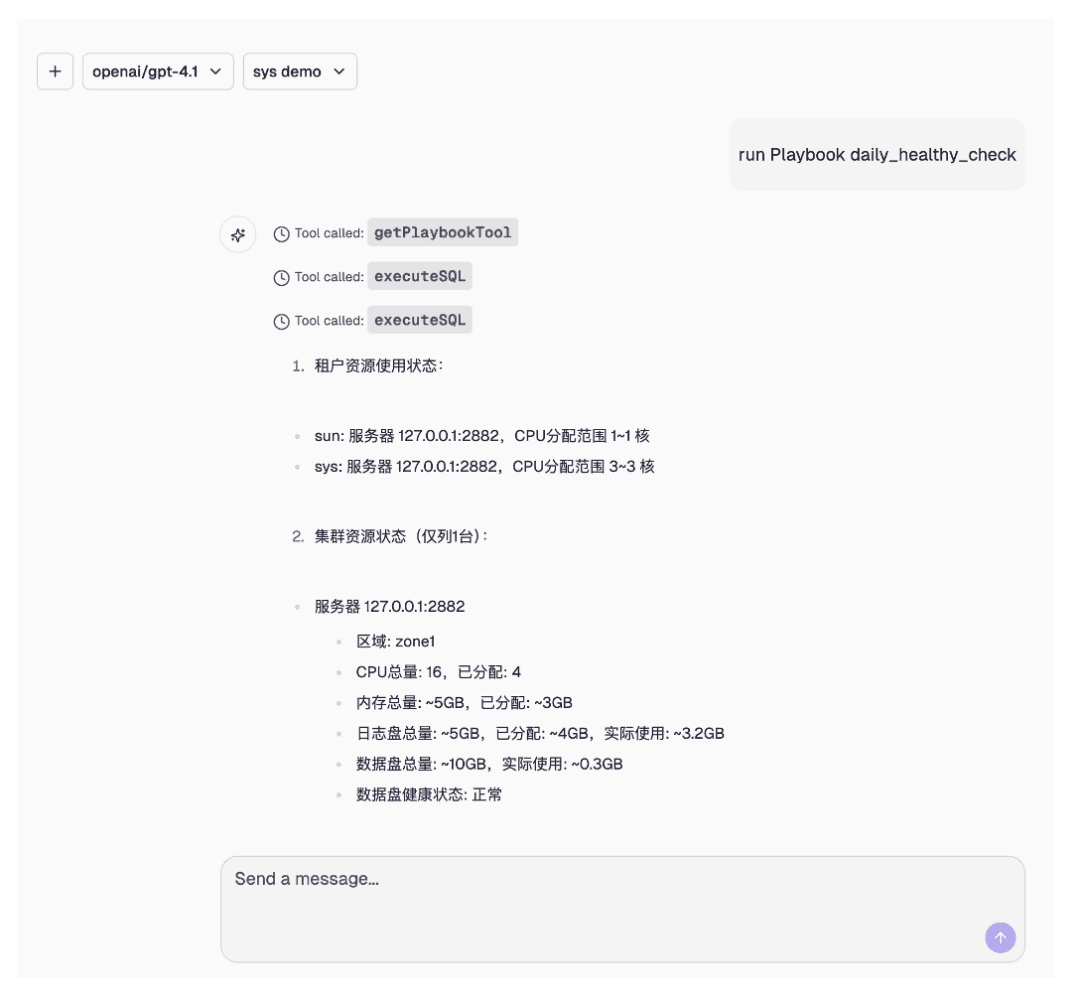
Executing a Playbook
Scheduler
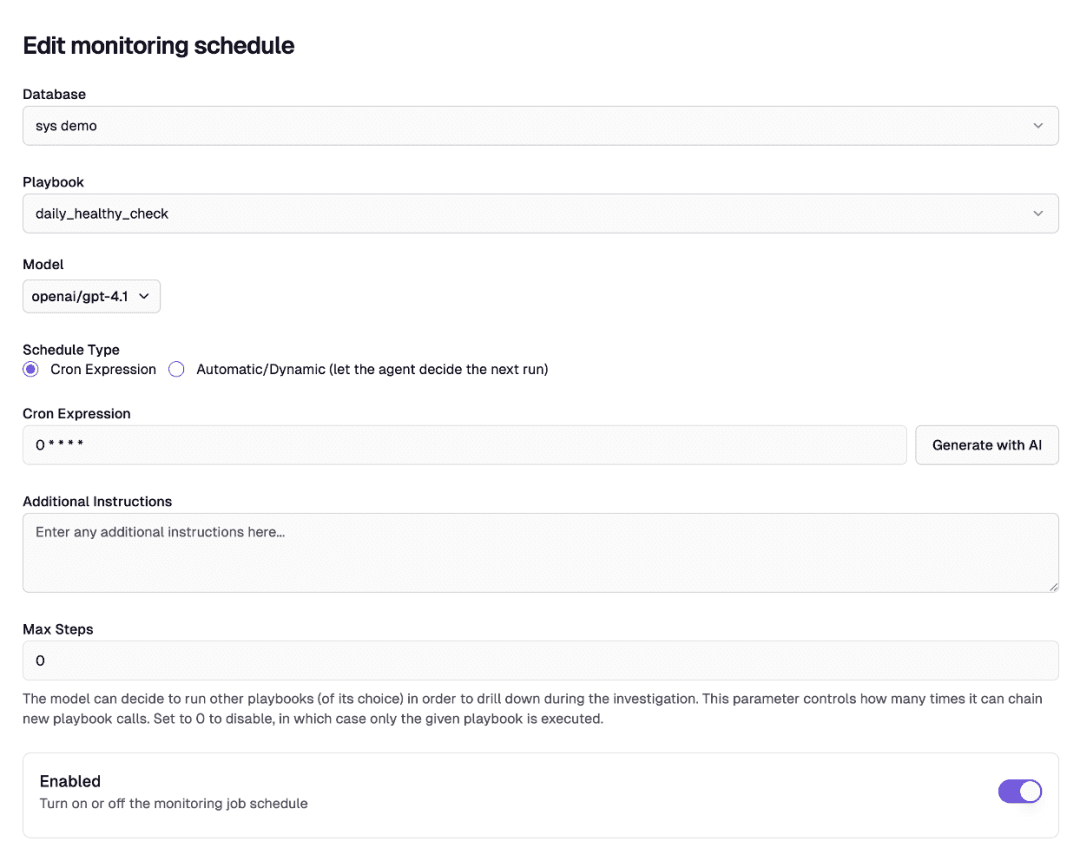
Daily inspections can run together with the Scheduler, using AI to generate a Cron expression. Once the Scheduler is created, Playbooks can be executed on a regular schedule.
03 MCP: The Infinite Possibilities Extensions Bring
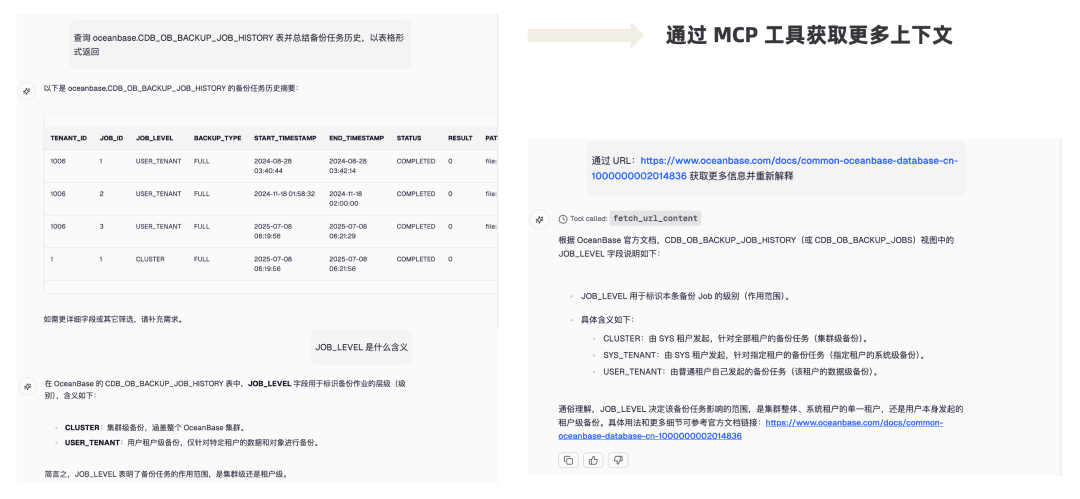
Example 1: Obtaining More Context via MCP
MCP provides flexible extension capabilities for the platform. Once integrated, the tool list immediately expands, and users can invoke tools as needed in the conversation, enabling functions such as web-page extraction, context injection, and chart generation without any additional development.
Example 2: Running Inspections and Sending Email
Basic capabilities such as daily inspections, monitoring alerts, and report delivery do not directly generate commercial value, yet they are must-haves for the platform. The R&D side considers them “low-tech, grunt-work development” and is reluctant to invest, while the business side complains about long schedules and slow delivery — and the two keep tugging back and forth. The extension capabilities of #MCP can directly address these “low-value but necessary” long-tail needs with a “plugin-ized” approach. By packaging common but fragmented capabilities such as email, WeCom, DingTalk, and chart rendering into independent MCP Servers, the business side can complete tasks simply by stating their needs in natural language within the Playbook Content.
1 | Run the daily inspection, summarize it into a report as output, and CC a copy to xxx@abc.com |
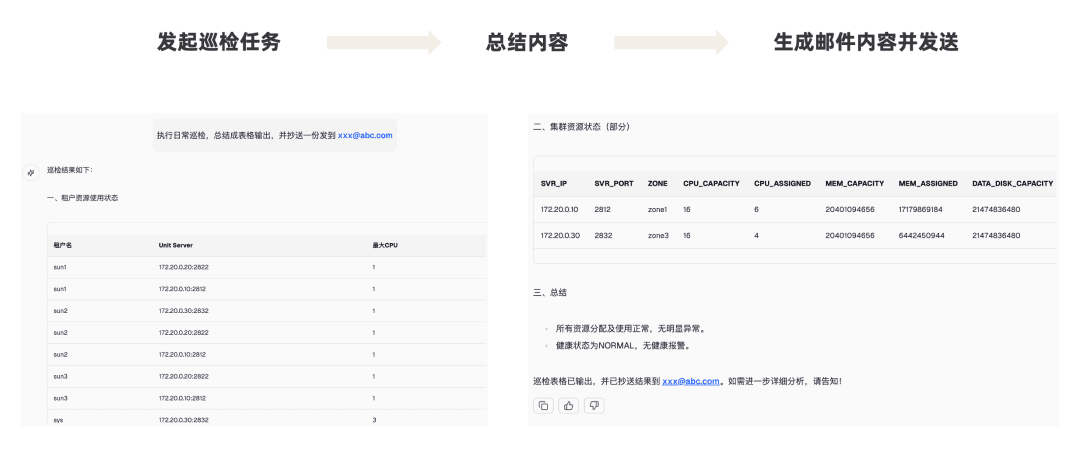
The MCP Server requires no code at all, so even non-developers can use it directly — they only need to run the following command to complete the environment configuration. It internally encapsulates a variety of capabilities and is simple and easy to use.
1 | dacker run -d \ |
Further reading
OceanBase MCP Server v0.0.3 has been released. Friends who are interested are welcome to give it a try.
📖 Community introduction article: https://ask.oceanbase.com/t/topic/35631743