AI Replacing the Traditional GUI: An OBCloud Workflow Based on MCP
Author: Qiao Lei, OceanBase frontend engineer
Database Operations Under Traditional Interaction
As a developer closely involved with databases and with substantial experience, when troubleshooting I usually need to inspect the OceanBase instance.
In the OB Cloud console, users can view information about OceanBase instances, tenants, nodes, proxies, and more. The console also provides dozens or even hundreds of monitoring metrics for observing whether anything is abnormal. However, users often have to locate problems by clicking through level by level and investigating step by step. In some cases, users also need to dig into OB Cloud’s diagnostics module to examine top SQL, slow SQL, suspicious SQL, or high-risk SQL to determine where the problem might be. After these two steps, they usually still need to go deeper into the database to perform related operations and further pinpoint the issue. At this point, users may need to consult OceanBase’s official documentation to aid their thinking and determine possible search directions to locate the problem.
Reviewing the interaction flow above, we can see some problems (limitations).
The UI of the OB Cloud console is a “generic” interaction scheme aimed at all users. To satisfy the logic of the information architecture, it inevitably sacrifices some operational convenience. For example, your operation path is always:
- Select an obcloud instance -> select a tenant -> view monitoring -> switch monitoring metrics -> view tenant diagnostics -> filter diagnostic information
- Select an obcloud instance -> select a tenant -> select a unit -> view unit monitoring -> switch monitoring metrics
Looking up docs on the official site can be seen as another repetitive interaction process. Consulting them directly can’t possibly hit the answer you want; you always have to browse and read the docs multiple times before you can find a possibly effective solution.
From both the interaction and lookup angles, users actually spend a great deal of time on these repetitive operations, and daily operations work often follows a similar flow. Even though, in practice, the probability of running into a problem is relatively low—much of the time users just want to check whether the currently running instances and databases are abnormal—completing this whole set of repetitive operations still consumes a lot of time.
Changes and Challenges AI Brings to Operations, from a Frontend Perspective
With the rise of artificial intelligence—especially the widespread application of AI over the past year—the way people respond when they encounter a problem has changed significantly. In the past, people might first search for answers via a search engine, but now they’re more inclined to ask an AI assistant (such as DeepSeek) directly.
This is because AI can understand user intent more efficiently and, based on that intent, synthesize answers that better match user needs, thereby eliminating many ineffective interactions in most scenarios. For example, when a user asks “how do I cook beef so it tastes good,” AI can provide an accurate answer, whereas with a search engine the user might have to browse multiple titles and even piece together information from several sources to find a satisfactory answer.
So, what changes can AI bring to traditional operations?
AI Replacing the Traditional GUI: OB Cloud MCP
In human-computer interaction in the AI era, data is the core element. The graphical user interface (GUI) exists mainly to help people better understand data. By combining AI, we can use large models to replace the traditional graphical interface and help users understand data. Compared with the process described above—interacting with OB Cloud and consulting the official docs—a large model can replace the intermediate interaction steps.
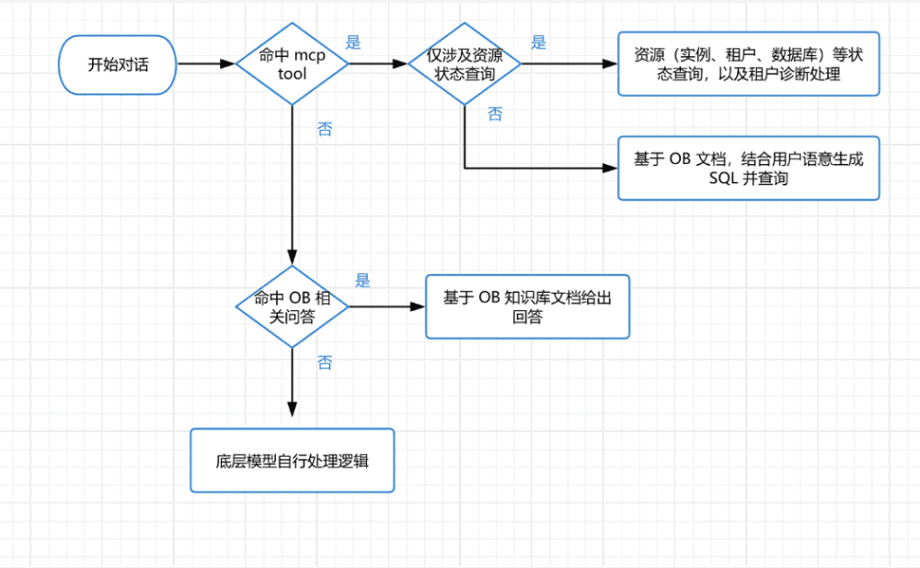
The MCP in the figure is a standard protocol form of the Function call, mainly used to turn the user’s intent (action) into an executable Function.
OB Cloud MCP provides two categories of Functions that a large model can execute:
- Get OB instance information: e.g., list_tenants (get the list of tenants for an instance) and diagnostics (get the relevant metrics of a tenant for diagnosis).
- Connect to the database and execute SQL (natural language converted by the large model into SQL).
The overall flow can be summarized as: during a conversation, the system tries to match whether MCP is hit. If MCP is hit, the system determines whether it only involves querying resource status information. If so, it queries the relevant information and returns it to the large model for processing; if not, it generates search terms based on the OB docs and user semantics and queries them. If MCP is not hit, it answers based on the OB knowledge base docs, or the underlying large model handles it on its own. Here are some demo cases.
OB Cloud MCP Case: Instance Information Retrieval and Diagnostics
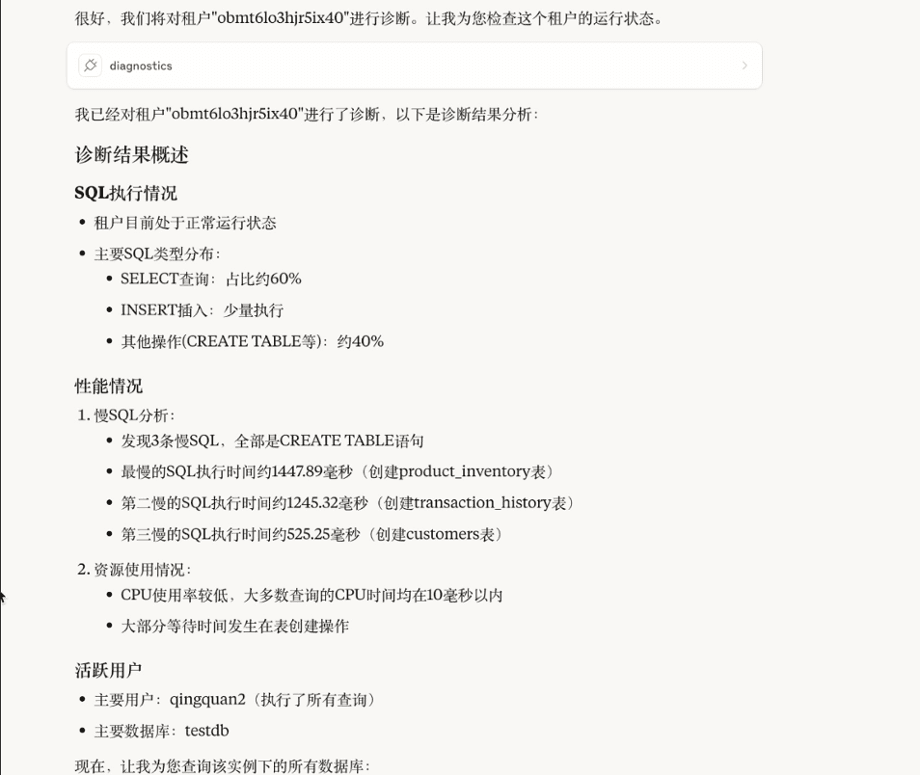
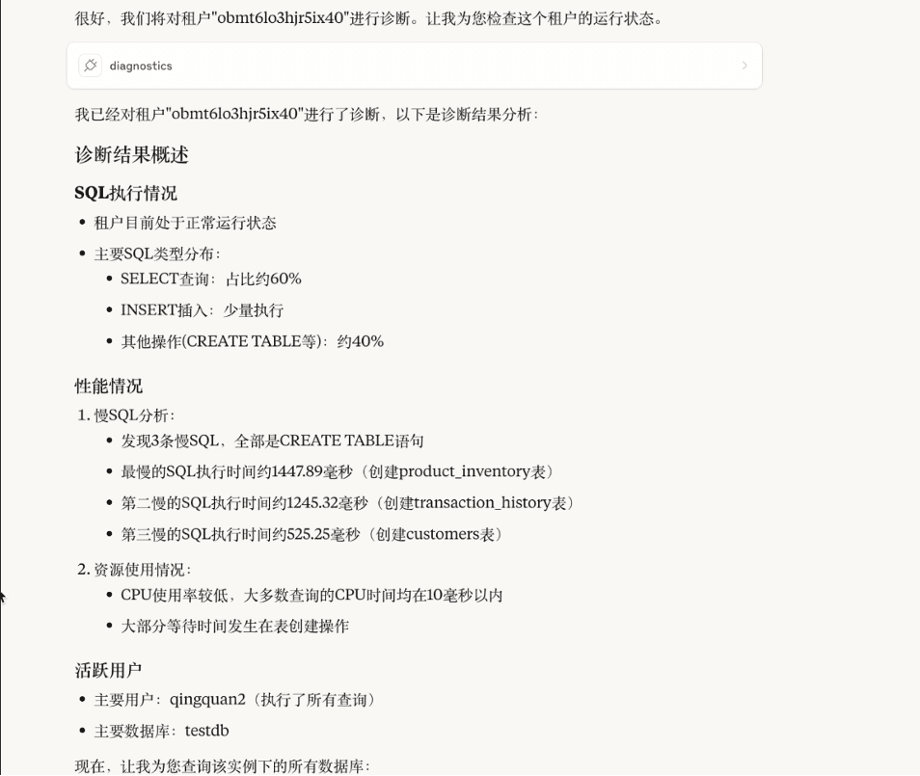
First, the user tries to ask about the current instance’s status. After the system matches the corresponding MCP, it performs the related operations and lists the instance information and diagnostic results. By calling OB Cloud’s API, the system passes the data to the large model for processing. The user can see the instance’s diagnostic results, including SQL statement execution, performance, slow queries, and resource usage. From the results, resource usage is fairly healthy, and the active users and the main databases being operated on are clear at a glance.
OB Cloud MCP Case: Modifying System Configuration
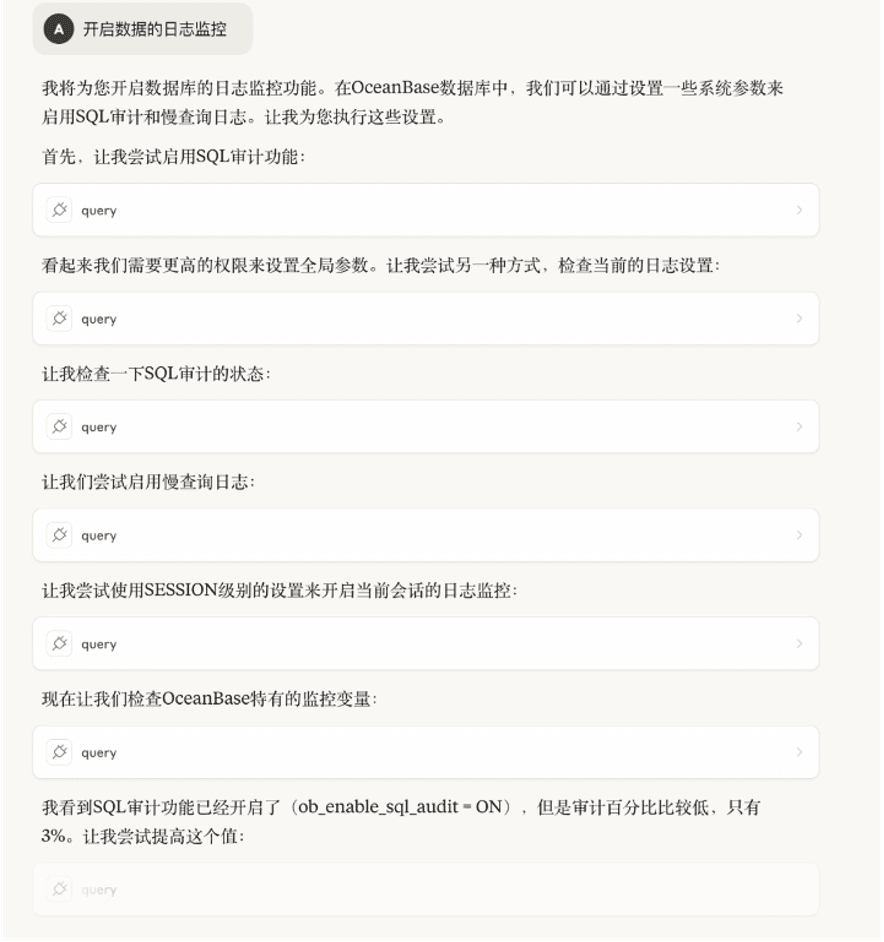
Another case is modifying system configuration. The user tries to enable the database’s log monitoring, and the system performs multiple operations and enables SQL auditing. After enabling SQL auditing, the system finds that the audit percentage is low and tries to raise it. In daily operations, a user might need to consult the OB docs to perform such an operation. However, “log monitoring” and “SQL auditing” aren’t strongly correlated terms with an obvious mapping, so a user might need multiple rounds of querying to acquire the relevant knowledge.
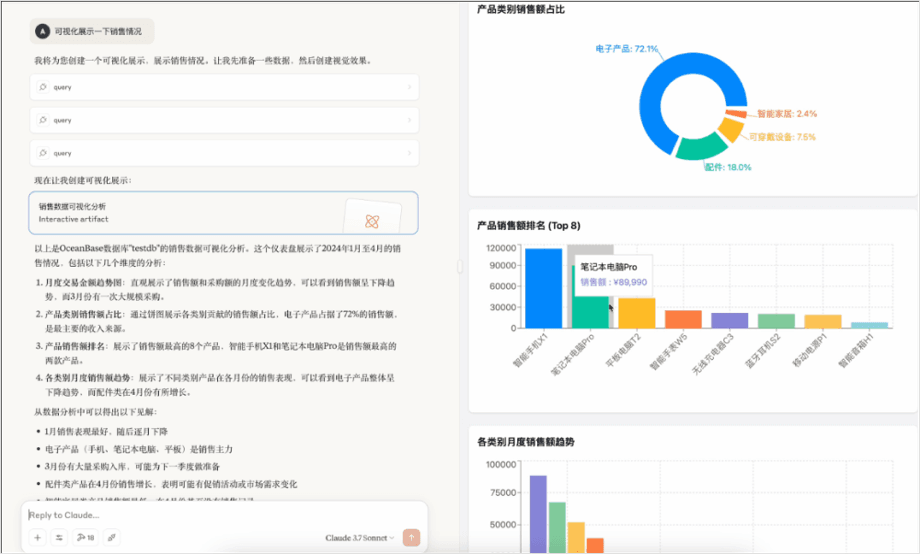
OB Cloud MCP Case: SQL Visualization
The last case is trying to visualize the data of a certain table. The system queries the relevant data and visualizes it. This data visualization capability depends on the MCP client’s support. Although it isn’t implemented directly by the user but completed by calling OB Cloud’s functionality, it demonstrates the possibility of using a large model to process data and convert it into a format that charts can recognize. A user could even implement a client of their own to visualize the data.
Summary
Looking back at the cumbersome interaction process mentioned earlier, based on large models and the MCP protocol, we can build a brand-new database operations workflow. This workflow can achieve a personalized effect: depending on the user’s level and ability as a database engineer and on the problem at hand, the large model can provide corresponding feedback and help solve the problem.
In the future, a user’s daily operations work may require nothing more than chatting with the large model, and they may even leverage the large model to complete some business intelligence (BI) operations. The related code has been submitted to GitHub: https://github.com/oceanbase/mcp-oceanbase/tree/main/src/obcloud_mcp_server, with a detailed MCP usage tutorial. Interested users and developers are welcome to refer to it.
Finally, I’d like to recommend the WeChat account “Lao Ji’s Tech Talk” run by Lao Ji, OceanBase’s open source lead. It continually publishes all kinds of technical content related to #databases, #AI, and #technical architecture. Anyone interested is welcome to follow!
“Lao Ji’s Tech Talk” not only aims to keep bringing you valuable technical content, but also hopes to contribute to the open source community together with everyone. If you appreciate the OceanBase open source community, please light up a little star ✨! Every Star you give is what motivates us.