A New Open-Source Community Development Experience in the Vibe Coding Era
01. Vibe Coding: From “Code Grunt” to “Code Conductor”
Have you ever felt that a big chunk of your daily development time is eaten up writing all that “boilerplate” code that just has to be there? For a single, simple data model, you need to write CRUD APIs, define data structures, configure database connections… This work is important but repetitive, and it slowly drains our creativity.
Now, imagine a scenario like this:
You open an AI code editor and tell it: “Hey, build me a user service that connects to my OceanBase database, with a table containing user ID, name, and email.”
A few seconds later, a fully functional backend service code skeleton appears before your eyes.
This is the magic of Vibe Coding (also known as Vibe-Driven Development). It represents a shift in programming philosophy: the developer transforms from a tedious executor of code into a conductor who describes intent. We simply provide the “Vibe,” and the rest is left to the AI.
The ecosystem of AI-driven development tools is growing rapidly, with different tools focusing on different development workflows. To give everyone a bird’s-eye view of today’s mainstream tools, we’ve put together the quick-reference table below.
The following table summarizes the features of two mainstream Vibe Coding tools—Cursor and Claude Code—so readers can quickly grasp their differences and strengths.
| Feature | Cursor | Claude Code |
|---|---|---|
| Type | IDE | CLI |
| Core strengths | Real-time code completion Codebase context awareness Natural-language editing Visual development |
Deep reasoning Multi-file refactoring Git integration Terminal-native Handles complex tasks |
As the table shows, each tool has its own unique strengths. Today we’ve chosen Cursor to share, in concrete terms, the practice of turning natural-language instructions into working code.
And to let Cursor understand and operate a professional database system, we need a bridge. That bridge is the OceanBase MCP Server.
02. The Connecting Bridge: OceanBase MCP Server
The OceanBase MCP Server is a service that implements the MCP (Model Context Protocol) protocol. It provides an efficient communication bridge between large language models and the OceanBase database. In short, it gives AI tools like Cursor the superpower to “talk” directly to the OceanBase database and execute SQL.
This project is already fully open-sourced on GitHub—you’re welcome to Star it and contribute:
https://github.com/oceanbase/mcp-oceanbase ✨
Today, drawing on the real experience of an OceanBase community developer, we’ll walk you through the complete workflow and see what kind of dazzling sparks fly when Cursor meets the distributed database OceanBase.
03. Practice Makes Perfect: Build a Backend Service in 5 Minutes with Vibe Coding
We’ll use a simple example to show how, through natural-language conversation, you can have Cursor leverage the OceanBase MCP Server to create—from scratch—a FastAPI backend application connected to an OceanBase database.
Prerequisites
Before you begin, make sure the following are installed on your machine:
- Git—download and install it for your operating system
- Python 3.11 or above
- The Cursor client—pick the right version for your OS on the Cursor download page and install it
- The Python package manager uv
1 | curl -LsSf https://astral.sh/uv/install.sh | sh |
After installation, run uv –version to verify it succeeded.
Step 1: Configure the OceanBase MCP Server
First, we need to let Cursor know how to command our OceanBase database.
Clone the OceanBase MCP Server source code
1 | git clone https://github.com/oceanbase/mcp-oceanbase.git |
Install the MCP Server dependencies. Enter the mcp-oceanbase directory and use uv to create a virtual environment and install dependencies.
1 | # Enter the project directory |
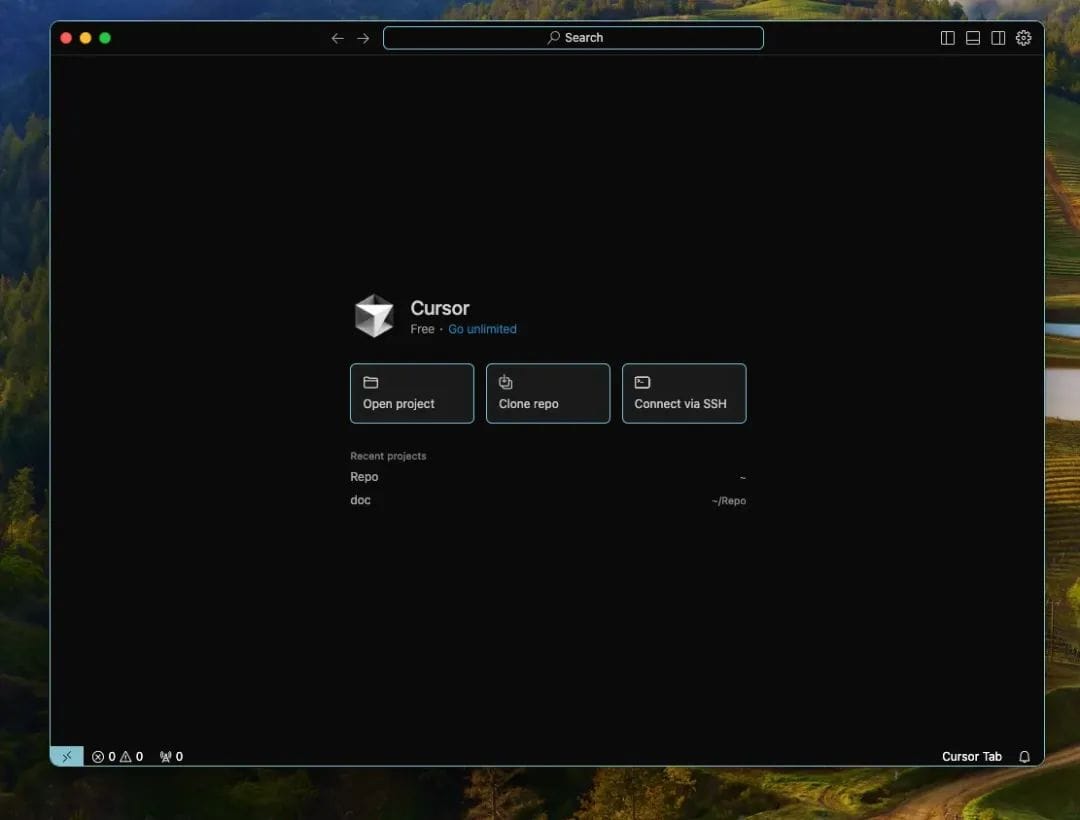
Configure the OceanBase MCP Server in Cursor. First, manually create a new working directory (for example, call it cursor-fastapi-demo) and open it with Cursor.
In Cursor, use the shortcut Cmd + L (macOS) or Ctrl + L (Windows) to bring up the chat box.
Click the gear (⚙️) icon in the top-right corner of the chat box and select MCP Tools.
Click Add Custom MCP to fill in the configuration file.
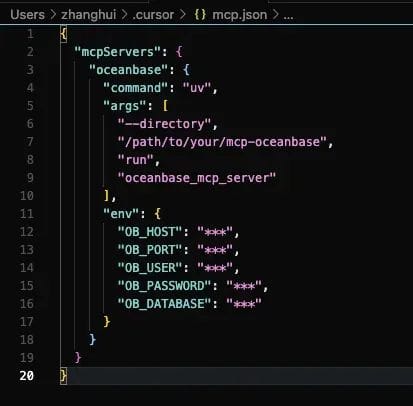
⏰ Tip: Be sure to replace the /path/to/your/mcp-oceanbase and all your_ob_* placeholders in the configuration above with the real connection details of your OceanBase database.
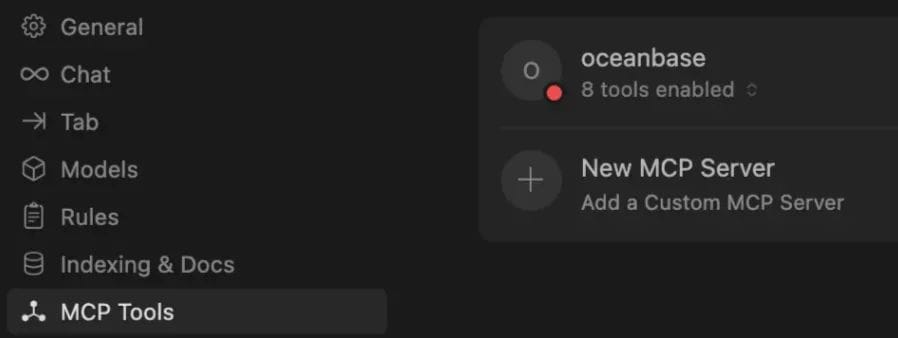
Once the configuration is correct, you’ll see the OceanBase tools shown as “available.”
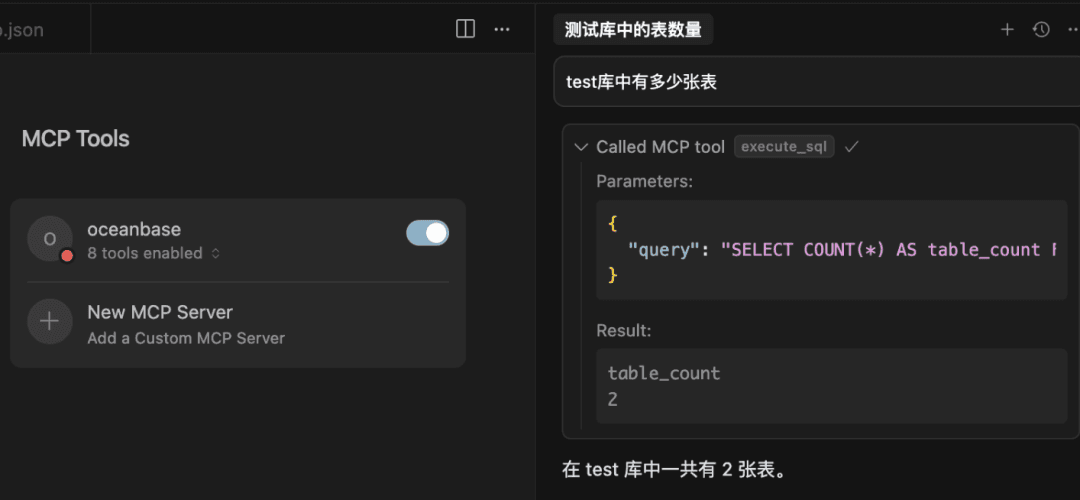
Verify the connection. Let’s test the connection with natural language. Type into the chat box:
“How many tables are in the test database?”
Cursor will call the OceanBase tools we configured and generate the corresponding SQL statement.
If all goes well, Cursor will return the table count. This means our AI assistant has successfully connected to the OceanBase database.
04. Vibe Coding Time: Quickly Build a RESTful API Project with FastAPI
Create a database table in one sentence
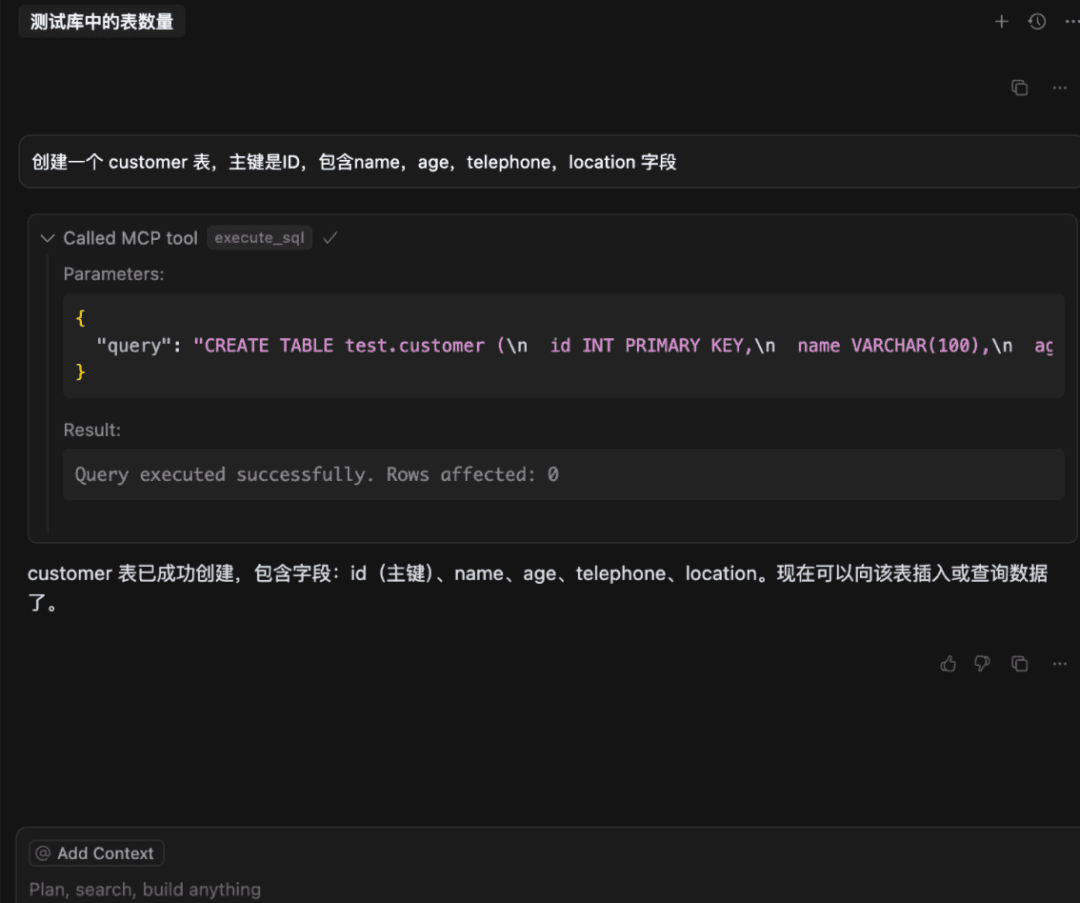
Create a customer table with ID as the primary key, containing the fields name, age, telephone, and location.
Cursor instantly generated a standard CREATE TABLE statement. Once you’ve confirmed it’s correct, click Run Tool, and the table is created.
Say goodbye to the tedium of hand-writing DDL!
Insert test data with another sentence
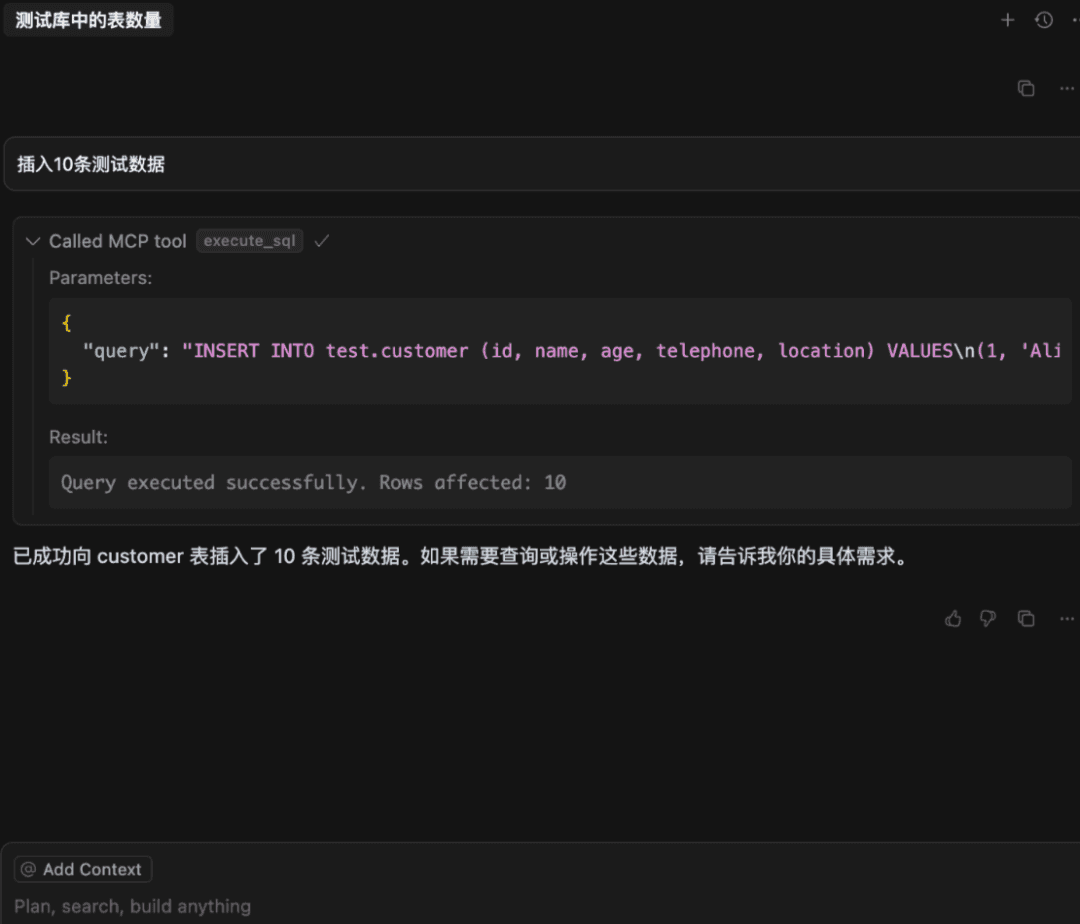
Insert 10 rows of test data.
Cursor again showed its prowess: not only did it generate the INSERT statement, it thoughtfully fabricated 10 very realistic-looking rows of test data. Click Run Tool, and the data is populated.
Create a FastAPI project
Now for the moment of magic. Let’s try something more ambitious:
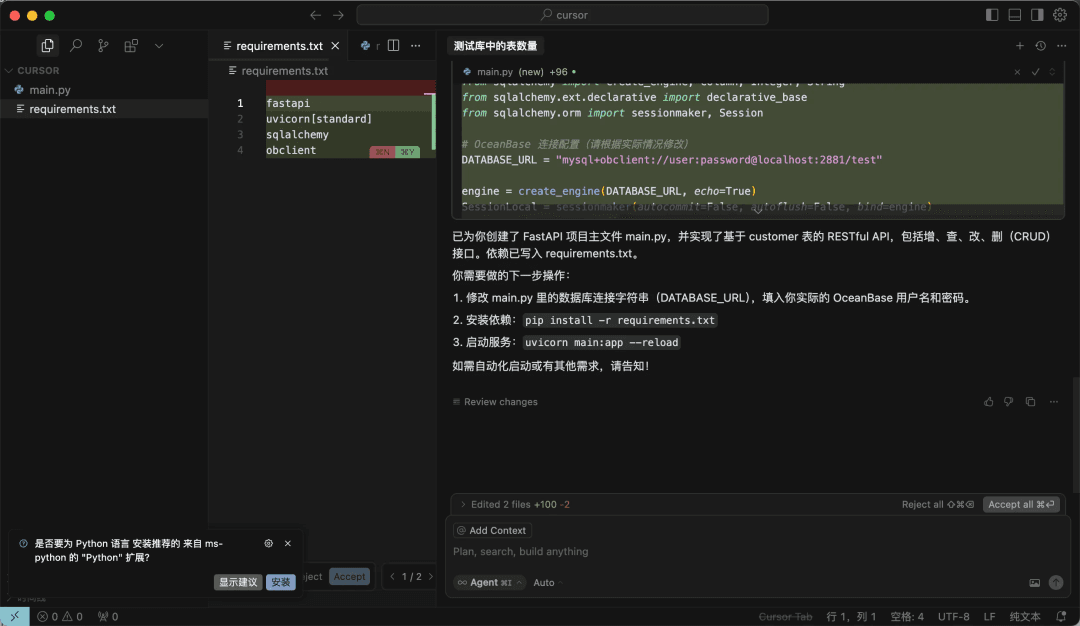
Create a FastAPI project that generates a RESTful API based on the customer table.
Cursor went into a “frenzy of output,” automatically creating two files—main.py and requirements.txt—in the file explorer on the left.
Click Accept All to accept all changes. The AI-generated code may differ slightly each time and sometimes needs minor tweaks, but it has already saved us at least half an hour of work.
Launch and verify
Now we just need to start the application in Cursor’s terminal following the usual process:
1 | # Create and activate a new virtual environment |
The service starts successfully! Finally, open another terminal window and use the curl command to access the API the AI just created for us, and see whether it can fetch data back from the OceanBase database:
1 | curl http://127.0.0.1:8000/customers |
You’ll see JSON data returned in a format like the following:
1 | curl http://127.0.0.1:8000/customers[{"id":1,"name":"Alice","age":28,"telephone":"1234567890","location":"Beijing"},{"id":2,"name":"Bob","age":32,"telephone":"2345678901","location":"Shanghai"},{"id":3,"name":"Charlie","age":25,"telephone":"3456789012","location":"Guangzhou"},{"id":4,"name":"David","age":40,"telephone":"4567890123","location":"Shenzhen"},{"id":5,"name":"Eve","age":22,"telephone":"5678901234","location":"Chengdu"},{"id":6,"name":"Frank","age":35,"telephone":"6789012345","location":"Wuhan"},{"id":7,"name":"Grace","age":30,"telephone":"7890123456","location":"Hangzhou"},{"id":8,"name":"Heidi","age":27,"telephone":"8901234567","location":"Nanjing"},{"id":9,"name":"Ivan","age":29,"telephone":"9012345678","location":"Tianjin"},{"id":10,"name":"Judy","age":31,"telephone":"0123456789","location":"Chongqing"}] |
It worked! Starting from an empty directory, with just a few conversations with the AI, we completed a fully functional FastAPI backend service that connects to the OceanBase database and includes all the create, read, update, and delete interfaces.
Here is the core code main.py generated by the AI:
1 | from fastapi import FastAPI, HTTPException, Depends |
05. Conclusion: Embrace the New Paradigm, Unleash New Potential
This experience gave us a profound sense that AI-driven Vibe Coding is already practical and ready to use. We no longer need to fret over repetitive database work; instead, we can pour more energy into innovating business logic and thinking about system architecture.
This, perhaps, is where the developer’s greatest value lies in the AI era.
You’re welcome to try out the OceanBase MCP Server!
https://github.com/oceanbase/mcp-oceanbase
Finally, we’d like to recommend the WeChat account of Lao Ji, the head of OceanBase open source: “Lao Ji’s Tech Talk.” It continuously publishes all kinds of technical content related to #Database, #AI, and #Tech Architecture. If you’re interested, feel free to follow!
“Lao Ji’s Tech Talk” not only hopes to keep bringing you valuable technical sharing, but also hopes to contribute to the open-source community together with everyone. If you recognize the value of the OceanBase open-source community, light up a little star ✨! Every Star you give is the motivation behind our efforts.