Help the Cursor AI Assistant Instantly Get Vector Databases — A Guide to the Cursor seekdb Extension
🌟 Tip: The seekdb used in this article is the AI-native database open-sourced by OceanBase. You’re welcome to try it out at https://github.com/oceanbase/seekdb — we’re confident it can bring a cleaner, more efficient data management solution to your AI application development!
In the era of AI-assisted programming, developers increasingly rely on intelligent tools to boost their coding efficiency. However, when you ask the Cursor AI about seekdb-related questions, it may not give you an accurate answer — because it may not yet know enough about seekdb, an AI-native search database that was released only recently.
This article will show you how, through the seekdb Cursor Extension, you can give the Cursor AI assistant expert knowledge of seekdb, so that you get precise technical guidance while developing AI applications on seekdb.

What Is seekdb?
seekdb is an AI-native search database from OceanBase. It unifies multiple data models — relational data, vectors, text, JSON, and GIS — in a single engine, and supports hybrid search and in-database AI workflows.
Typical use cases for seekdb include:
- RAG and knowledge retrieval: bring real-time, trustworthy external knowledge to large language models to improve answer quality
- AI-assisted programming: build vector and full-text indexes over code repositories to enable semantic code search
- Semantic search engines: capture user search intent for precise, cross-modal retrieval
- Agent applications: provide AI Agents with a unified foundation for memory, planning, perception, and reasoning
What Is the seekdb Cursor Extension?
The seekdb Cursor Extension is a Cursor extension that adds rules under the .cursor/rules directory, enabling the Cursor AI assistant to retrieve seekdb’s official documentation and thereby understand seekdb database knowledge. This lets it:
- ✅ Understand seekdb database concepts: vector search, hybrid search, AI functions, and more
- ✅ Provide accurate code suggestions: generate best-practice code based on the official documentation
- ✅ Answer seekdb-related questions: get technical support right inside the editor
- ✅ Accelerate the development workflow: spend less time reading docs and more time on business logic
Key Features
- 🚀 One-click install: install quickly via the Cursor extension marketplace or the command palette
- 📚 Complete documentation: retrieve seekdb’s official documentation knowledge base, covering comprehensive technical docs on vector search, hybrid search, AI functions, and more
- 🌐 Dual-mode support: prioritize fetching the latest docs from GitHub, with local docs as a fallback
Quick Start
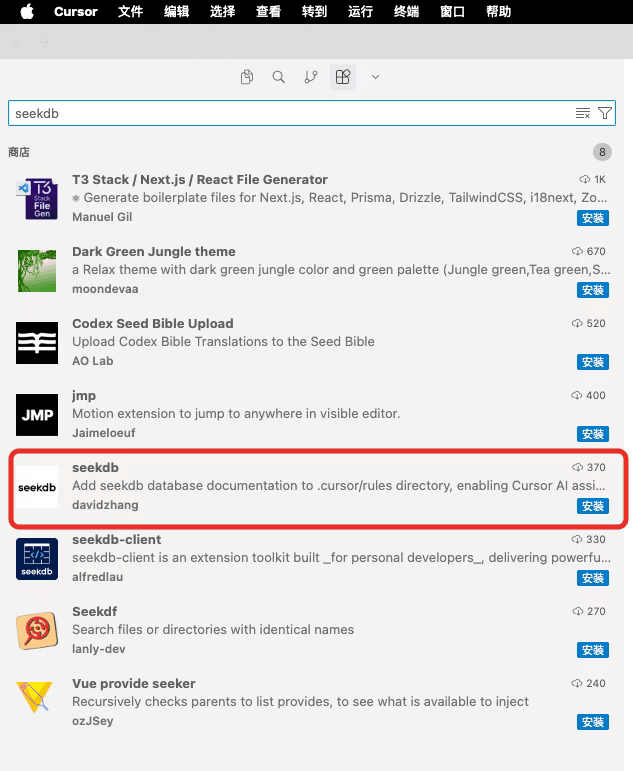
Step 1: Install the Extension
- Open the extension marketplace in Cursor (
Ctrl+Shift+XorCmd+Shift+X) - Search for “seekdb”
- Click Install to install the extension
Step 2: Add the seekdb Docs
- Open a project directory in Cursor (the docs will be added under this directory)
- Open the command palette:
- Windows/Linux: press
Ctrl+Shift+P - macOS: press
Cmd+Shift+P
- Windows/Linux: press
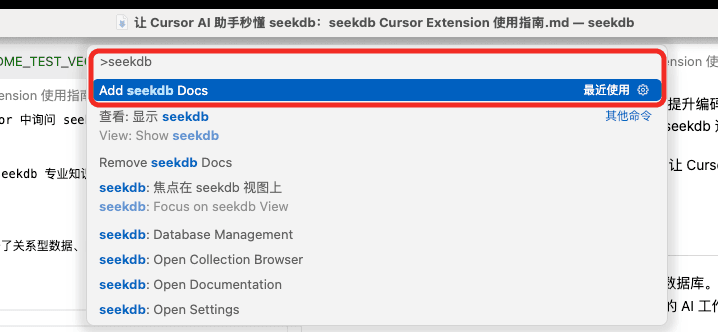
- Type and select the command:
- Type “seekdb” or “Add seekdb Docs”
- Select the
Add seekdb Docscommand
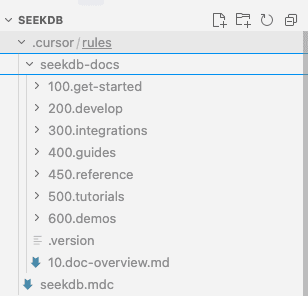
- The docs will be added automatically:
- The
.cursor/rules/seekdb-docsdirectory (official docs) - The
.cursor/rules/seekdb.mdcfile (rules file)
- The
- Reload the window to make the rules take effect
Installation complete! Now you can ask the Cursor AI assistant any seekdb-related question directly.
Seeing It in Action
Let’s walk through a real example to see how the seekdb Cursor Extension can help you develop.
Example: Using the AI Assistant to Create a seekdb Hybrid Search App
After installing the extension and adding the docs, start a new conversation in Cursor and enter the following prompt:
For example: I want to create a simple seekdb app in Python that implements hybrid search over documents. Please help me write the code.
The Cursor AI assistant will then give an accurate answer:
1 | """ |
Running the Example
- Install pyseekdb
1 | pip install pyseekdb |
- Run the code
1 | python quick_start_hybrid_search.py |
- View the results
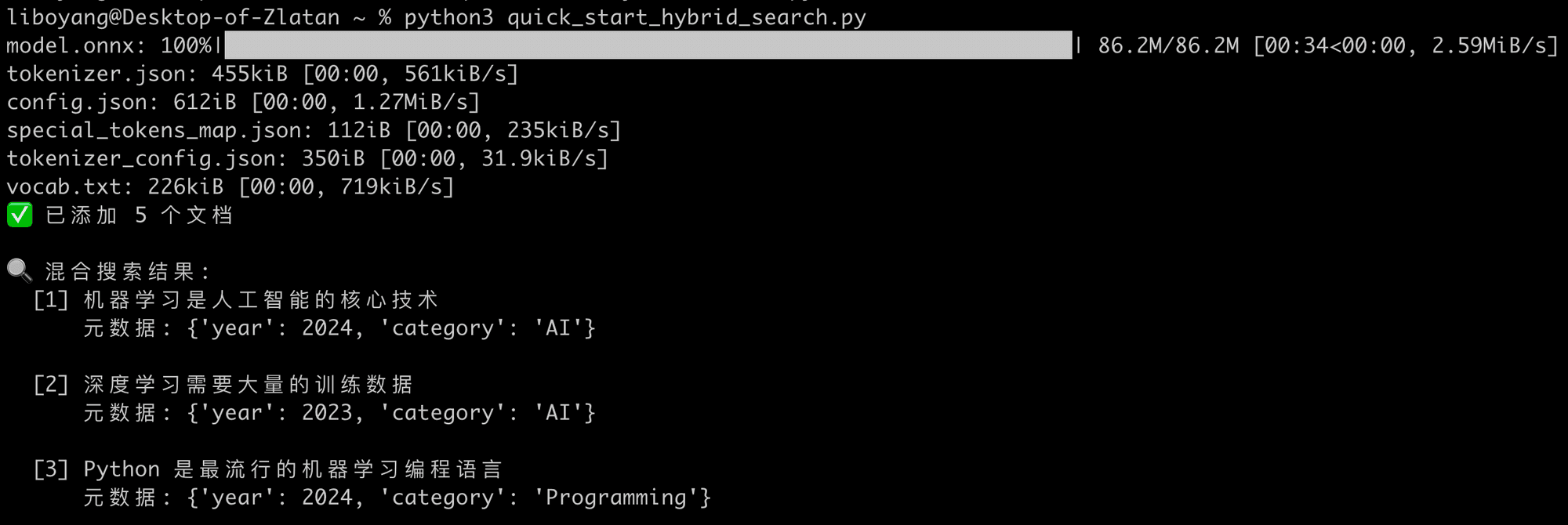
Hybrid search combines keyword matching (documents containing “machine learning”) and semantic search (documents semantically close to “AI technology”), fusing the two sets of retrieval results via the RRF (Reciprocal Rank Fusion) algorithm to return the most relevant documents. For what RRF means exactly, see this introductory article on the basics, A Gentle Introduction to Hybrid Search.
A note in particular: seekdb’s embedded mode currently only supports Linux servers. If you’re testing locally on Mac or Windows, you need to change client = pyseekdb.Client() in the Python code to a server-mode connection address (we recommend using the seekdb desktop edition on Mac or Windows).
1 | client = pyseekdb.Client( |
More Use Cases
After installing the seekdb Cursor Extension, you can ask the AI assistant all sorts of seekdb-related questions:
Basic Queries
- How do I get started with seekdb?
- Which deployment modes does seekdb support?
Technical Questions
- How do I create a vector index in seekdb?
- What AI functions does seekdb have? How do I use the AI_EMBED function?
Code Examples
- Show me an example of implementing vector similarity search using seekdb SQL.
- How do I integrate seekdb with LangChain?
Integration
- How does seekdb configure an OpenAI model for vector embeddings?
How It Works
The seekdb Cursor Extension works in a very straightforward way:
- Rules-file injection: the extension adds seekdb’s official documentation and an
.mdcrules file to the.cursor/rulesdirectory - AI context augmentation: Cursor automatically reads the contents of the
.cursor/rulesdirectory and uses them as context knowledge for the AI assistant - Intelligent retrieval: when you ask a seekdb-related question, the AI assistant draws on these docs to provide an accurate answer
Removing the Docs
If you no longer need the seekdb docs, you can remove them easily:
- Open the command palette (
Ctrl+Shift+PorCmd+Shift+P) - Type “Remove seekdb Docs”
- Select and run that command
The docs will be removed from the .cursor/rules directory.
Conclusion
With the seekdb Cursor Extension, you can get seekdb’s official documentation support at any time while developing in Cursor. Whether you’re learning seekdb’s new features or solving technical problems you run into during development, the AI assistant can provide accurate guidance based on the latest official docs.