Hybrid Search: A Hands-on Guide to Multimodal Retrieval (Chapter 4)
1. From Corrective RAG to Multimodal Retrieval
In Chapter 3, we studied Corrective RAG (CRAG), which improves the reliability of a RAG system through document scoring and fallback mechanisms. CRAG mainly addresses the quality-validation problem for retrieval results, but at the retrieval step itself, traditional RAG systems still have a fundamental problem: the blind spots of any single retrieval method.
This chapter solves that problem: how to combine multiple retrieval methods through Hybrid Search to improve both recall and precision.
2. Why Do We Need Hybrid Search?
2.1 What Is Hybrid Search?
Hybrid Search is a technique that combines three modalities — vector search, sparse search, and full-text search — and improves retrieval effectiveness through weighted score fusion. By letting different retrieval methods complement one another, it overcomes the blind spots of any single method and thereby improves recall and precision.
2.2 The Problems with a Single Retrieval Method
Let’s first look at the problems you run into when relying on just one retrieval method.
Blind spots of vector search:
Vector search is good at understanding semantics and concepts, but it misses precise keywords. For example, if you search for proper nouns like “GAAP” or “Q3 2023,” vector search may return results that are conceptually similar but actually irrelevant. There’s also the problem of over-generalization — it may return documents that are conceptually similar but that don’t actually answer your question.
Blind spots of keyword search:
Keyword search is good at matching exact terms, but it doesn’t understand semantics. For example, if you search for “machine learning,” it won’t find documents containing “AI”; if you search for “revenue,” it won’t find content containing “earnings” or “income.” This is the semantic blind-spot problem.
The crux of the issue is this: vector search misses keywords, and keyword search misses semantics — each method has its own blind spots.
2.3 Hybrid Search: Fusing Three Modalities
The idea behind Hybrid Search is: since every single method has blind spots, why not combine them? Specifically, Hybrid Search combines three complementary retrieval methods:
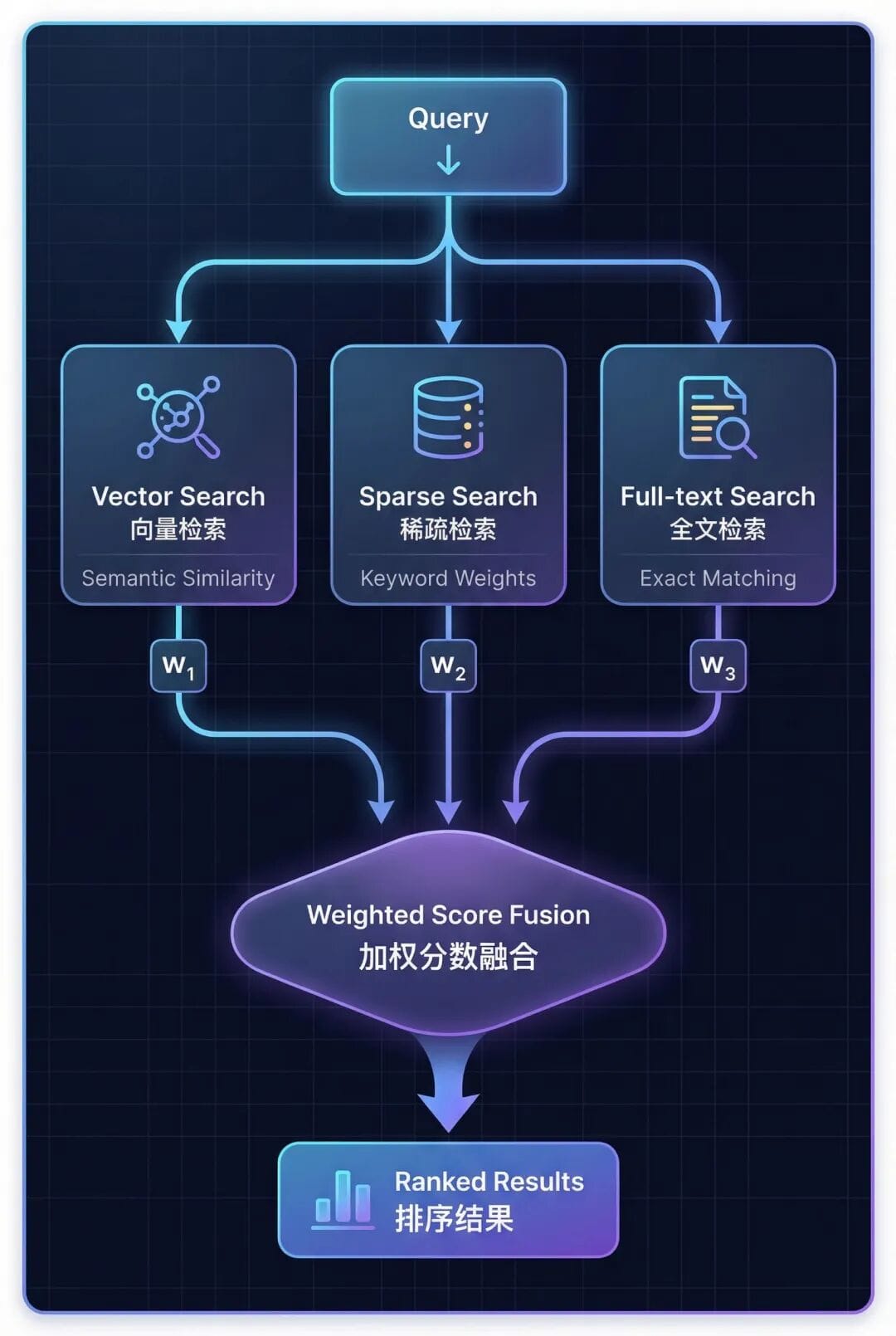
The three retrieval methods each have their own emphasis:
- Vector Search → understands semantic similarity
- Sparse Search → matches keywords and synonyms
- Full-text Search → exact phrase matching
2.4 Hybrid RAG vs Corrective RAG
Hybrid Search and corrective mechanisms address problems at different stages:
| Dimension | Hybrid RAG (this chapter) | Corrective RAG (Chapter 3) |
|---|---|---|
| Core goal | Better Retrieval | Better Validation |
| Approach | Combines 3 retrieval modalities | Document relevance scoring |
| Key mechanism | Weighted score fusion | Query rewriting + fallback |
| Stage | Retrieval stage | Post-retrieval validation stage |
| Agent’s role | Selects the retrieval strategy | Assesses quality + triggers fallback |
These two techniques pair perfectly: use Hybrid Search to improve retrieval quality, then use Corrective RAG for quality validation.
3. A Detailed Look at the Three Retrieval Modalities
Now that we understand why Hybrid Search is necessary, let’s take a deep dive into the three core modalities that make it up.
3.1 Vector Search
Vector search converts text into dense embeddings (typically 768–1536 dimensions), then uses cosine similarity to measure the angle between vectors, returning the documents that are most semantically similar.
Its strength lies in understanding concepts and semantic relationships, and it can handle paraphrases and synonymous expressions. But it can’t precisely match specific terms, such as proper nouns like “GAAP” or “SKU-12345.”
Best for: conceptual queries, such as “What causes inflation?”
3.2 Sparse Search
Sparse search uses TF-IDF (term frequency–inverse document frequency) to extract keywords, can expand synonyms within the vocabulary, and matches based on keyword weights (not exact string matching).
The principle of TF-IDF is: Term Frequency × Inverse Document Frequency — the rarer a word is across the entire document collection, the higher the weight it receives.
The strength of sparse search is its ability to match related terms — synonyms like revenue, earnings, and income — without requiring an embedding model. But it is constrained by vocabulary dimensions and struggles with rare proper nouns.
Typical use case: Tool Selection
Sparse search plays the keyword-matching role within Hybrid Search and performs especially well in tool selection and in term-sensitive queries (such as proper nouns and technical abbreviations).
3.3 Full-text Search
Full-text search builds a tokenized inverted index, applies the BM25 scoring algorithm (an improved TF-IDF that adds document-length normalization), and returns exact phrase matches.
BM25 is an improved version of TF-IDF that adds document-length normalization to prevent long documents from getting unfairly high scores.
The strength of full-text search is its ability to exactly match phrases (such as “Item 1A Risk Factors”), handle rare proper nouns, and support precise section location. But it can’t handle typos or variants, and it doesn’t understand semantic relationships.
Best for: precise section lookup, such as “Find the Risk Factors section of the 10-K report.”
3.4 Choosing Among the Three Modalities
No single modality is the best — the key is to combine them according to the query pattern:
| Retrieval Modality | Best Query Type | Example Query | Core Strength |
|---|---|---|---|
| Vector search | Conceptual queries requiring semantic understanding | “What are Nike’s financial risks?” | Semantic understanding |
| Sparse search | Synonym-aware keyword matching | “Nike earnings 2023” | Keyword generalization |
| Full-text search | Exact phrase queries, section names | “Item 1A Risk Factors” | Exact matching |
4. seekdb: An AI-Native Search Database
4.1 What Is seekdb?
seekdb is the AI-native search database from OceanBase. It integrates vector storage, relational data, and full-text search into a single unified platform. Traditional solutions require a dedicated vector database, which adds extra operational cost and system complexity; seekdb solves this with a unified, multi-model engine.
4.2 The Core Advantages of seekdb
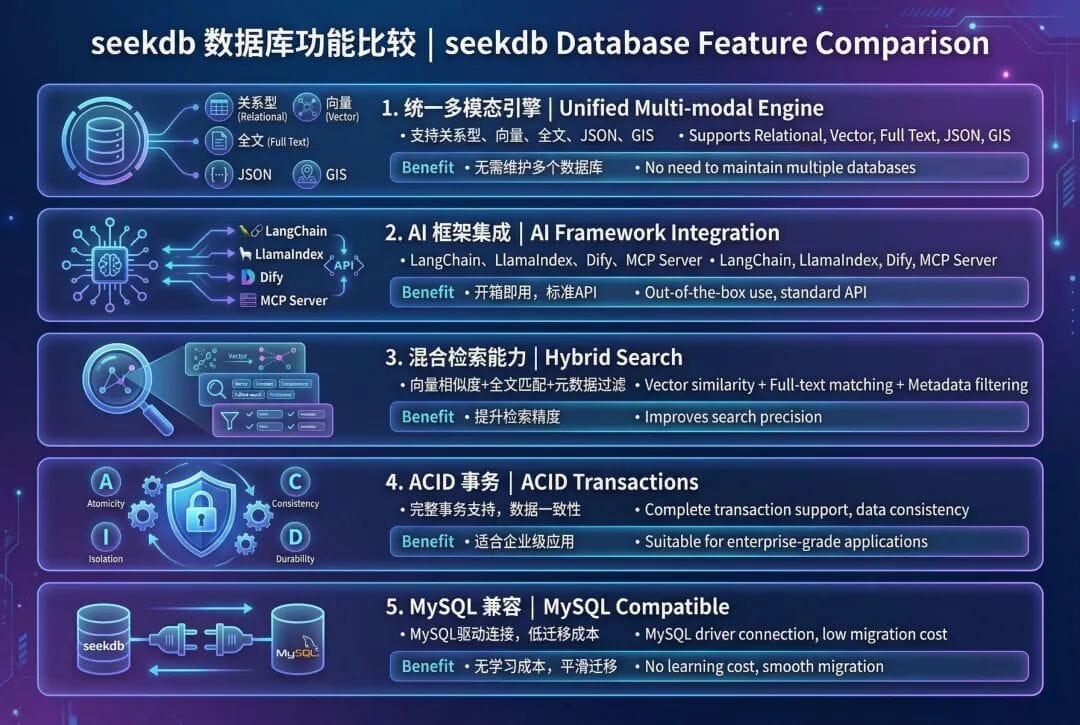
4.3 Why Choose seekdb to Implement Hybrid Search?
- A single query can invoke all 3 modalities, with no need to call external services
- Native weighted fusion, with built-in RRF and linear combination algorithms
- Automatic index synchronization — vector, sparse, and BM25 indexes are maintained automatically
- MySQL protocol, compatible with existing tools and drivers
- Seamless migration to an OceanBase cluster
5. Hands-on: Implementing Hybrid Search
5.1 Preparing the Environment
1 | import os |
Load the embedding model.
1 | from langchain_dev_utils.embeddings import register_embeddings_provider, load_embeddings |
Configure the OceanBase connection.
1 | # OceanBase connection parameters |
5.2 Loading Documents
First, load the source documents to demonstrate hybrid search.
1 | from langchain_community.document_loaders import PyPDFLoader |
5.3 Initializing the Hybrid Store
Enable all three search modes:
- Dense vectors: semantic similarity via embeddings
- Sparse vectors: keyword importance computed via TF-IDF weighting
- Full-text search: exact phrase and keyword matching
1 | from langchain_oceanbase.vectorstores import OceanbaseVectorStore |
5.4 Generating Sparse Vectors
Sparse vectors use TF-IDF (term frequency–inverse document frequency) to represent keyword importance.
Term Frequency (TF): how often a word appears in a document; Inverse Document Frequency (IDF): how rare or important a word is across the corpus.
Vocabulary-based: terms are mapped directly to indexes (no hash collisions).
We’ll build a custom TF-IDF encoder that works within OceanBase’s 500,000-dimension limit.
1 | import re |
5.5 Preparing Full-text Content
Full-text search needs its own indexable content. We’ll enrich the page content with metadata.
1 | # Create enhanced full-text content |
5.6 Adding Documents Across All Three Modalities
Store the documents into the vector database and build all three indexes.
1 | print("⏳ Adding documents with hybrid search capabilities...") |
5.7 Testing Each Modality
Test all three retrieval methods separately and compare the search results.
Each modality returns different results — vector search finds semantically related content, sparse search finds keyword matches, and full-text search finds exact phrases.
5.7.1 Vector Search
1 | query = "What were Nike's total revenues and financial performance?" |
5.7.2 Sparse Vector Search (Keyword Matching)
1 | # Generate TF-IDF sparse query vector for keyword matching |
5.7.3 Full-text Search (Exact Matching)
1 | # Full-text search with exact phrase matching |
6. Advanced Hybrid Search
In the previous steps, we enabled all three retrieval modalities and tested each one separately. The question now is: how do we effectively combine these three retrieval methods?
That’s the core problem advanced hybrid search solves: through weighted score fusion, automatically combining multiple retrieval modalities to achieve better retrieval results than any single modality.
6.1 The Built-in Score Fusion Mechanism
OceanBase provides the advanced_hybrid_search() method, which automatically combines the retrieval results of all three modalities.
How it works:
- Run the three searches in parallel — execute vector search, sparse search, and full-text search simultaneously
- Score normalization — normalize each modality’s scores to the 0–1 range
- Weighted fusion — apply the weighting formula:
final_score = w₁×vector + w₂×sparse + w₃×fulltext - Sort and return — sort by the fused score and return the Top-K results
All of the score normalization and fusion logic is handled automatically inside seekdb; developers only need to focus on configuring the weights.
6.1.1 Search Mode Presets
Different types of queries need different weight configurations. We can define several commonly used search modes:
Balanced
Suited to general queries, such as “Nike business in 2023.” Weight configuration: Vector 40%, Sparse 30%, Fulltext 30%.
Semantic
Suited to conceptual understanding, such as “What is Nike’s strategy?” Weight configuration: Vector 70%, Sparse 20%, Fulltext 10%.
Keyword
Suited to specific terms and numeric queries, such as “Nike earnings 2023.” Weight configuration: Vector 20%, Sparse 60%, Fulltext 20%.
Exact
Suited to legal text and section lookup, such as “Item 1A Risk Factors.” Weight configuration: Vector 10%, Sparse 20%, Fulltext 70%.
| Preset | V/S/F | Use Case | Example Query |
|---|---|---|---|
| Balanced | 40/30/30 | Unknown or mixed query types | “Nike business in 2023” |
| Semantic | 70/20/10 | Research, exploratory questions | “What is Nike’s strategy?” |
| Keyword | 20/60/20 | Specific terms, numeric queries | “Nike earnings 2023” |
| Exact | 10/20/70 | Legal text, section lookup | “Item 1A Risk Factors” |
6.2 Weight-Tuning Recommendations
- Start with Balanced — when in doubt, use 40/30/30 as a baseline
- Adjust to your business scenario — analyze your actual query logs to identify the dominant query types
- Validate with A/B testing — compare the retrieval effectiveness of different weight configurations
- Allow dynamic adjustment — different queries can use different weight configurations
6.3 Choosing a Fusion Algorithm
Besides linear weighted combination, seekdb also supports other fusion algorithms:
- Linear Combination — a weighted average, suitable for most scenarios
- RRF (Reciprocal Rank Fusion) — rank-based fusion, insensitive to score scale
- Max fusion — takes the highest score across modalities, suitable for “OR” logic
Recommended practice: start with linear combination, and if the results aren’t ideal, try RRF.
💡 Extended knowledge: The RRF and max fusion mentioned in this section are common fusion algorithms; seekdb supports multiple fusion strategies. For the specific API, please refer to the official documentation.
7. Agentic Hybrid RAG: Letting the Agent Choose the Optimal Strategy
7.1 Why Combine Agentic + Hybrid Search?
Combining intelligent decision-making with multimodal retrieval gives you the best of both worlds.
Hybrid Search alone: multimodal (V+S+F), better recall — but fixed weights and always performs retrieval.
Agentic + Hybrid Search: dynamic search modes, multi-step reasoning, skipping retrieval when it isn’t needed, and synthesizing results from multiple searches.
The core value: Agentic RAG + Hybrid Search = intelligent decision-making + multimodal retrieval.
7.2 Defining a Tool with Dynamic Search Modes
Create a tool that lets the Agent choose the best search strategy.
1 | from langchain.tools import tool |
Available search modes:
- balanced (general scenarios, 40/30/30)
- semantic (concepts and semantics, 70/20/10)
- keyword (keyword queries, 20/60/20)
- exact (exact phrases, 10/20/70)
The Agent analyzes the query and automatically selects the best mode.
7.3 Creating an Agent with LangChain
Build an intelligent Agent that can dynamically use hybrid search.
1 | from langchain.agents import create_agent |
Agent capabilities: analyzing the query type before searching, selecting the optimal search mode, performing multi-step searches for complex questions, and synthesizing the results into a coherent answer. The system prompt guides the Agent on when to use each search mode.
Advanced tip: have the Agent output custom weights (such as 0.5/0.3/0.2) instead of preset names, for finer-grained control.
7.4 Agent in Action: Examples
Watch how the Agent dynamically selects its search strategy.
Financial data query:
User: “Nike revenue fiscal 2023?” → Agent analysis → search_mode=”keyword”, reasoning: use keyword mode to find a specific number.
Strategy question:
User: “What is Nike’s innovation approach?” → Agent analysis → search_mode=”semantic”, reasoning: use semantic mode to understand concepts.
Section lookup:
User: “Find Item 1A Risk Factors” → Agent analysis → search_mode=”exact”, reasoning: use exact mode for precise matching.
Key advantage: the Agent intelligently selects its search strategy based on its analysis of the query — no manual tuning required.
8. Key Takeaways
8.1 Three Modalities
- Vector search → semantic understanding
- Sparse search → keywords + synonym expansion
- Full-text search → exact phrases
8.2 Weighted Fusion
- Four preset modes: balanced / semantic / keyword / exact
- Supports custom weights for combining modalities
- Tune the weights to your domain
8.3 The Agentic Approach
- Let the Agent choose the search strategy
- Dynamic mode selection per query
- Multi-step search for complex Q&A
8.4 seekdb by OceanBase
- Native hybrid search support
- A single query → 3 modalities
- Easy migration to an OceanBase cluster
8.5 Practical Recommendations
- Start with Balanced: use 40/30/30 weights when the query type is uncertain
- Let the Agent decide: guide the Agent’s search-mode selection through the system prompt
- Tune iteratively: adjust the weight presets based on your actual query logs
- Combine techniques: Hybrid Search + Corrective RAG = a more powerful system
9. Next Steps
In this chapter, we developed a deep understanding of the multimodal fusion mechanism behind Hybrid Search, learned how to combine the three modalities of vector search, sparse search, and full-text search, and used seekdb to build a complete Agentic Hybrid RAG system.
Follow the WeChat account “Lao Ji’s Tech Talk” to keep up with this series of courses! Let’s explore more of what Agentic RAG and Hybrid Search can do together! 🎯