A Step-by-Step Tutorial — Building a RAG Application with OceanBase seekdb
📚 Every step in this tutorial is something you can reproduce hands-on with seekdb! Come follow along at https://github.com/oceanbase/seekdb—two hours from now you might just have your own RAG application~
This is another step-by-step tutorial, showing you in detail how to build a RAG (Retrieval-Augmented Generation) system with OceanBase seekdb.

A RAG system combines a retrieval system with a generative model, generating new text based on a given prompt. The system first uses seekdb’s native vector search to retrieve relevant documents from a corpus, then uses a generative model to produce new text based on the retrieved documents.
Prerequisites
- Python 3.11 or higher installed
- uv installed
- An LLM API Key ready
Preparation
Clone the Code
1 | git clone https://github.com/oceanbase/pyseekdb.git |
Set Up the Environment
Install Dependencies
Basic installation (for the default or api embedding types):
1 | uv sync |
Local model (for the local embedding type):
1 | uv sync --extra local |
Tips:
- The
localextra includessentence-transformersand its related dependencies (about 2–3 GB). - If you are in mainland China, you can use a domestic mirror source to speed up downloads:
- Basic installation (Tsinghua mirror):
uv sync --index-url https://pypi.tuna.tsinghua.edu.cn/simple - Basic installation (Aliyun mirror):
uv sync --index-url https://mirrors.aliyun.com/pypi/simple - Local model (Tsinghua mirror):
uv sync --extra local --index-url https://pypi.tuna.tsinghua.edu.cn/simple - Local model (Aliyun mirror):
uv sync --extra local --index-url https://mirrors.aliyun.com/pypi/simple
- Basic installation (Tsinghua mirror):
Set Environment Variables
Step 1: Copy the environment variable template
1 | cp .env.example .env |
Step 2: Edit the .env file and set the environment variables
This system supports three types of Embedding functions, which you can choose based on your needs:
default(the default, recommended for beginners)- Uses pyseekdb’s built-in
DefaultEmbeddingFunction(based on ONNX). - Automatically downloads the model on first use; no API Key configuration needed.
- Suitable for local development and testing.
- Uses pyseekdb’s built-in
local(local model)- Uses a custom
sentence-transformersmodel. - Requires installing the
sentence-transformerslibrary. - The model name and device (CPU/GPU) can be configured.
- Uses a custom
api(API service)- Uses an OpenAI-compatible Embedding API (such as DashScope, OpenAI, etc.).
- Requires configuring the API Key and model name.
- Suitable for production environments.
The following uses Tongyi Qianwen as an example (using the api type):
1 | # Embedding Function type: api, local, default |
Environment variable reference:
| Variable | Description | Default/Example | Required When |
|---|---|---|---|
| EMBEDDING_FUNCTION_TYPE | Embedding function type | default (options: api, local, default) |
Always required |
| OPENAI_API_KEY | LLM API Key (supports OpenAI, Tongyi Qianwen, and other compatible services) | - | Always required (used to generate answers) |
| OPENAI_BASE_URL | LLM API base URL | https://dashscope.aliyuncs.com/compatible-mode/v1 | Optional |
| OPENAI_MODEL_NAME | Language model name | qwen-plus | Optional |
| EMBEDDING_API_KEY | Embedding API Key | - | Required when EMBEDDING_FUNCTION_TYPE=api |
| EMBEDDING_BASE_URL | Embedding API base URL | https://dashscope.aliyuncs.com/compatible-mode/v1 | Optional when EMBEDDING_FUNCTION_TYPE=api |
| EMBEDDING_MODEL_NAME | Embedding model name | text-embedding-v4 | Required when EMBEDDING_FUNCTION_TYPE=api |
| SENTENCE_TRANSFORMERS_MODEL_NAME | Local model name | all-mpnet-base-v2 | Optional when EMBEDDING_FUNCTION_TYPE=local |
| SENTENCE_TRANSFORMERS_DEVICE | Device to run on | cpu | Optional when EMBEDDING_FUNCTION_TYPE=local |
| SEEKDB_DIR | seekdb database directory | ./data/seekdb_rag | Optional |
| SEEKDB_NAME | Database name | test | Optional |
| COLLECTION_NAME | Embedding table name | embeddings | Optional |
Tips:
- If you use the
defaulttype, you only need to configureEMBEDDING_FUNCTION_TYPE=defaultand the LLM-related variables. - If you use the
apitype, you need to additionally configure the Embedding API-related variables. - If you use the
localtype, you need to install thesentence-transformerslibrary, and you may optionally configure the model name.
Main Modules Used
Initializing the LLM Client
We initialize the LLM client by loading the environment variables:
1 | def get_llm_client() -> OpenAI: |
Creating a Database Connection
1 | def get_seekdb_client(db_dir: str = "./seekdb_rag", db_name: str = "test"): |
A Factory Pattern for Custom Embedding Models
In the .env file, you can configure EMBEDDING_FUNCTION_TYPE to use different embedding_functions. You can also refer to this example to customize your own embedding_function.
1 | from pyseekdb import EmbeddingFunction, DefaultEmbeddingFunction |
Creating a Collection
In the get_or_create_collection() method we pass in an embedding_function. Afterward, when using this collection’s add() and query() methods, you no longer need to pass in vectors—just the text, and the vectors will be generated automatically by the embedding_function.
1 | def get_seekdb_collection(client, collection_name: str = "embeddings", |
The Core Data-Insertion Function
1 | def insert_embeddings(collection, data: List[Dict[str, Any]]): |
Vector Similarity Search
1 | results = collection.query( |
Gathering Statistics About the Data in a Collection
1 | def get_database_stats(collection) -> Dict[str, Any]: |
Building the RAG System
This module implements the retrieval functionality of the RAG system. By converting a user’s question into an embedding vector and leveraging the native vector search capability provided by seekdb, it quickly retrieves the document chunks most relevant to the question, supplying the necessary context for the downstream generative model.
Importing Data
We use pyseekdb’s SDK documentation as an example, but you can also use your own Markdown documents or directory.
Run the data import script:
1 | # import a single document |
Launching the Application
In the pyseekdb/demo/rag path, run the following command to launch the application via Streamlit:
1 | uv run streamlit run seekdb_app.py --server.port your_port |
Use the IP and port (default 8501, customizable via the --server.port option) to open the RAG interface in your browser.
Tip: If you use uv as your package manager, prefix commands with uv run to ensure the correct Python environment and dependencies are used.
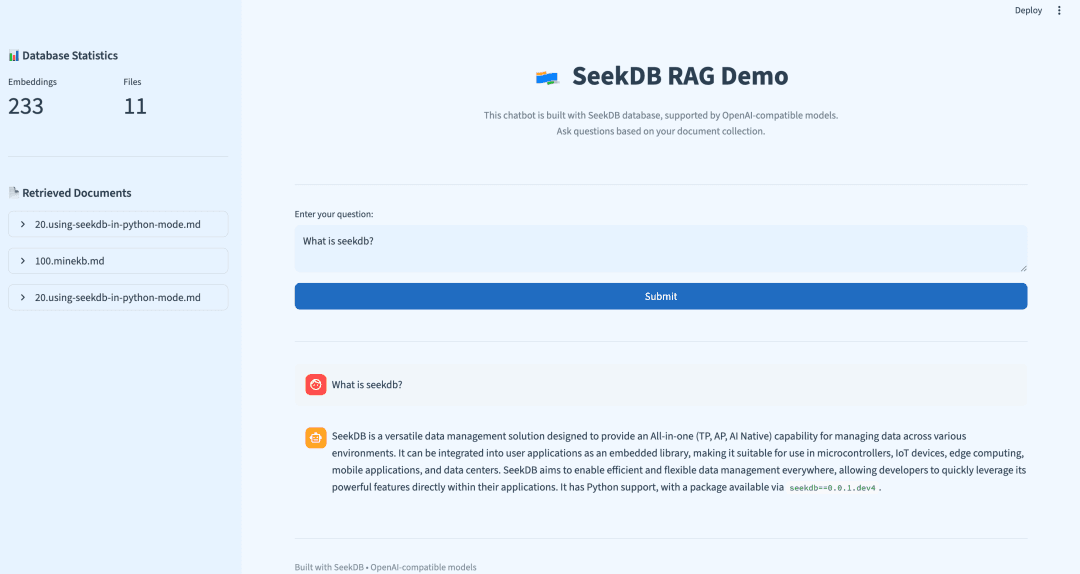
A Real-World Example Run
Below is a real query example, demonstrating the actual results of the seekdb RAG system:
User question: “What is seekdb’s vector search?”
Retrieved relevant documents:
1 | 1. 30.experience-vector-retrieval.md |
The answer generated by the LLM:
SeekDB’s vector search is a powerful feature that enables efficient and accurate retrieval of data by encoding various types of data—such as text, images, and audio—into mathematical vectors and performing searches in a vector space. This approach captures deep semantic relationships within the data, going beyond traditional keyword-based search methods to deliver more relevant results.
Key capabilities of SeekDB’s vector search include:
- High-dimensional vector support: It supports up to 16,000 dimensions for float-type dense vectors and sparse vectors.
- Multiple distance metrics: It supports various similarity or distance calculations, including Manhattan distance, Euclidean distance, inner product, and cosine distance.
- Advanced indexing methods: Vector indexes can be created using HNSW (Hierarchical Navigable Small World) or IVF (Iterative Virtual File), enabling fast approximate nearest neighbor searches.
- Incremental updates: The system allows for real-time insertion and deletion of vectors without compromising search accuracy or recall.
- Hybrid search with scalar filtering: Users can combine vector similarity search with traditional attribute-based (scalar) filtering for more precise results.
- Flexible access interfaces: SeekDB supports SQL access via MySQL protocol clients in multiple programming languages, as well as a Python SDK.
- Automatic embedding and hybrid indexing: With hybrid vector index features, users can store raw text directly—the system automatically converts it into vectors and builds indexes.
In summary, SeekDB’s vector search provides a comprehensive, high-performance solution for semantic search, particularly valuable in AI applications involving large-scale unstructured data.
This example demonstrates:
- ✅ Accurate information retrieval: the system successfully found relevant information in the documents.
- ✅ Multi-document integration: extracting and integrating information from 3 different documents.
- ✅ Semantic matching: accurately matching documents related to “vector search.”
- ✅ Structured answers: the AI organized the retrieved information into a clear structure.
- ✅ Completeness: covering the main features of seekdb’s vector search.
- ✅ Professionalism: the answer includes technical details and practical application value.
Retrieval quality analysis:
- Most relevant document:
experience-vector-retrieval.md- vector search overview. - Technical details:
using-seekdb-in-python-mode.md- specific technical specifications. - Advanced features:
experience-hybrid-vector-index.md- hybrid vector index functionality.
A Quick Try
To quickly try out the seekdb RAG system, refer to Quick Deployment.
References
- [1] LLM API base URL: https://dashscope.aliyuncs.com/compatible-mode/v1
- [2] Embedding API base URL: https://dashscope.aliyuncs.com/compatible-mode/v1
- [3] Quick deployment: https://github.com/oceanbase/pyseekdb/blob/main/demo/rag/README_CN.md
- [4] seekdb project: https://github.com/oceanbase/seekdb