Building an Intelligent Book Search App from Scratch with seekdb
📖 Want your own intelligent book search app? Give it a try at https://github.com/oceanbase/seekdb! Semantic search, hybrid retrieval, RRF ranking… follow this article step by step, and you’ll find that AI application development is actually quite fun~
What Kind of Database Is seekdb?
I recently took seekdb for a spin—here are a few first impressions.
First, it’s a single-node, lightweight design. It runs easily on my MacBook deployed via Docker Desktop, and on Linux you can install it directly with pip. Word is that macOS/Windows support is coming soon, which will skip Docker entirely—you’ll just install it with a single command.
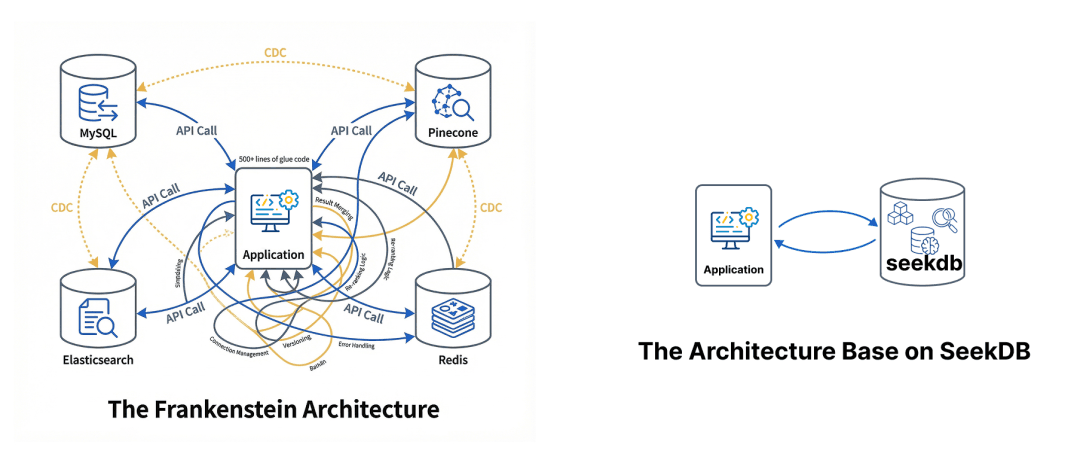
Second, it’s an integrated design that natively fuses five data types—relational, vector, full-text, JSON, and GIS. All indexes are updated atomically within the same transaction, which means Zero Data Lag and strict ACID, completely avoiding the latency and inconsistency problems caused by traditional CDC synchronization.
Third, it’s an AI-Native database. This shows up in its built-in embedding model and AI Functions: a single SQL statement performs a joint query over vector + full-text + scalar filtering, with no need to write reams of complex glue-layer logic to stitch together various tech stacks—it drives the RAG flow directly (see the figure).
Fourth, its API has a Schema-free design—you simply write data in, with no requirement to define a strict table schema in advance.
Fifth, it’s fully MySQL-compatible, which means traditional databases can easily be upgraded with AI capabilities.
The sixth point matters just as much: it’s open sourced under the Apache 2.0 license, and it carries OceanBase’s DNA. Its long-term development is assured—it will only grow more mature over time.
Tutorial: Building an Intelligent Book Search App with seekdb
This tutorial will take you from scratch to building an “intelligent book search” program with seekdb, demonstrating how to implement core seekdb capabilities such as semantic search and hybrid search.
Specifically, the tutorial covers:
- Data import
- Import data from a CSV file into seekdb.
- Support for batched data import.
- Automatically convert each book’s text information into a 384-dimensional vector embedding.
- Three search capabilities used
- Semantic search: based on vector similarity, find semantically related books using natural language queries.
- Metadata filtering: precisely filter by fields such as rating, genre, year, and price.
- Hybrid search: combine semantic search + metadata filtering, fusing the rankings with the RRF algorithm.
- Index optimization
- Create an HNSW vector index to improve semantic search performance.
- Generated-column indexes on metadata (extracting fields from JSON to create indexes).
- Tech stack
- Database: seekdb, pyseekdb (seekdb’s Python SDK), pymysql.
- Data processing tools: pandas.
Preparation
1. Install OrbStack
OrbStack is a lightweight Docker alternative, optimized for Mac, with fast startup and a low resource footprint. We’ll use it to deploy seekdb locally.
Step 1, install via Homebrew (recommended):
1 | brew install orbstack |
Or download from the official site: visit https://orbstack.dev to download the installer.
Step 2, launch OrbStack:
1 | # launch OrbStack |
2. Deploy the seekdb Image
If it gets stuck, first configure a domestic Docker mirror source in OrbStack.
1 | # pull the SeekDB image |
Wait about 30 seconds for seekdb to fully start. You can view the startup logs with docker logs -f seekdb; seeing “boot success” indicates startup is complete.
3. Download the Dataset
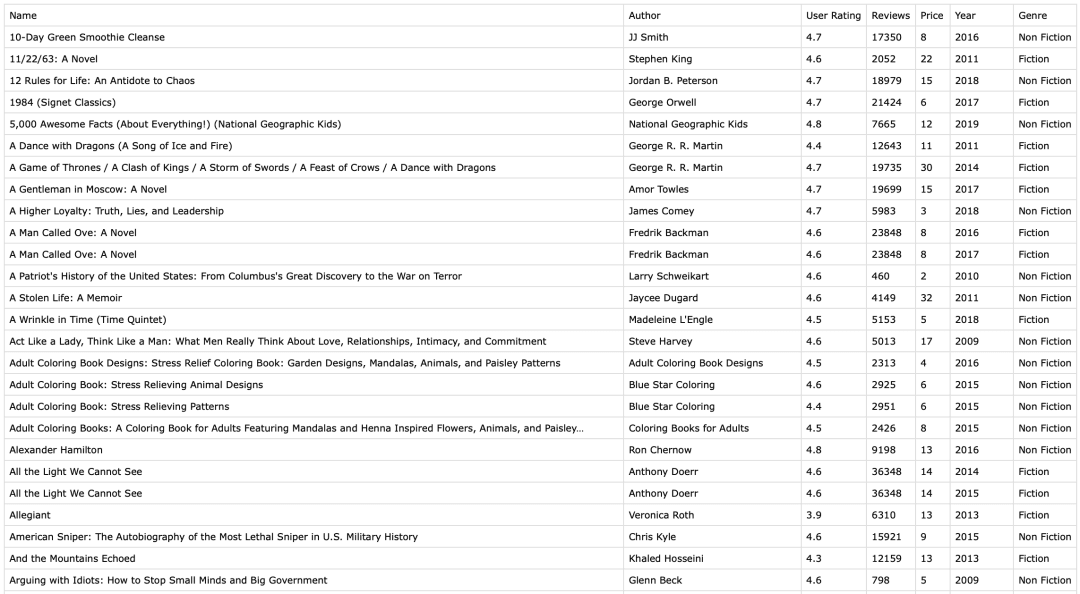
Download the dataset: https://www.kaggle.com/datasets/sootersaalu/amazon-top-50-bestselling-books-2009-2019
Name the dataset bestsellers_with_categories.csv. It contains 550 records of historically bestselling Amazon books, with contents as shown in the figure:
4. Download the Tutorial Code
1 | git clone https://github.com/kejun/demo-seekdb-hybridsearch.git |
Project structure:
1 | demo-seekdb-books-hybrid-search/ |
Create a Python virtual environment:
1 | # create the virtual environment |
Install dependencies:
1 | pip install -r requirements.txt |
Execution Results
Run python import_data.py to import the data. You can watch the whole process: load the data file → connect to the database → create the database → create the collection → import the data in batches → create the metadata indexes (note: seekdb currently only supports creating HNSW indexes on the embedding column and full-text indexes on the document column; creating indexes on metadata fields is not yet supported, though it’s said to be planned).

seekdb uses a schema-free interface design. For example, in data/processor.py, when calling collection.add() you pass in an arbitrary dictionary directly:
1 | collection.add( |
The full results (somewhat trimmed) are as follows:
1 | Loading data file: bestsellers_with_categories.csv |
Once the data is imported, you can query the database directly in the terminal using the mysql client or by installing obclient.
1 | # enter the SeekDB container |
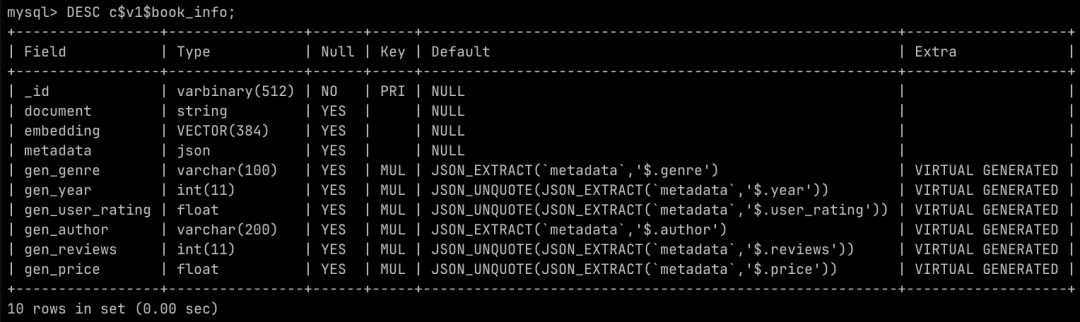
book_info is a seekdb collection; the corresponding underlying table name is c$v1$book_info:
1 | -- list all databases |
Let’s look at the table structure with DESC c$v1$book_info:
Let’s look at the indexes that were created:
(Note: pyseekdb does not yet directly support creating indexes on metadata columns, so the project implements metadata indexing via pymysql + SQL DDL. It’s said that the next pyseekdb version will support automatically indexing metadata fields.)

Next, run the search with python hybrid_search.py. seekdb’s built-in embedding model is sentence-transformers/all-MiniLM-L6-v2, with a maximum vector dimension of 384. For better results, you should still configure an external model service.
Hybrid search is seekdb’s killer feature. It performs full-text retrieval and vector retrieval at the same time, then merges them using the RRF (Reciprocal Rank Fusion) algorithm.
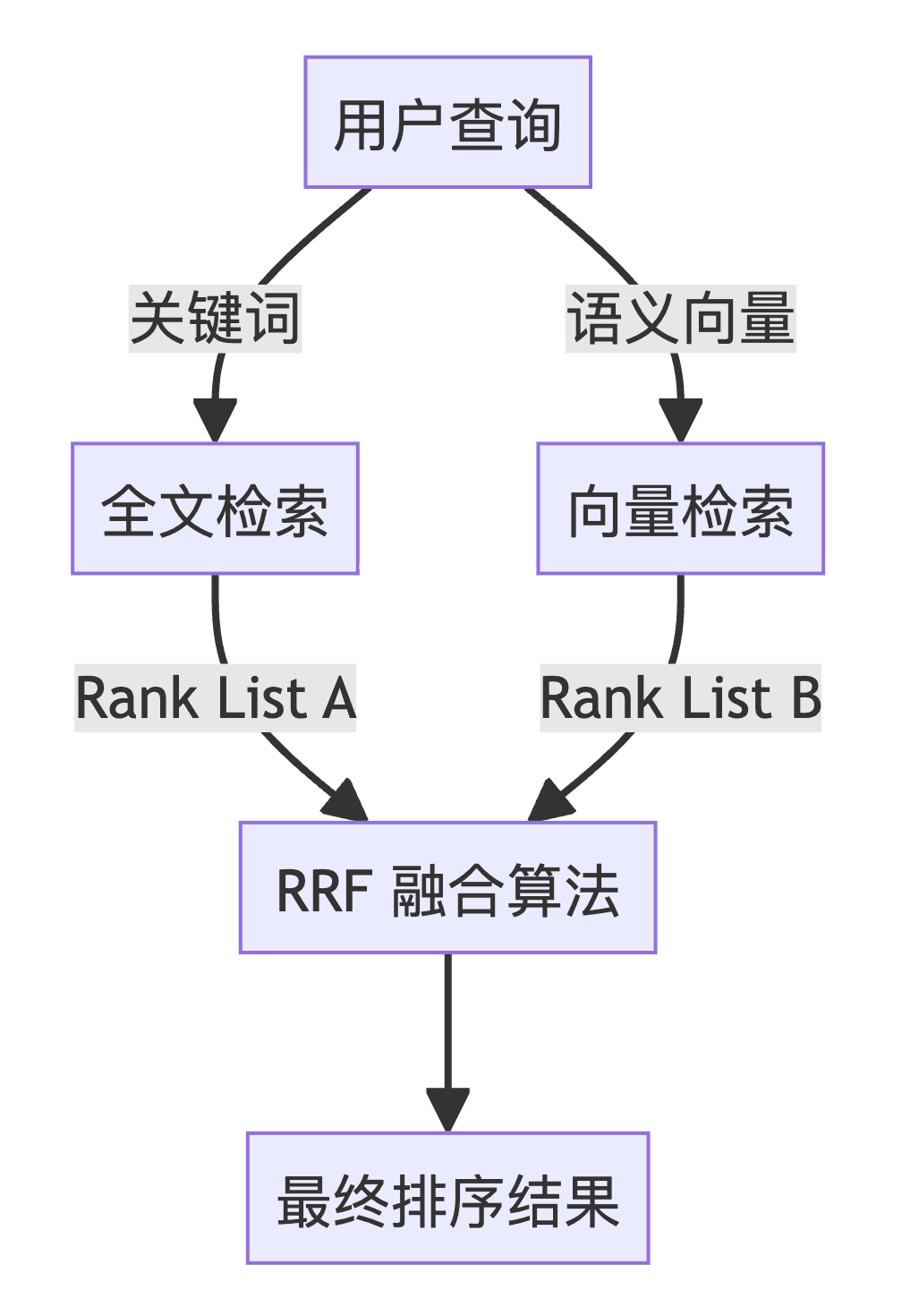
Let’s look at a concrete code example. query_params defines a full-text search for “inspirational,” filtered by the user rating (user_rating) in the metadata (rating greater than or equal to 4.5). knn_params is the semantic search, with query_texts being “inspirational life advice,” filtered by the same user rating.
Code snippet:
1 | query_params = { |
You can vibe-eval the results—they feel pretty accurate. The full execution results (somewhat trimmed) are as follows:
1 | === Semantic Search === |
Vibe Coding Friendly
If you develop with Cursor or Claude Code, you’ve surely installed context7-mcp. It queries the latest API docs, code examples, and more—the perfect companion for #Vibecoding. I noticed seekdb has also been added to Context7:
- seekdb: https://context7.com/oceanbase/seekdb
- pyseekdb: https://context7.com/oceanbase/pyseekdb — if you haven’t installed it yet, I highly recommend it:
1 | { |
Once installed, you can learn and use it at the same time.
I hope this tutorial helps you get started with #seekdb more smoothly. Enjoy!