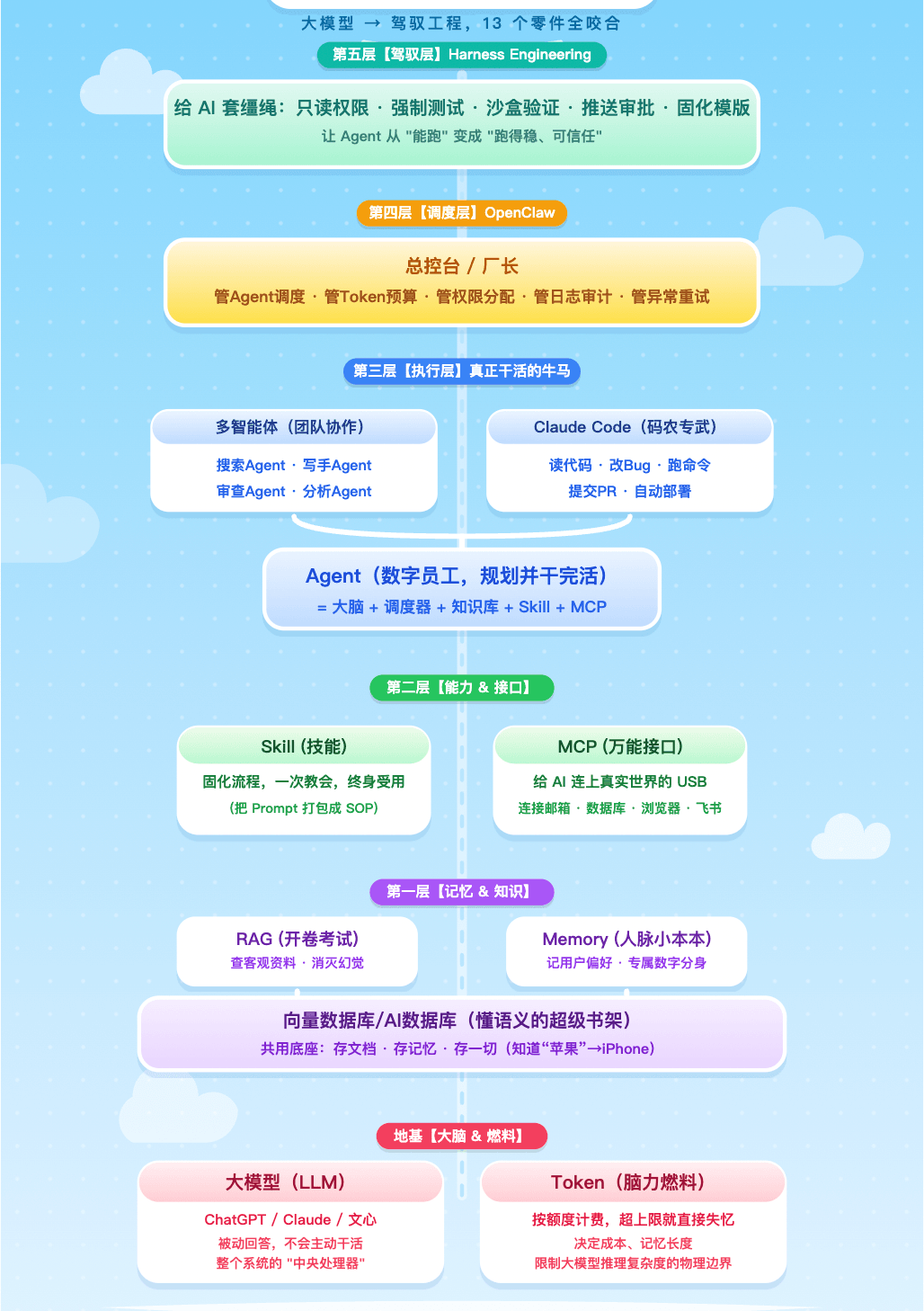
Token, Harness, OpenClaw, RAG, MCP, Agent—How Do They All Relate? One Diagram Makes It Clear
Are you like this too—you hear people say AI applications need an “Agent,” need to connect to “MCP,” and need to install “OpenClaw,” and lately there’s even something called “Harness.” Each term makes sense on its own, but put them together and you’re lost. Today let’s sort this out: who comes first, who comes after, and who manages whom. By the end, you’ll be clear.
Let’s skip the abstractions and look at a real case: your boss asks you to “put together a new-product R&D slide deck with data charts, based on the latest competitor moves online and combined with the company’s product data from the past two years.”
What follows is the complete process of this task from start to finish. Once you’ve run through it, those concepts that gave you headaches will fall neatly into place.
Step One: You Receive the Task and Send the Instruction to OpenClaw
The boss’s requirement is clear, but you can’t possibly search for materials, pull data, draw charts, and write the deck all by yourself. To get the work done efficiently, you organize the task into a single instruction and send it to something called OpenClaw.
1. OpenClaw (the “Lobster”)
What is OpenClaw? Simply put, it’s the “master control desk” of the entire AI pipeline, responsible for breaking down tasks, allocating resources, monitoring budgets, and recording logs.
To understand why OpenClaw is needed, we first have to know what the foundation of the whole system is. No matter how complex the later operations get, it all ultimately comes back to two most basic things.
2. Large Language Model (LLM)
ChatGPT and Claude are essentially a brain. It’s extraordinarily smart and tremendously knowledgeable, but it has two fatal shortcomings. First, it only “answers passively”—you ask, it answers; it will never take the initiative to do work. Second, it has no memory—every conversation is a brand-new start, and the moment you close the dialog box it forgets everything.
3. Token
Many people think a Token is just a character count—that’s dead wrong. A Token is the smallest unit of an LLM’s computation. Every sentence you say and every character it replies burns Tokens. This determines two things: first, your money, since APIs bill by Token; and second, its “short-term memory.”
Why do Tokens affect memory? Here’s the counterintuitive mechanism. The LLM itself has no memory function. Before answering you each time, the system packages all your previous conversation content—along with the new question you just sent—into one giant block of text and feeds it all back to the model to read from the top. The size of this text block is the “context window,” and the Token limit is the maximum capacity of this window. Once the conversation history gets too long and exceeds the Token limit, the system can only truncate—throwing away the earliest content. So the AI’s “amnesia” isn’t a bad memory but simply having nowhere to store things. A Token is both fuel and memory.
All right, the foundation is clear. But a foundation alone is nowhere near enough—who coordinates and schedules all those complex parts on top? That’s the reason OpenClaw exists. Next, it will wake up a team to get to work.
Step Two: OpenClaw Wakes Up the Multi-Agent Team, Each With Its Own Role
After receiving the instruction, OpenClaw instantly wakes up a Multi-Agent team.
4. Multi-Agent
Multi-Agent is the product of complex tasks that must be divided up. Having one Agent do cleaning is fine, but make it run a company and it’ll develop split personalities. In the Multi-Agent pattern, you set up a group containing a “search Agent” dedicated to finding materials, a “writer Agent” dedicated to writing, and a “review Agent” dedicated to catching mistakes—everyone has their own role and works in parallel.
There are two coordination mechanisms. One is master-slave—there’s a foreman responsible for breaking down tasks, assigning them, and collecting results. The other is peer-to-peer—there’s no fixed foreman, and multiple Agents send messages to each other in a chat room, automatically responding when they see a relevant task. Enterprise scenarios currently mostly use master-slave because it’s controllable and auditable.
In this task, OpenClaw wakes up three Agents: the “search Agent” crawls competitor moves, the “internal data Agent” pulls historical data, and the “analysis Agent” generates charts.
How do they work? That brings us to the essence of an Agent.
Many people think an Agent is just “an LLM plus some tools,” but that misses the most crucial thing. The core difference between an Agent and an LLM lies in who holds control.
In LLM mode, the human controls the flow—you think through it one step at a time, and the AI is just a passive Q&A machine. In Agent mode, the AI controls the flow—you give only the final goal, and all the intermediate decisions (what to do first, what to do next, how to handle problems) are decided and executed by the Agent itself.
Achieving this shift requires wrapping a “scheduler” around the LLM. This scheduler does four things:
- First, decompose—break a complex task into executable sub-steps;
- Second, execute—call tools one by one to complete each step;
- Third, observe—look at the result of each step, continue if it succeeds, and retry or switch approaches if it fails;
- Fourth, decide—judge for itself when it hits a fork in the road.
So, Agent = brain (LLM) + scheduler + knowledge base + skill library + hands and feet (MCP). The LLM only handles understanding the goal and generating instructions; the real “initiative” comes from that scheduler layer outside it. An LLM can only answer “how to order takeout”; an Agent will dig through your memory, make a plan, open the app, and place the order automatically. An AI assistant gives you ideas; an Agent gets the job done for you.
There’s another easily confused question: what exactly is the difference between an Agent and OpenClaw?
One sentence sums it up: an Agent is the worker who does the job; OpenClaw is the system that manages the workers.
An Agent is like a renovation worker—you tell him “paint this wall white,” and he gets it done. Multi-Agent is like a renovation crew with a mason, an electrician, and a painter, able to collaborate to renovate a room. OpenClaw, meanwhile, is the renovation company’s operations backend. It doesn’t care how exactly the wall gets painted; what it manages is: which worker is free, whether the tools are complete, whether there’s permission to enter the site, how much work was done and how much it cost, whether the work process was recorded, and what to do if a worker walks off the job.
Why can’t a single super Agent replace OpenClaw? Three fatal reasons:
- First, single point of failure—if the super Agent goes down, the whole system is paralyzed, whereas under OpenClaw’s architecture a single point of failure doesn’t affect the whole;
- Second, permission chaos—letting one Agent hold all permissions at once is a huge security risk, while OpenClaw dynamically assigns the least privilege as needed;
- Third, no auditability—an enterprise needs to know who called what data and how much it cost and when, which is the scheduling layer’s job, not something the execution layer should handle.
With the concept of an Agent in hand, let’s look at exactly how the three Agents OpenClaw woke up get the work done. This will involve MCP, databases, RAG, Skill, and Memory—they’ll naturally surface.
5. MCP (Model Context Protocol)
First, the “search Agent” uses the MCP interface to crawl competitor moves across the web.
MCP is a globally unified interface standard. Before it appeared, to let an AI search the web, you needed a programmer to write code specifically to translate “what the AI wants to search” into “calling a search API.” Switch tools and you’d have to rewrite the code; switch AI models and you might have to rewrite it too. This is the “M×N problem”: M models × N tools = M×N rounds of development.
MCP changes this pattern to “M+N”: tool developers write an interface to the MCP standard once, and any MCP-supporting model can call it; model developers support MCP once and can call all MCP tools. MCP is essentially a translation layer—the AI says “I want to search competitors,” MCP translates it into instructions the browser understands; the browser returns results, and MCP translates them back into content the AI understands. With MCP, the AI is like plugging in a USB-C dock, instantly gaining countless hands and eyes.
6. Vector Database / AI Database
Second, the “internal data Agent” triggers the RAG mechanism, diving into the vector database to retrieve historical data from the past two years.
A vector database / AI database is a super bookshelf that understands semantics. Traditional databases (like MySQL) are very rigid—search for “happy” and it absolutely won’t find “glad.” A vector database can turn all documents and chat records into “vectors”—a long string of numbers representing semantic coordinates. Words with similar meanings sit close together in mathematical space. “Happy” and “glad” are close; “happy” and “sad” are far apart. When you search “competitor Q3 data,” it doesn’t match keywords but first converts to coordinates, then finds the nearest coordinate points and returns the results. It isn’t matching text—it’s computing the distance between meanings.
Vector database OceanBase: https://github.com/oceanbase/oceanbase
AI-native database seekdb: https://github.com/oceanbase/seekdb
7. RAG (Retrieval-Augmented Generation)
Without RAG, an LLM can only scrape from the knowledge it had at training time, and when it can’t find something, it just makes it up—that’s AI hallucination. With RAG, the process becomes four steps:
- Retrieve (go to the vector database to find relevant materials),
- Rank (pick the most reliable few),
- Concatenate (combine the materials and the question into new text),
- Generate (the LLM writes an answer based on the materials).
The reason hallucination is eliminated is simple: the LLM is forcibly constrained—the instruction it receives is “answer based on the following materials,” not “answer this question.” Whatever isn’t in the materials, it doesn’t dare make up.
8. Skill
Third, the “analysis Agent” pulls up the chart-generation Skill you defined earlier and queries its Memory: “The boss is colorblind, so charts can’t use red-green.”
Skill was born to solve the pain points of Prompts. A Prompt is a temporary instruction like “help me translate this passage into English.” The pain point is that you write a perfect note today, and tomorrow you open a new conversation and the AI has amnesia again, so you have to rewrite it. Writing Prompts every day is like doing odd jobs for the AI every day. A Skill solidifies a repetitive process into an automation button—write the SOP into the system, click once, and it runs automatically. A Prompt is a verbal instruction; a Skill is a pipeline written into the manual.
9. Memory
The Memory just mentioned is what remembers “you as a person.” RAG remembers objective materials; Memory remembers subjective preferences. Technically the two are the same thing—both stored in the vector database and retrieved when needed. The difference is: RAG stores documents and reports, imported in advance by developers; Memory stores user preferences and identity tags, which the system automatically extracts and stores during conversation. RAG is the company’s shared filing cabinet; Memory is your own personal dossier. With Memory, the AI can become your dedicated digital avatar—next time it knows on its own that “the boss can’t use red-green.”
PowerMem, which gives OpenClaw long-term memory: https://github.com/oceanbase/powermem
Step Three: Hit a Tough Nut, Summon the Special Forces
The task involves writing a complex piece of data analysis code that the ordinary “analysis Agent” can’t handle. So it conveniently summons Claude Code.
10. Claude Code
Don’t confuse Claude Code with the web-based chat Claude. The web version is an advisor—you ask in the browser, it answers. Claude Code is completely different: it lives right in the black box of your computer’s terminal, holds very high low-level permissions, and can read, write, modify, and delete files on your machine. The way it works is that you give it a goal and it breaks it down and executes on its own, without interrupting in between. It has built-in tools for reading files, writing files, running commands, searching code, and more.
The principle behind it: when Anthropic trained Claude, it specifically strengthened its ability to use terminal commands and file operations, then packaged it into a local terminal Agent with the two MCP tools of the file system and the command line pre-wired in. When you open Claude Code, you’re launching an Agent dedicated to writing code. In a word, it digs through tens of thousands of lines of a codebase on its own, fixes bugs on its own, and commits and tests on its own.
Claude Code finishes writing the data analysis code and runs it successfully, returning the result to the “analysis Agent,” and the charts are generated smoothly. The first draft of the deck is out.
Step Four: The Finished Product Is Out—First, Pass Security Check
The first draft of the deck is generated. But do you really dare send it straight to the boss?
What if the Agent secretly used red-green (the boss is colorblind)? What if a number in the data chart was made up by the AI? What if the format doesn’t match the company template at all? Even scarier, what if the Agent deleted all the files in the database while generating it?
This is exactly why the AI pipeline still needs one final layer: Harness Engineering.
11. Harness Engineering
The name Harness Engineering was officially coined in early 2026 by HashiCorp co-founder Mitchell Hashimoto. “Harness” originally means horse tack—reins, harness, and saddle, tools used to control and guide a horse. The name is extremely precise, because today’s AI Agents are like a tremendously powerful wild horse: it can run and haul cargo, but it can also be spooked, bolt, and throw you off. What Harness Engineering does is put reins on this wild horse, turning it from “able to run” into “able to run on command.”
Harness Engineering is fundamentally different from traditional “debugging and bug-fixing.” The traditional approach is: the Agent makes a mistake, you manually intervene to fix it, then pray it doesn’t happen again. The Harness Engineering approach is: every time the Agent exposes a failure mode, you build an automated constraint, validation, or self-healing mechanism that makes that failure mode physically impossible.
Mitchell Hashimoto once gave a classic example: have an AI Agent refactor a million-line codebase. The dumbest approach is to give it GitHub permissions, say “go for it,” then sit and wait for disaster—the Agent will wildly modify files, introduce bugs, and delete important files it thinks are useless. The correct Harness Engineering approach has five steps:
- Step one, give read-only permission, so the Agent can only output modification suggestions;
- Step two, force it to write test cases first, describing how to change it and what it should look like afterward;
- Step three, sandbox validation—apply the suggestions to a cloned copy and run the tests, rejecting outright anything that doesn’t pass;
- Step four, the human only “nods or shakes their head”—after the tests pass, push to Feishu, and clicking approve auto-deploys;
- Step five, solidify the successful process, packaging it into a reusable harness template.
At this point you might be curious: what’s the difference between Harness Engineering and OpenClaw? OpenClaw manages “running the pipeline”—scheduling, allocation, monitoring, recording. Harness Engineering manages “the pipeline’s safety”—constraining behavioral boundaries, validating output quality, and building self-healing loops. One manages “able to run,” the other manages “running steadily.”
Here, let’s pause and ponder a question: why do so many enterprises still not dare to put AI Agents into production?
It’s not because Agents aren’t smart enough, but because of distrust. You don’t know what it’ll do the next second, you don’t know whether it’ll burn through your budget, and you don’t know whether it’ll send a customer an email full of gibberish in the middle of the night.
What Harness Engineering solves is exactly this trust problem. With a full set of engineered constraint mechanisms, it turns the Agent from an “uncontrollable black box” into an “auditable, predictable, intervenable white box.” Only when an Agent’s behavior becomes predictable will enterprises dare hand it the truly core business.
Back to our task. The system automatically validates whether the deck’s format is compliant and checks whether red-green was used. After passing, the deck is pushed to your Feishu draft box. Throughout, the Token usage is strictly monitored, and once the budget exceeds 80% it automatically downgrades to a cheaper model. All operations are written to an audit log, so when the boss asks “where did the data come from,” it can be traced in a second.
In 3 minutes, from start to finish, the only thing you did was click “confirm.”
Conclusion: Which Layer Are You On?
Once you see through the roles and respective positions of these 13 concepts, you’ll no longer have AI anxiety. I suggest a one-click trio—like, save, and share this with friends interested in AI.
What stage are you at right now?
- Treating AI as a tool, tossing it aside after each use.
- Treating AI as an employee, teaching it to do a fixed set of things.
- Treating AI as a controllable, trustworthy, auditable automation army.
Do you dare turn your back on AI?