An OceanBase Backup Mystery: Who Cleaned Up My Backup Data?
This case study explains why OceanBase backup directories can disappear overnight. OceanBase physical backups form linked recovery chains, and scheduled cleanup removes data that is no longer required by the configured recovery window. It is not random file deletion.
When a directory is missing from the backup destination, it is natural to suspect an operator error or a storage problem. Before drawing that conclusion, inspect the backup catalog, the objects in the destination, and the cleanup history.
The explanation usually lies in the relationship among OceanBase physical backups: full data backups, incremental data backups, log backups (archived redo logs), and the recovery window. Cleanup preserves the backup data needed to meet the recovery objective; it does not treat every directory as an independent retention unit.
What an OceanBase physical backup contains
A physical backup is a recoverable set of database files and metadata, not a collection of independent folders that can safely be removed by hand.
Think of recovery like rebuilding a book from numbered chapters:
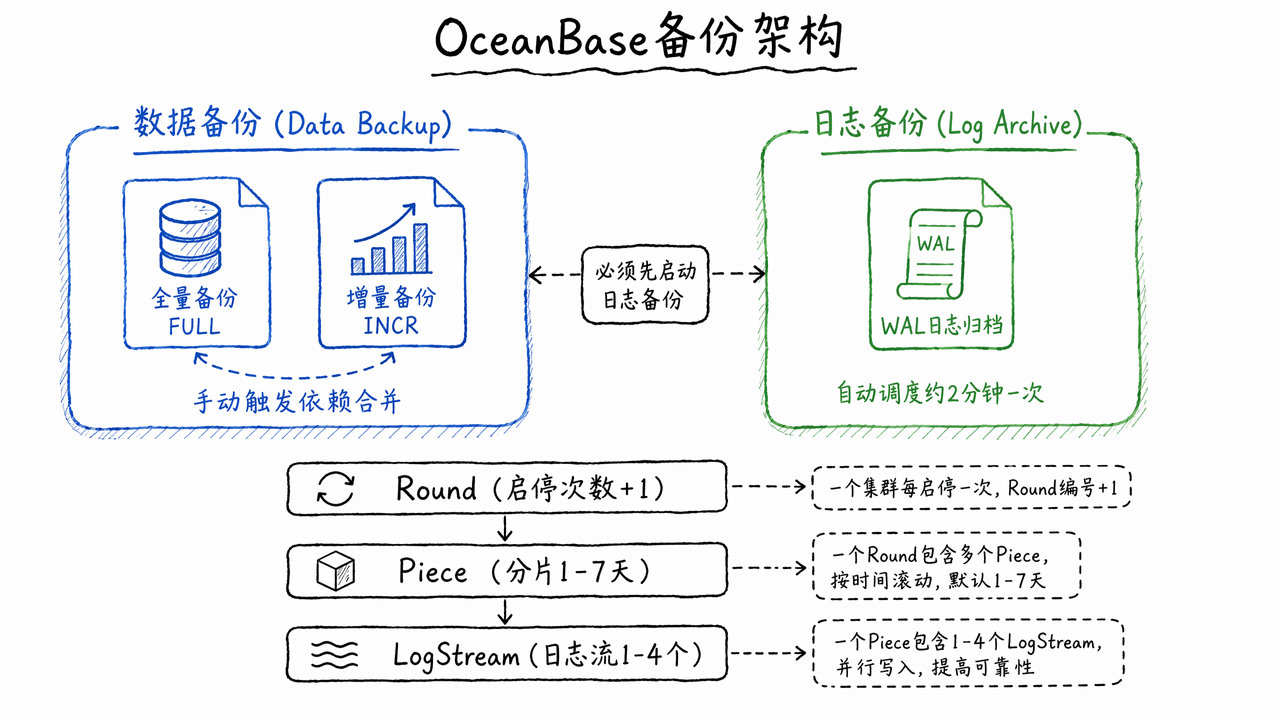
- A full data backup is the baseline for a recovery chain.
- An incremental data backup records changes since the preceding full or incremental data backup and depends on that earlier backup.
- A log backup contains archived redo logs and enables point-in-time recovery while the log chain is continuous.
- Metadata records the tenant, backup destination, backup set, log-backup round, piece, and completion state.
A recoverable chain needs the relevant data backup, all required incremental backups, continuous log backups, and their metadata. Consequently, deleting one directory is not the same as deleting an independent file. Never delete backup objects manually: use OceanBase backup cleanup so the catalog and destination remain consistent.
Reading the OceanBase backup directory
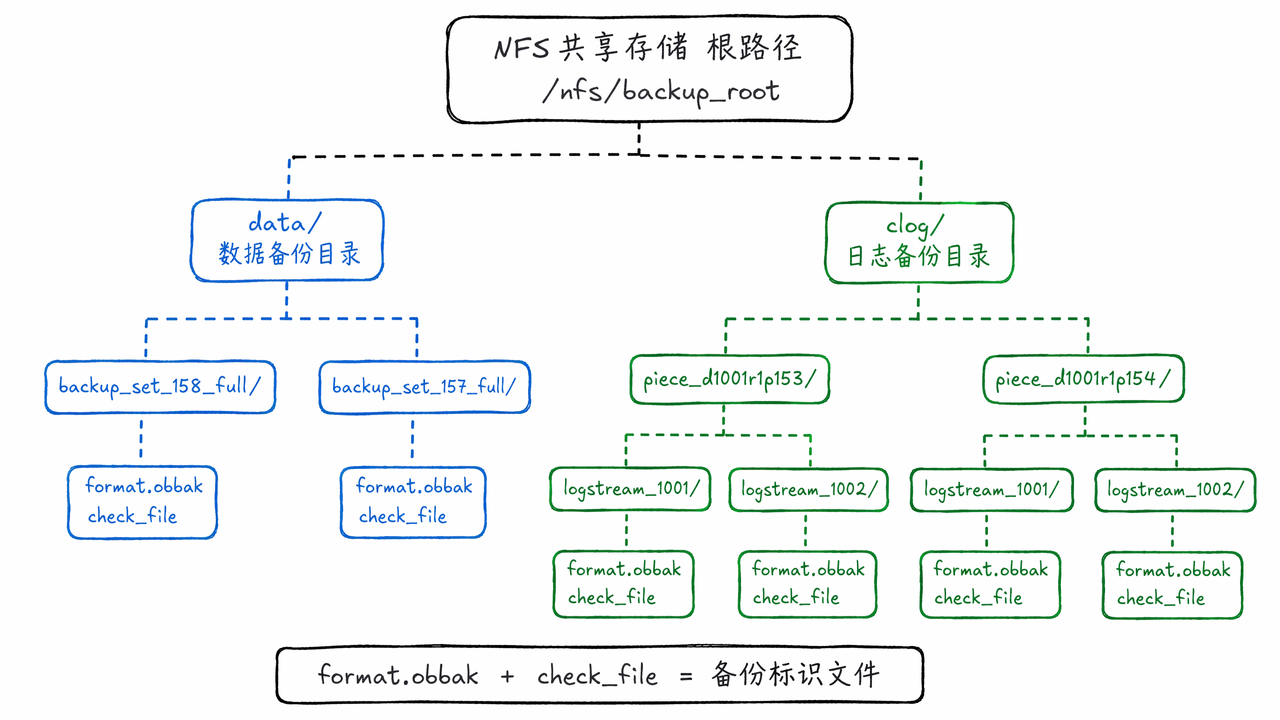
Read the directory layout through its recovery dependencies, not file names alone. OceanBase commonly uses a separate destination for data backups and log backups. In a file-system destination, format.obbak and the check_file directory identify a backup destination; do not remove them.
At the data-backup root, backup_set_<id>_full denotes a full backup and backup_set_<id>_incr an incremental backup. At the log-backup root, a directory such as piece_d<dest>r<round>p<piece> is a log-backup piece. The round increments when log backup is stopped and started again; the piece identifies a complete time segment within that round.
When a backup appears to be missing, correlate these three sources:
- the backup catalog maintained by OceanBase;
- the actual objects in the backup destination;
- the cleanup policy and recovery window.
A difference between the catalog and the storage listing does not itself prove data loss. It can indicate an unfinished backup, an expired object, or successful cleanup. Check the catalog before making any storage-level changes.
Why OceanBase log-backup storage keeps growing
Log backups are often the largest day-to-day storage cost. They cannot be removed arbitrarily while a data backup still needs them for recovery. A gap in a log-backup stream can prevent point-in-time recovery across that gap.
Common reasons log storage keeps climbing:
- the recovery window requires more recoverable history;
- a backup job is incomplete, failed, or stuck;
- the backup destination was temporarily unavailable;
- the tenant generates redo faster than cleanup can reclaim it;
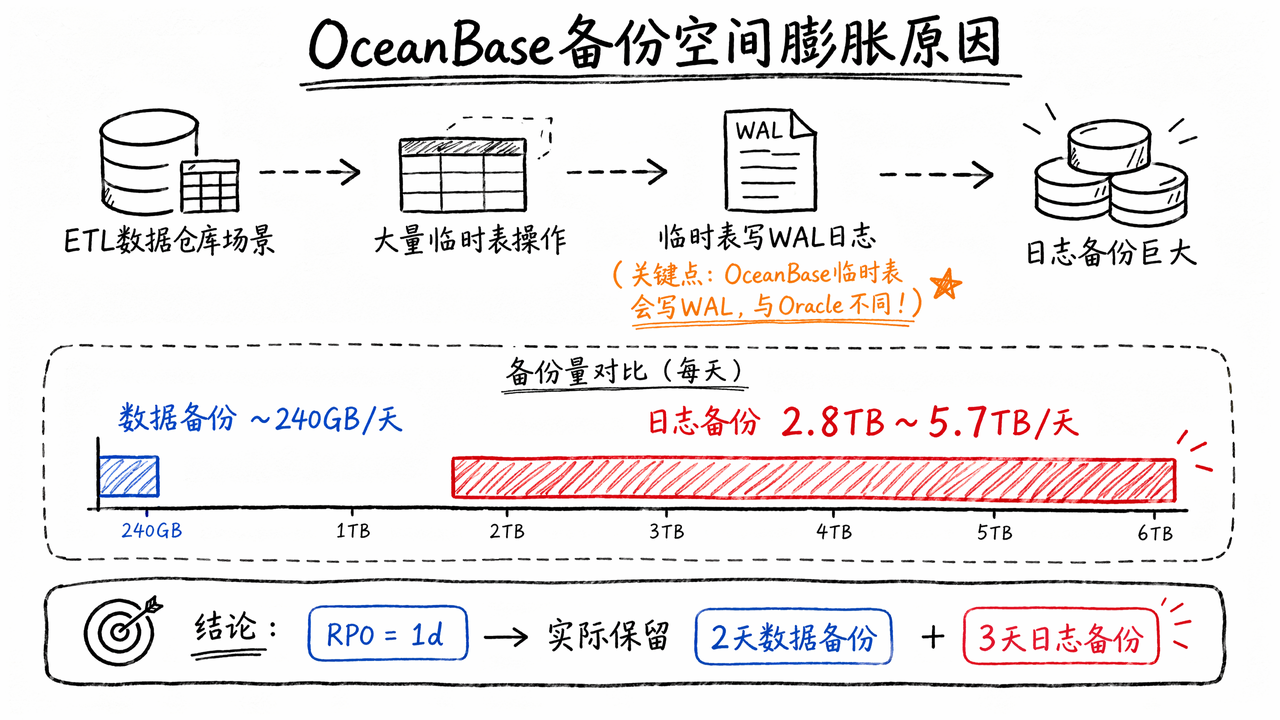
- large ETL workloads or temporary-table activity generate substantial redo.
Use this diagnostic sequence:
Confirm the configured recovery window, rather than relying only on a UI label such as “retention days”:
1
2
SELECT policy_name, recovery_window
FROM oceanbase.DBA_OB_BACKUP_DELETE_POLICY;Identify the oldest backup that must remain recoverable.
Inspect the corresponding log-backup round, piece, and log-stream range.
Check backup cleanup jobs and tasks for failures or unfinished work:
1
2
3
4
5
SELECT job_id, type, parameter, start_timestamp, end_timestamp, status,
CONCAT(success_task_count, ' / ', task_count) AS task_info
FROM oceanbase.DBA_OB_BACKUP_DELETE_JOB_HISTORY
ORDER BY job_id DESC
LIMIT 15;Verify that cleanup can access the destination and has the required permissions.
Test restoration from a representative recovery chain before relying on the policy in production.
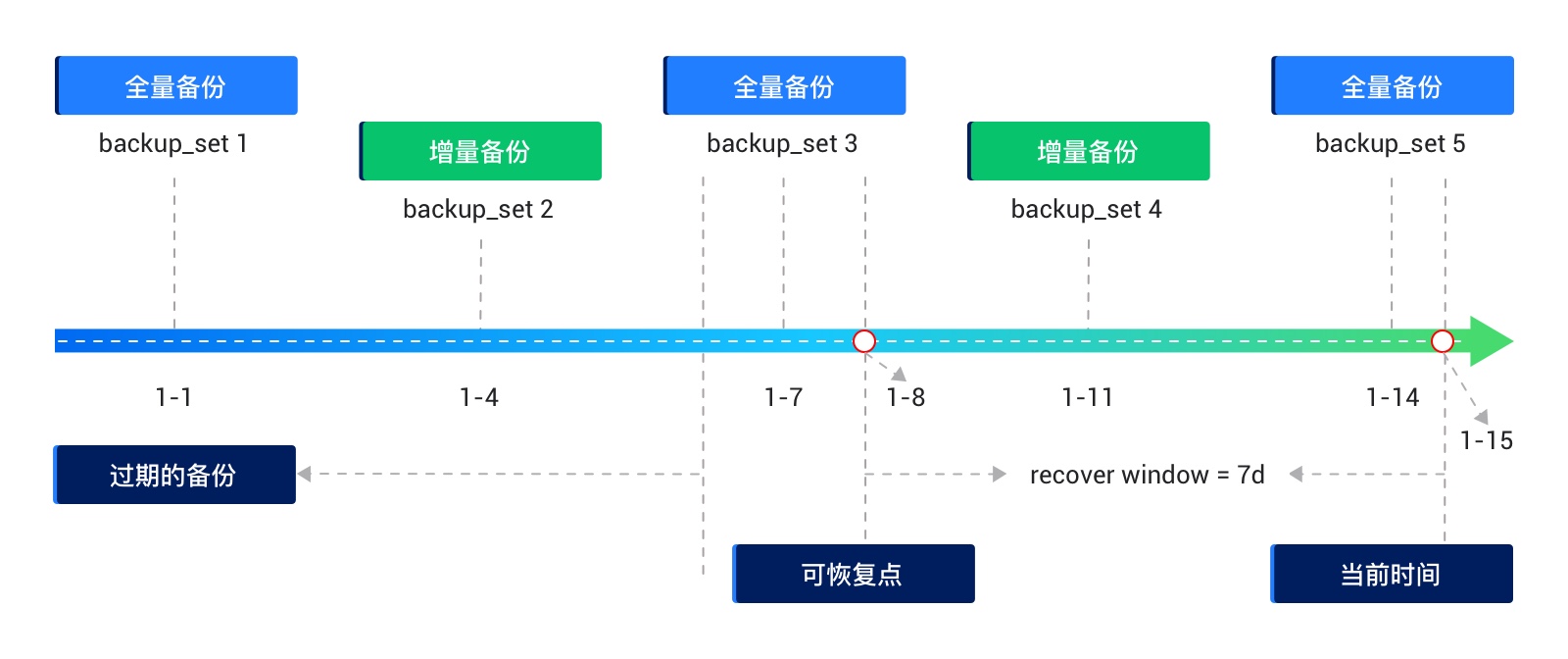
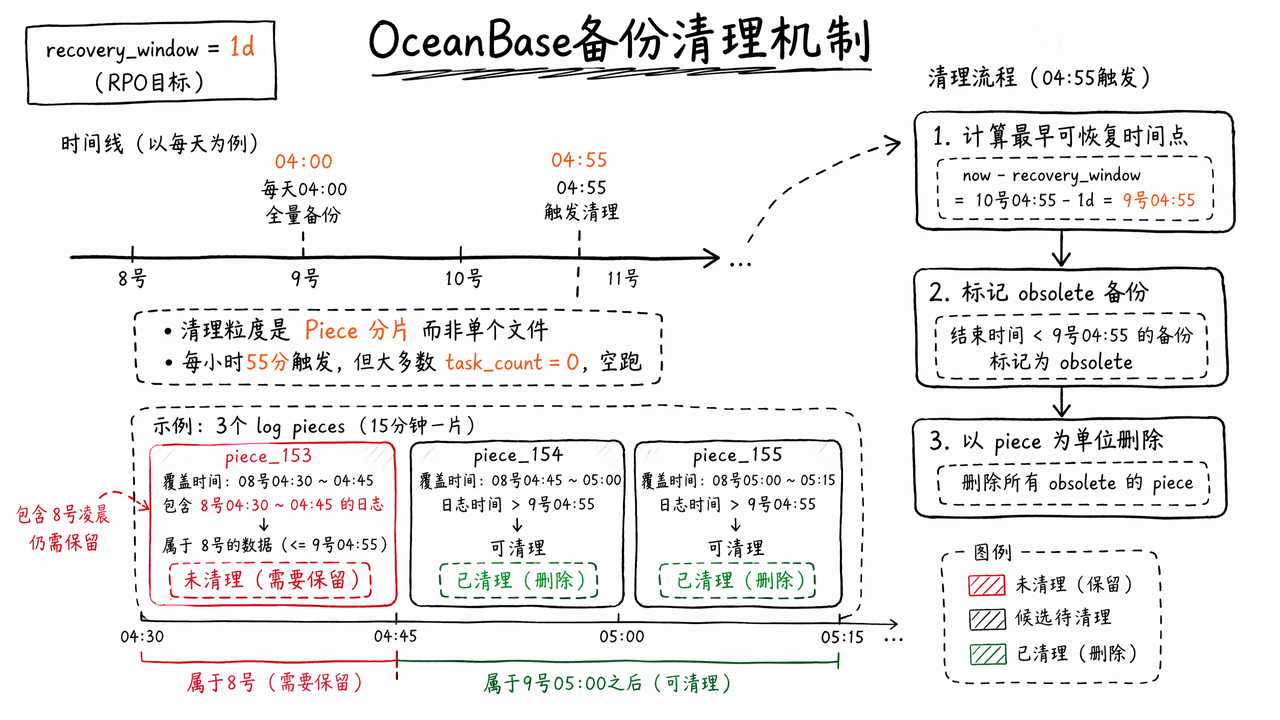
Why recovery_window = 1d can keep more than one day of data
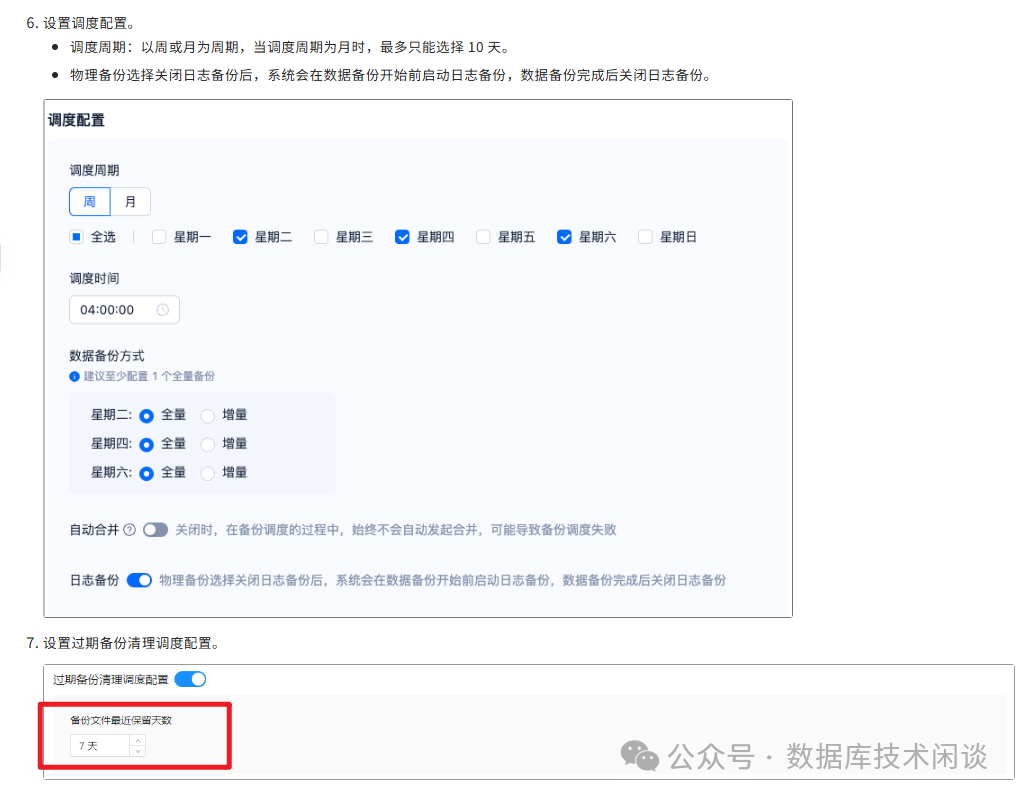
recovery_window expresses the required recoverability window, not an exact file-retention period. Cleanup operates on backup sets and log-backup pieces, not individual log files. In the documented case, recovery_window = 1d retained roughly two days of data backups and three days of log-backup pieces. Actual retention depends on backup scheduling, piece boundaries, and recovery-chain dependencies. A piece stays intact until every recovery chain that depends on any part of that piece is obsolete.
Log pieces are configured in whole days (1–7 days in the documented configuration). A one-day piece is generally the most space-efficient choice because it limits the amount of still-required data that shares a piece with expired data. The actual piece boundary is determined by the time at which log backup starts, not necessarily by a clock-hour boundary.

Conclusion: backup cleanup is dependency management
Backup cleanup is dependency management, not a search for the person who deleted a file. The right question is: “Which recovery chain still depends on this data, and what does the recovery window allow OceanBase to remove?”
Once full data backups, incremental data backups, and log backups are treated as one linked system, the apparent mystery becomes an operational question that can be verified from the catalog, storage destination, and cleanup history. Size storage for the recovery objective and redo volume, and validate recovery regularly rather than manually pruning backup files.