DB Performance Testing - The 3 Common Suites - A Step-by-Step Guide to Running tpcc
Abstract
Sharing a note I wrote in the past. The three most commonly used database testing suites are: sysbench – OLTP testing, tpch – OLAP testing, and tpcc – transaction performance testing.
This article walks you through running tpcc step by step.
The whole process is divided into:
- Introduction
- Preparation
- Compilation
- Testing
- Troubleshooting
Introduction
TPC-C can run in different modes. It’s a stress-testing tool for databases that simulates an e-commerce business, with the main operations being placing new orders, querying inventory, shipping, and payment. For details, see https://github.com/domino-succ/tpcc-hbase/wiki/%E4%B8%AD%E6%96%87-TPC-C%E7%AE%80%E4%BB%8B
Model Overview
Before testing begins, the TPC-C Benchmark defines the initial state of the database—that is, the rules for generating the data within it. The ITEM table always contains 100,000 items, while the number of warehouses can be adjusted. Suppose the WAREHOUSE table has W records; then:
- The STOCK table should have W×100,000 records (each warehouse holds stock data for 100,000 items);
- The DISTRICT table should have W×10 records (each warehouse serves 10 districts);
- The CUSTOMER table should have W×10×3000 records (each district has 3,000 customers);
- The HISTORY table should have W×10×3000 records (one transaction history record per customer);
- The ORDER table should have W×10×3000 records (3,000 orders per district), and the last 900 orders generated are added to the NEW-ORDER table, with each order randomly generating 5 to 15 ORDER-LINE records.
During testing, each district (DISTRICT) has a corresponding terminal (Terminal) that simulates providing service to users. Over the lifetime of each terminal, various transactions are executed in a loop. The flow of each transaction is shown in the figure; when a terminal finishes one transaction cycle, it enters the next transaction cycle, as illustrated below.
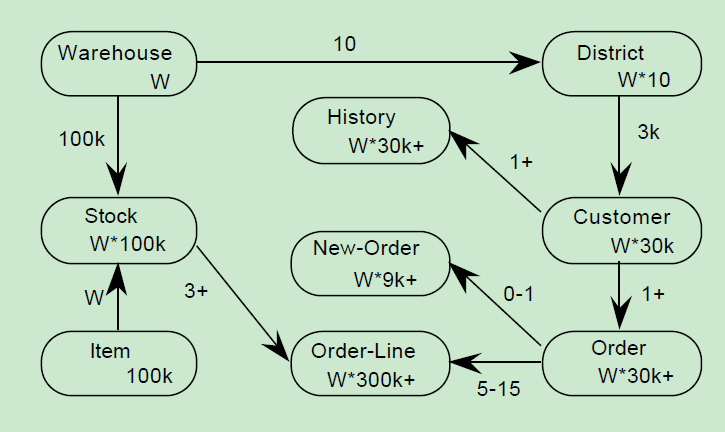
After a customer places an order, an order (ORDER) containing several order lines (ORDER-LINE) is generated and added to the new-order (NEW-ORDER) list.
A customer’s payment for an order also generates a transaction history (HISTORY).
Each order (ORDER) contains an average of 10 order items (ORDER-LINE), of which 1% need to be sourced from a remote warehouse.
These are the 9 data tables in the TPC-C model. The number of warehouses W can be adjusted according to the actual situation of the system to achieve the best performance test results.
Metrics
TPC-C uses the tpmC value (Transactions per Minute) to measure a system’s maximum effective throughput. Here Transactions is based on the NewOrder Transaction—that is, the final unit of measure is the number of orders processed per minute.
Transaction Types
This benchmark contains 5 types of transactions:
- NewOrder: Generating a new order randomly selects 5–15 items from a given warehouse and creates a new order. 1% of these transactions need to roll back (i.e., err). Generally, new-order requests cannot exceed 45% of all transaction requests.
- Payment: Order payment updates the customer’s account balance to reflect their payment. Proportion: 43%
- OrderStatus: Recent-order query, randomly displaying one user and showing their most recent order along with the status of each item in that order. Proportion: 4%
- Delivery: Delivery, simulating a batch-processing transaction that updates the balance of the order’s customer and removes the shipping note from new-order. Proportion: 4%
- StockLevel: Inventory stock-out status analysis. Proportion: 4%
Requirements
Next, the terminal simulates the user entering the parameters required for a transaction and waits for a keying time (Keying Time). After the wait ends, the transaction execution formally begins, and after it finishes, the actual transaction execution time (txnRT) is recorded. TPC-C has a minimum requirement for the execution time of each transaction type:
- At least 90% of NewOrder transactions must execute in under 5 seconds,
- At least 90% of Payment transactions must execute in under 5 seconds,
- At least 90% of OrderStatus transactions must execute in under 5 seconds,
- At least 90% of Delivery transactions must execute in under 5 seconds,
- At least 90% of StockLevel transactions must execute in under 20 seconds;
Finally, the terminal simulates the user reviewing and thinking about the results, waiting for a thinking time (Thinking Time); after the thinking time ends, it enters the next transaction cycle. After the entire test is complete, dividing the total number of processed new-order transactions by the total number of minutes the test ran, and rounding down, gives the tpmC value.
Survey of Testing Tools
Common tools for TPC-C testing include tpcc-mysql, benchmark-sql, HammerDB, DBT2, and sqlbench. These tools support the TPC-C standard to varying degrees. After investigation, we found that sqlbench—an open-source tool derived from DBT2—is the testing tool closest to the standard requirements. So we’ll first compare how different tools support the standard, then introduce the steps for running a TPC-C test with sqlbench.
About tpcc-mysql
TPCC-MYSQL is a product derived by Percona from TPC-C (abbreviated as TPCC below), dedicated to MySQL benchmarking. It’s a stress-testing tool for databases that simulates an e-commerce business, with the main operations being placing new orders, querying inventory, shipping, and payment. Usage documentation: https://www.percona.com/blog/2013/07/01/tpcc-mysql-simple-usage-steps-and-how-to-build-graphs-with-gnuplot/
About benchmark-sql
benchmark-sql is a TPCC tool implemented in Java. It uses the JDBC interface and supports Oracle, PostgreSQL, Firebird, and MySQL.
About HammerDB
HammerDB is a TPCC/TPCH tool implemented in Tcl. It uses stored procedures and Tcl packages and supports Oracle, SQL Server, DB2, MySQL, PostgreSQL, Redis, and Trafodion. It supports a Windows GUI as well as Tcl scripts, and is fairly full-featured.
About DBT2
Databases Test 2 is a tool developed by the Open Source Development Lab for testing database performance. Although it doesn’t fully implement TPCC, it basically simulates OLTP application scenarios. The test results include transactions processed per second, CPU usage, IO, and memory usage.
About sqlbench
sqlbench is derived from DBT2; the author is Rongsheng (diancheng.wdc) of Alibaba. The original DBT2 splits the entire test process into two applications, client and driver, with each terminal requiring 2 threads. If you test with many warehouses, it consumes a lot of machine resources. sqlbench optimizes this by merging the two applications and optimizing thread usage, using 1 thread to handle multiple terminals, greatly reducing machine resource usage and allowing a single machine to run more warehouses. In addition, DBT2 has many external dependencies, such as a dependency on the R environment; sqlbench removes unnecessary external dependencies and currently depends only on the client library of the database under test.
Database Support
| sqlbench | MySQL, PostgreSQL |
|---|---|
| tpcc-mysql | MySQL |
| benchmark-sql | PostgreSQL, EnterpriseDB and Oracle, MySQL |
| HammerDB | Oracle Database, SQL Server, IBM Db2, MySQL, MariaDB, PostgreSQL and Redis |
| DBT2 | MySQL, PostgreSQL |
Support for SQL Execution Methods
| sqlbench | plain SQL, prepared statement, stored procedure |
|---|---|
| tpcc-mysql | Prepared statement |
| benchmarksql | Prepared statement |
| HammerDB | Stored Procedure |
| DBT2 | Plain SQL, prepared statement, stored procedure |
Support for Key-in Time and Think Time
The TPC-C standard specifies a simulated user input time and a time to think about the output results for each transaction, which makes the SQL transactions issued by a single terminal very low-frequency operations. Through these two delay times, the TPC-C standard limits the number of transactions a single terminal can complete in a given time. At the same time, the standard specifies that at most 10 terminals access the same warehouse at one time. By calculation, the maximum TpmC a single warehouse can provide is 12.86.
| sqlbench | YES |
|---|---|
| tpcc-mysql | NO |
| benchmark-sql | NO |
| HammerDB | NO |
| DBT2 | YES |
Decoupling of Terminal and Database Connection
TPC-C specifies that the path from terminal to transaction-processing engine must go through a network connection, but none of the tools listed here support this architecture. Although DBT2 and sqlbench don’t support this three-tier structure, they do support separating terminal processing and DB connections into different threads. The other tools have no concept of a terminal and complete transactions directly through DB connection threads.
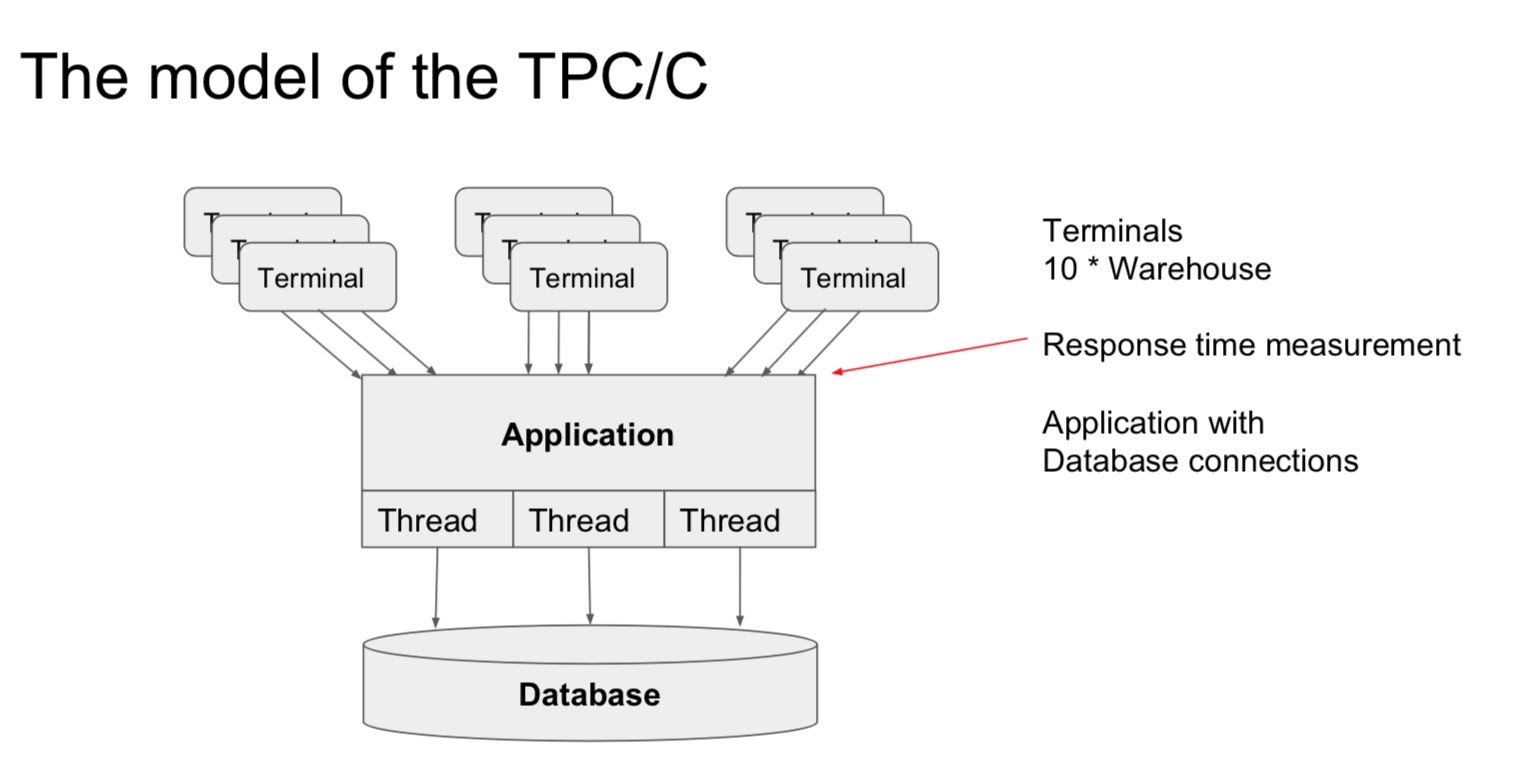
| sqlbench | Terminal and DB connection are decoupled and their counts can be configured separately. Terminal processing threads support reuse; the default configuration supports 50 terminals per thread. |
|---|---|
| tpcc-mysql | No terminal; only the number of DB connections can be configured |
| benchmark-sql | No terminal; only the number of DB connections can be configured |
| HammerDB | No terminal; only the number of DB connections can be configured |
| DBT2 | Terminal and DB connection are decoupled and their counts can be configured separately |
Home Warehouse Support in the TPC-C Standard
The standard requires each terminal to keep its warehouse ID unchanged throughout the test run—that is, the home warehouse stays the same.
| sqlbench | Supports terminal home warehouse |
|---|---|
| tpcc-mysql | Not supported; warehouse is randomly generated per transaction |
| benchmark-sql | Not supported; warehouse is randomly generated per transaction |
| HammerDB | Supports terminal home warehouse |
| DBT2 | Supports terminal home warehouse |
Visual Information Interaction on the Terminal
The standard defines that the user enters data from the terminal, and then the detailed result data of the transaction needs to be returned to the terminal user for display, which introduces additional latency. None of the tools support terminal information interaction.
sqlbench
prepare
1 | yum install -y autoconf automake mysql mysql-devel postgresql-devel |
compile
1 | git clone https://github.com/swida/sqlbench.git |
Loading Data
Download the load.sh script from https://github.com/longdafeng/test/tree/master/shell/tpcc/sqlbench
1 | cd sqlbench |
- You must use an IP; it’s recommended not to use a domain name, because with a domain name you often can’t establish a connection to the database.
- The script is placed under ${sqlbench_source_dir}/src/scripts
- ipxxxx The database IP
- portxxx The database port number
- userxxx The database username
- password The database password
- dbnamexxx The database name
- warehousexxx The number of warehouses, e.g., 100
Running the Test
1 | cd sqlbench |
Here:
- -t specifies the database type (e.g., mysql or postgresql); –dbname and –host are the database connection parameters, and any others not specified use default values
- -w specifies the test data as 100 warehouses
- -l the total test run time is 7200 seconds
- -r the ramp-up time is 1200 seconds
- -c uses a total of 32 database connections
Other common sqlbench parameters include:
- –no-thinktime The default TPC-C test has keying time and thinking time to simulate real user scenarios. You can use this parameter to set those times to 0, removing time-interval control to generate maximum pressure
- –sqlapi Choose the SQL execution method; options:
- simple — plain SQL mode
- extended — uses the prepare/bind/execute method, which generates a query plan and caches it first, then executes directly afterward, more efficient
- storeproc — uses stored procedures, which compared with extended also saves the overhead of communicating with the database server
- -s and -e specify the starting and ending warehouse numbers. With more warehouses, you can use these two options to allocate warehouses, splitting into multiple sqlbench instances stress-testing the same database
- –altered By default, sqlbench generates the number of terminals according to the TPC-C standard (each terminal represents a user, with 10 terminals per warehouse, which can also be changed with –tpw). This parameter directly specifies the number of terminals, evenly distributed across these warehouses.
- –sleep Specifies the sleep time after creating each thread; the default is 1s
- -o Specifies the output directory for storing error logs and test result files
sqlbench’s other parameters are used to customize the various parts of the TPC-C standard, including keying time, thinking time, the proportion of each transaction, the data volume of each table, etc. The default values all follow the TPC-C standard.
For example, common usage:
- Without think-time control
1 | ./src/core/sqlbench -t mysql --dbname=tpcc --user=user --password=password --host=$HOST --port=$PORT -w$WH -c$CONN -l7200 -r1200 --sqlapi=storeproc --no-thinktime --sleep=10 |
- With think-time control
1 | ./src/core/sqlbench -t mysql --dbname=tpcc --user=user --password=password --host=$HOST --port=$PORT -w$WH -c$CONN -l7200 -r1200 --sqlapi=storeproc --sleep=10 |
Generating the Test Report
1 | src/utils/post_process -l mix.log |