DB Performance Testing - The 3 Common Suites - A Step-by-Step Guide to Running TPCH
Abstract
Sharing a note I wrote in the past. The three most commonly used database testing suites are: sysbench – OLTP testing, tpch – OLAP testing, and tpcc – transaction performance testing.
This article walks you through running TPCH step by step. Even if you’ve never run a database test before, you can follow along and run TPCH directly. This article runs TPCH on MySQL. If you want to run TPCH against Postgres or another database, you can use this post as a starting point and then search GitHub for the corresponding database’s TPCH repository.
The whole process is divided into:
- Introduction
- Compilation
- Data Generation
- Data Loading
- Performance Testing
- Table Schema Overview
Introduction
TPC’s current test standards are TPC-E, TPC-C, TPC-H, and TPC-App. Based on these 4 benchmarks, TPC currently has 4 main technical subcommittees: the TPC-E Technical Subcommittee, the TPC-C Technical Subcommittee, the TPC-H Technical Subcommittee, and the TPC-App Technical Subcommittee. Standards that TPC used earlier but has since retired include TPC-A, TPC-B (a benchmark for database processing capacity), TPC-D, TPC-R (a benchmark for decision-support systems, similar to TPC-H), and TPC-W (a benchmark for web processing capacity).
TPC-H (the business intelligence computing test) is a test set developed by the Transaction Processing Performance Council (TPC) to simulate decision-support applications. It is currently widely used in both academia and industry to evaluate the performance of decision-support technology applications. This commercial test comprehensively evaluates a system’s overall business computing capability, places higher demands on vendors, and has broad commercial practical significance. It is widely applied in bank credit analysis and credit card analysis, telecom operations analysis, tax analysis, and decision analysis in the tobacco industry.
The TPC-H benchmark evolved from TPC-D (a standard designated by the TPC organization in 1994 for testing decision-support systems). TPC-H implements a data warehouse using 3NF, comprising 8 base relations, with a data volume that can be set anywhere from 1G to 3T. The TPC-H benchmark includes 22 queries (Q1–Q22), and its main evaluation metric is the response time of each query—that is, the time from submitting a query to the result being returned. The TPC-H benchmark’s unit of measure is the number of queries executed per hour (QphH@size), where H represents the average number of complex queries the system executes per hour, and size represents the scale of the database; it reflects the system’s capability in handling queries. TPC-H is modeled on a real production environment, which allows it to evaluate key performance parameters that some other tests cannot. In short, the TPC-H standard published by the TPC organization meets the testing needs of the data warehouse field and pushes vendors and research institutions to drive the technology to its limits.
For details, see tpch_reference
Compilation
Download the source package tpch
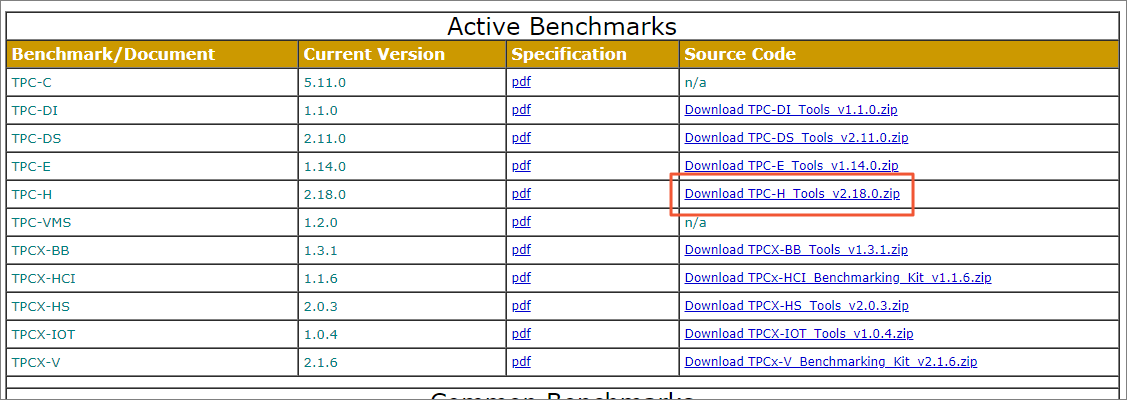
- Open the dbgen directory.
1 | cd dbgen |
- Copy the makefile.
1 | cp makefile.suite Makefile |
- Modify the parameter definitions in the Makefile, such as CC, DATABASE, MACHINE, and WORKLOAD.
Open the Makefile.
Modify the definitions of the CC, DATABASE, MACHINE, and WORKLOAD parameters.
1 | ################ |
Press the ESC key, then type :wq to exit and save.
- Modify the tpcd.h file and add a new macro definition.
Open the tpcd.h file.
vim tpcd.h
Add the following macro definition.
1 | #ifdef MYSQL |
Press the ESC key, then type :wq to exit and save.
- Compile the files.
1 | make |
After compilation, two executables are generated in this directory:
- dbgen: the data generation tool. When testing with InfiniDB’s official test scripts, you need this tool to generate the TPCH table data.
- qgen: the SQL generation tool. It generates the initial test queries. Since different seeds generate different queries, for reproducible results, please use the 22 queries provided in the attachment.
Generating Data
Generating Test Data
You can generate TPCH 10g, 100g, or even 1TB. This example uses 100g. The 100g record count is around 600 million rows, roughly comparable to the large-table scale of an ordinary small-to-medium company.
1 | ./dbgen -s 100 |
Generating Query SQL
- Copy qgen and dists.dss into the queries directory.
1 | cp qgen queries |
- Use the following script to generate the queries.
In the queries directory, create the script gen.sh
1 | #!/usr/bin/bash |
1 | ./gen.sh |
- Adjust the query SQL
1 | dos2unix * |
Remove the “limit -1” from the generated files, and remove the (3) after day. Taking q1 as an example, the SQL is as follows:
1 | -- using default substitutions |
Loading Data
- Download the load scripts
1 | mkdir load |
Because this test includes a PolarDB index-creation script, readers who don’t use PolarDB can skip downloading polar.index.sh and modify the load.sh file to remove the index-setting step.
- Modify the dss.ri script
dss.ri mainly sets the primary keys and foreign keys.
1 | -- Sccsid: @(#)dss.ri 2.1.8.1 |
Delete the “CONNECT TO TPCD;” and remove all the “TPCD.” prefixes.
If you don’t want to modify dss.ri, you can directly download the ready-made dss.ri
- Install the MySQL client
1 | yum install mysql -y |
- Start loading
1 | nohup./load.sh hostxxx portxxx userxxx passwordxxx dbxxx > load.log 2>&1 & |
Here:
- hostxxx is the DB address
- portxxx is the DB port
- userxxx is the username — the username must be created in advance; for cloud users, you also need to set the allowlist, adding the machine’s IP to it
- passwordxxx is the user’s password
- dbxxx is the name of the database to be created. Because the script automatically loads from the directory created in the “Generating Data” section (tpch100 in our example), the database name must also match the directory created when generating data in the previous section.
Starting the Test
Download the test script from https://github.com/longdafeng/test/tree/master/python/tpch
Configure the config file example.cfg
1 | { |
Run the script
1 | nohup ./tpch.py -f example.cfg > run.log 2>&1 & |
Finally, go into the directory specified by “output_dir” in the config file and check the result file.