When the Intelligent Robot Says "Bro, the Language Just Doesn't Connect"—How Should You, the Developer, Respond?
There is a Southeast Asian courier company with a large volume of user inquiries and service needs. To reduce labor costs, it planned to introduce an intelligent robot to replace human customer service.
With the rapid advances in AI large model technology over recent years and its wide adoption across industries, intelligent robot products have become increasingly mature. However, most intelligent robots on the market today support Chinese and English well and can understand user input reasonably, but their support for minor languages such as Thai is far from ideal. For example, for the phrase “Welcome to the Beijing City Exchange Meeting,” in a Chinese context the intelligent robot will split the sentence into multiple keywords for analysis (see Figure 1), but in a Thai context, without a suitable tokenizer, it is hard to achieve accurate semantic expression.
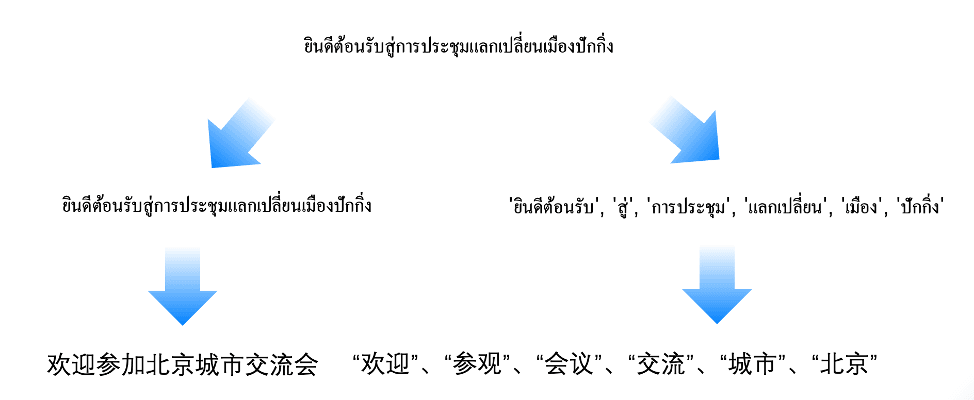
Figure 1: Keyword analysis in a Chinese context
For instance, if we want to build an intelligent robot based on OceanBase, we need to follow the workflow shown in the vector model framework in Figure 2. When OceanBase does not support a Thai tokenizer, we have to contact the OceanBase community or file a request on GitHub, asking OceanBase to support the tokenizer feature as soon as possible. After going through evaluation, R&D, testing, and other development steps, it usually takes one to three months to implement—a fairly long wait.
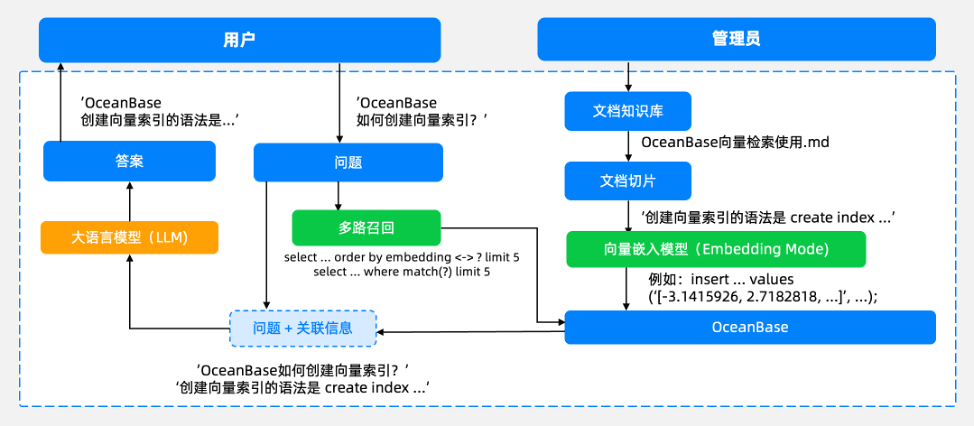
Figure 2: The vector model framework
At this point, as a developer, how should you implement the relevant feature to help the business meet the customer’s needs?
Using a plugin to achieve accurate understanding and expression of Thai is a good choice. Some companies have already built Thai-language intelligent robots based on OceanBase tokenizer plugins, significantly improving customer service efficiency. This article explains how to cleverly use plugins to quickly respond to feature requests when the need is urgent and the result must be guaranteed.
How to Develop Your Own Plugin
The Flexible Development Approach Based on OceanBase
A plugin is a feature extension module independent of OBServer—a dynamic library, a JAR package, or a runtime package in some other language, independent of OceanBase. It can be released, loaded, and upgraded on its own, with no need to replace the OceanBase core binary. It has three core characteristics.
1. Low coupling and a short development cycle.
In the traditional model, any new feature must be merged into the OceanBase kernel source code, and the process from requirement review to code merge usually takes one to three months. A plugin, however, is isolated from OBServer and has an independent lifecycle: it can be released, loaded, and upgraded independently, and bug fixes or feature enhancements only require updating the plugin without affecting the database kernel.
2. More open, with a lower development threshold.
Developers can implement any feature simply by following the public API, free from the constraints of OceanBase’s kernel coding conventions. Moreover, developers can use the programming language they are familiar with—such as C/C++, Java, or Python—and decide their own runtime environment. In addition, developers are free to choose their own C++ standard library, exception handling model, or other third-party dependencies; as long as exception capture and resource management are handled well at the plugin boundary, stable integration with OceanBase is guaranteed.
3. Customizable, with self-controlled code.
Individual or enterprise developers can customize private features as needed, keeping control of their own code, free from the constraints of the OceanBase Mulan license. The code can be used commercially or contributed to the OceanBase public plugin repository.
In short, the plugin mechanism keeps the lowest possible coupling with the OceanBase kernel at the levels of functionality, usage, and maintenance, while offering a flexible, secure, and continuously evolvable extension solution. Its openness provides diverse options for individual developers and enterprises alike.
How to Develop and Use Plugins
Developing a Plugin
To make it easy for developers to get started, we released a development kit, with sample code for each type of plugin. Once you install the development kit, you can copy the sample code directly into your own development directory and make adjustments on that basis—which is more convenient. The plugin dynamic library runs together with the kernel code, with no sandbox mechanism, so it must be thoroughly tested. If the plugin runs unstably—for example, with memory access errors—it will crash the entire OceanBase process at runtime. Therefore, we recommend testing your custom features thoroughly before releasing them to production.
We welcome everyone to publish their code in the OceanBase GitHub repository (https://github.com/oceanbase/oceanbase) and share it openly. The plugins currently released are licensed under Apache 2.0, allowing commercial secondary development, and everyone is welcome to try them out.
The plugin mechanism supports extending features independently outside the OceanBase kernel in a highly open way, providing both the Plugins and OceanBase Kernel interfaces (see Figure 3).
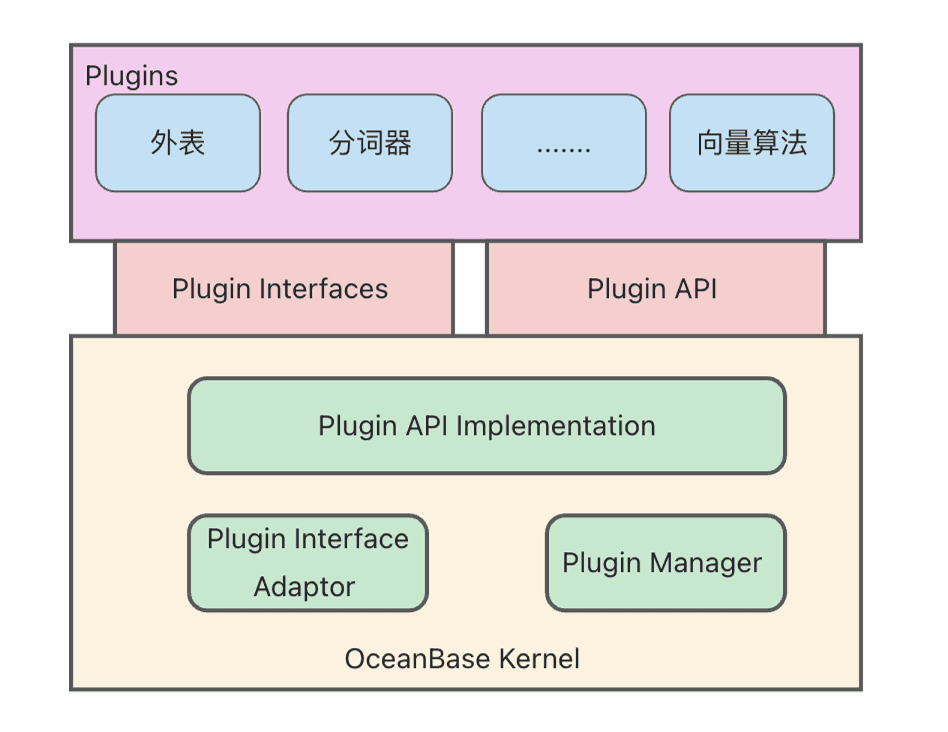
Figure 3: The plugin interfaces
Plugins
- Plugin Interfaces: Multiple types of plugins are known to exist, including external table plugins and tokenizer plugins. Each plugin type corresponds to a set of predefined interfaces (Plugin Interfaces); a plugin completes its integration with the database by implementing these interfaces.
- Plugin API: At the same time, a plugin may also need to call kernel capabilities, such as using the kernel’s memory allocator. For this, OceanBase provides the kernel interface, namely the Plugin API.
Both the Plugin Interfaces and the Plugin API act as a barrier between the plugin and the database kernel, enabling independent upgrades and striving to maintain compatibility during upgrades.
OceanBase Kernel
- Plugin Interface Adaptor: The plugin adaptor, used to adapt different types of plugins. Take the tokenizer as an example: the tokenizer Plugin Interfaces are implemented in C, while other tokenizers inside the OceanBase Kernel, such as the IK tokenizer or the N-gram tokenizer, are implemented in C++, OceanBase’s code language. When an external plugin needs to be converted for internal invocation, the plugin adaptor can shield the details of the plugin interface’s upgrade and compatibility, keeping the workload of kernel and plugin upgrades as small as possible.
- Plugin Manager: Used for plugin management—managing which specific plugins are included in a given plugin category, for example, which plugins the tokenizer plugins include and which plugins the external table plugins include.
Using a Plugin
Plugins are fairly simple to use. A plugin written in C/C++ compiles into a dynamic library, and a Java plugin is a JAR package. Place the dynamic library or JAR package in the designated directory or a user-configured directory, modify the configuration items, and restart (if you deployed with OBD, you can directly use the OBD restart-cluster command obd cluster restart + cluster name to restart) to use the plugin.
Existing Plugins: Tokenizer and External Table
OceanBase currently has two types of plugins—the tokenizer plugin and the external table plugin—both of which provide corresponding interfaces and sample code. OceanBase has also implemented the jieba tokenizer plugin, which is quite friendly to Chinese.
Tokenizer Plugin
OceanBase’s tokenizer plugin has three main characteristics: multilingual, industry customization, and system compatibility (see Figure 4).
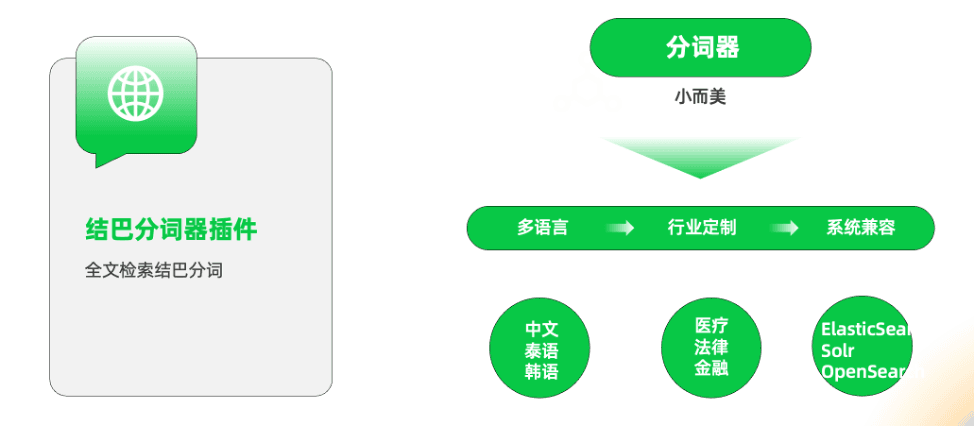
Figure 4: The main characteristics of OceanBase’s tokenizer plugin
Multilingual. OceanBase’s tokenizer functional interfaces are fairly simple and easy to use, with a rich set of applicable scenarios. For example, the Thai tokenizer mentioned earlier can better serve Southeast Asian business for users with operations in the region, and users can also personalize and extend multilingual tokenizers such as a Korean tokenizer according to their business needs.
Industry customization. Beyond supporting multilingual tokenizers, for specific industries with their own particular vocabulary—such as healthcare, law, and finance—you can also customize your own tokenizer and dictionary to more accurately recognize the specific scenario.
Compatible with multiple systems. If you need to run multiple systems within one system, such as Elasticsearch and Amazon OpenSearch Service, plugins can make them behave as similarly as possible. For example, for another tokenizer used in Elasticsearch, you can write a plugin following the Elasticsearch tokenizer and use it in OceanBase, making the product components mesh more smoothly when integrating a large system.
jieba Tokenizer Plugin
Figure 5 shows a usage example of the jieba tokenizer. You can see that the jieba tokenizer is very friendly to Chinese and handles both pure-Chinese and mixed Chinese-English needs well. For the jieba tokenizer code, please refer to: https://github.com/oceanbase/oceanbase-plugins/tree/main/jieba_ftparser.
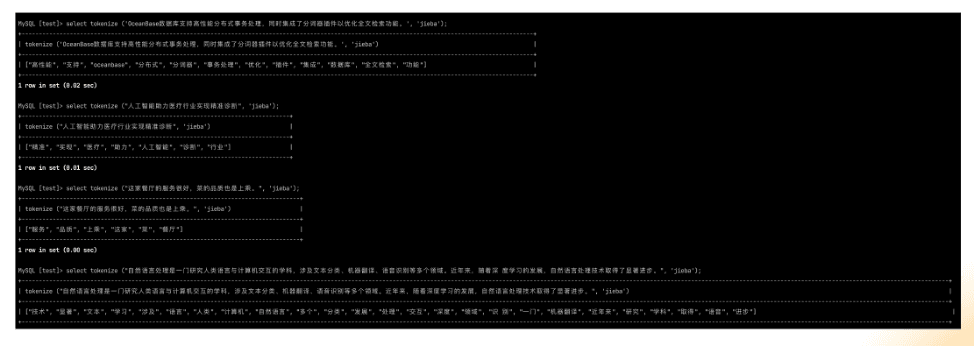
Figure 5: A usage example of the jieba tokenizer
External Table Plugin
Before introducing the external table plugin, let’s briefly introduce the concept of an external table so everyone can better understand it. Taking the OceanBase external table as an example, you can connect to OceanBase directly through the OceanBase client and create an external table to access MySQL, ODPS, or even CSV files in some local directory. At the same time, an external table can also be joined with tables inside OceanBase, making data analysis more convenient. For the external table plugin code, please refer to: https://github.com/oceanbase/oceanbase-plugins/tree/main/external_table.
An external table means users can join external CSV or MySQL data directly with tables inside OceanBase without importing the data into OceanBase, achieving a “many sources, one place” effect (see Figure 6). It currently supports mainstream data sources such as HDFS, Kafka, and MySQL, as well as data files such as CSV, ORC, and Excel, which you can flexibly customize as needed. For data file types, OceanBase has already implemented CSV, Parquet, ORC, and more; if you have other needs such as Excel or Doc, you can customize them through the interface, and once you install the plugin into OceanBase, you can use it.
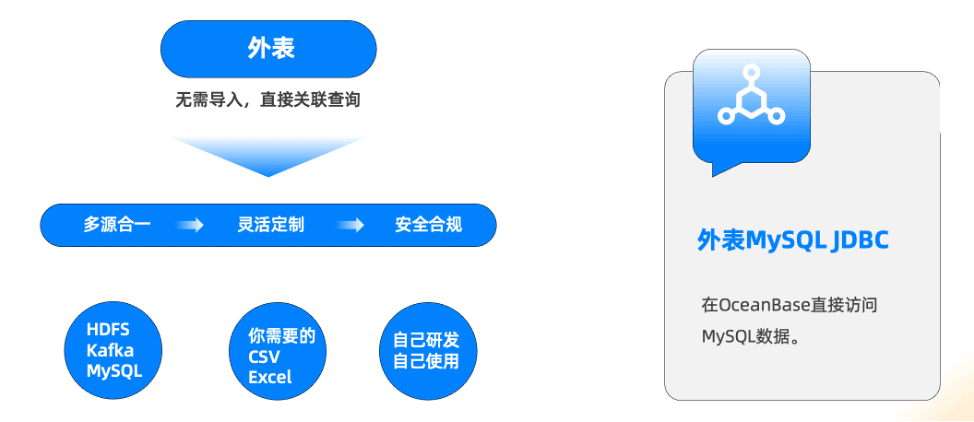
Figure 6: The value of external tables
In addition, an enterprise may have some data formats internally that differ from standard formats. If you don’t use the plugin approach, you must first convert the data format, which is inefficient. In this case, the enterprise can develop a plugin directly and apply it internally to improve efficiency.
Figure 7 is OceanBase’s external table product diagram, supporting direct access through the OceanBase engine to external data in different formats and different storage methods (such as cloud S3 and OSS). Of course, these data formats include not only the features implemented by external table plugins, but also some features built into OceanBase, data lake features, and so on—all of which can be queried directly through OceanBase.
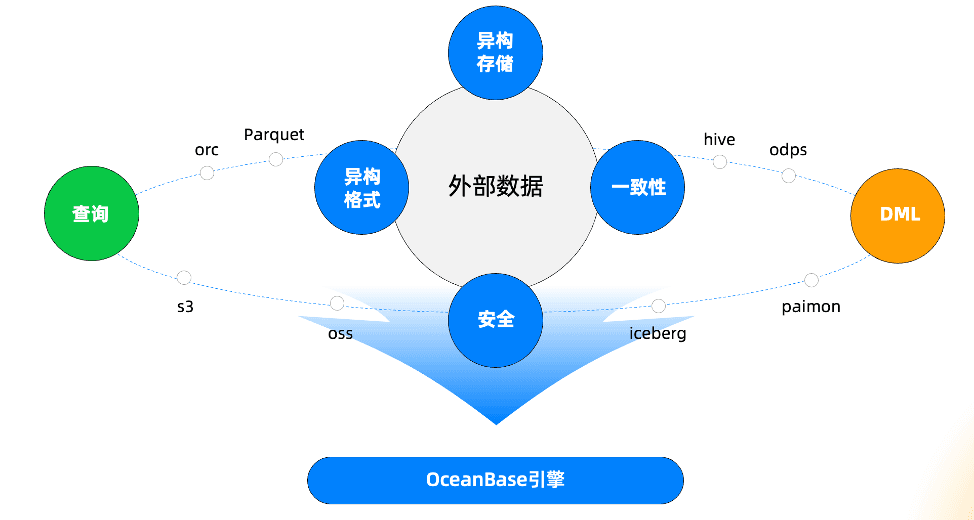
Figure 7: OceanBase’s external table product diagram
If you are interested in understanding the implementation of plugins in depth, you can first learn about the implementation of external table TableScan. As shown in Figure 8, TableScan is the table-scan interface, and different types of tables require implementing different AccessServices: ObAccessService corresponds to OceanBase internal tables; ObVirtualDataAccessService corresponds to OceanBase internal virtual tables; and ObExternalTableAccessService corresponds to external tables. The external-table query class ExternalTableScan can create different row iterators for different data types—for example, MySQL is implemented based on JdbcRowIterator with the JDBC driver loaded—and it can also be easily extended to PostgreSQL and other databases that support JDBC drivers.
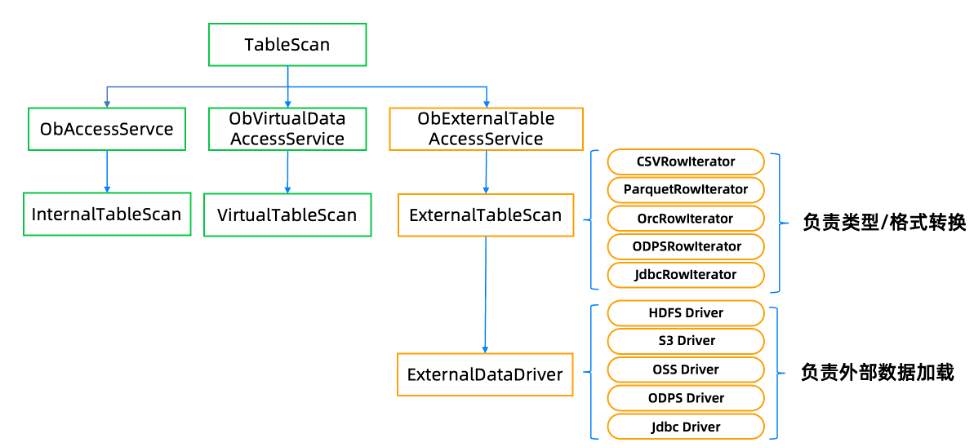
Figure 8: The implementation of TableScan
Come On, Build Your Own Plugin
Based on the above explanation of the plugin system, developers who already have feature requirements should understand what to do next. For developers who don’t yet have feature requirements, OceanBase currently provides two types of plugin frameworks, but the available types are still fairly limited. We welcome and accept your ideas and requirements to enrich the plugin types: whether it’s an audit interface, an authentication interface, or any other type of plugin concept, feel free to propose it.
During plugin development, if you need to call kernel features, access OceanBase’s system variables, or implement configurable support, we can solve it together. Besides the C++ and the external-table Java languages OceanBase currently supports, if you have needs for Python, Rust, or other languages, you can also contact the community, and we will evaluate and expand multilingual support together.
Friends interested in OceanBase plugin development are welcome to scan the code to join the OceanBase plugin developer group, where information about plugin products is shared from time to time.
Finally, we recommend the WeChat official account “Lao Ji’s Tech Talk,” run by Lao Ji, the OceanBase open-source lead. It continuously publishes a variety of technical content related to #Databases, #AI, and #Tech Architecture. Friends who are interested are welcome to follow!
“Lao Ji’s Tech Talk” not only hopes to keep bringing you valuable technical sharing, but also hopes to contribute to the open-source community together with everyone. If you appreciate the OceanBase open-source community, please light up a little star ✨! Every Star you give is the motivation behind our efforts.