EchoKit × OceanBase seekdb: An Open-Source, Localized Voice AI Framework
🌟 Tip: The seekdb used in this article is the AI-native database open-sourced by OceanBase. You are welcome to try it out at https://github.com/oceanbase/seekdb — it should bring a cleaner, more efficient data management solution to your AI application development!
Background
EchoKit is a voice AI framework project recently open-sourced by the WasmEdge team. WasmEdge itself is an open-source project under the Linux Foundation, with broad adoption in the WebAssembly runtime space. EchoKit is the team’s new venture into voice AI; the entire project is written in Rust, which gives it high performance and a low resource footprint.
The project’s core philosophy is clear: to provide a fully open-source voice AI solution that can be deployed locally. This way, developers can build intelligent voice assistants that are both privacy-preserving and highly customizable. Unlike the products on the market that must rely on cloud services, EchoKit gives developers complete control.
For the knowledge base and data retrieval layer, EchoKit chose OceanBase seekdb.
OceanBase is a company that has spent many years deeply invested in the database field; its distributed database has been thoroughly proven in extreme scenarios such as Singles’ Day. seekdb is an AI-native hybrid search database released by OceanBase in November 2025, open-sourced under the Apache 2.0 license.
seekdb’s positioning is clear: it is not a database in the traditional sense, but one redesigned for the AI era. Within a single engine, it unifies relational data, vector data, full text, and JSON, and supports hybrid search and in-database AI workflows. This design philosophy aligns closely with EchoKit’s needs. The traditional approach is to use multiple independent systems to handle different data types — for instance, PostgreSQL for structured data, Elasticsearch for full-text search, and a dedicated vector database for semantic search. Such an architecture is highly complex, data synchronization is a problem, and query performance suffers. OceanBase seekdb integrates these capabilities into a single engine, greatly simplifying the system architecture.
Problems Facing Today’s Voice AI Services
Today’s voice AI services on the market — for example, ChatGPT’s voice feature — do indeed perform very well in conversational fluency and response speed. When you chat with it, you basically don’t sense any latency, and the conversation feels very natural. But this kind of service has some fundamental problems that make it fall short in certain scenarios.
The most obvious problem is privacy. When you use these cloud services, your voice data, conversation content, and personal information all have to be uploaded to the provider’s servers for processing. This leads to an awkward situation: if you ask it “what’s my home WiFi password,” it certainly can’t answer, because it simply doesn’t know, and you couldn’t possibly tell it such private information. Going further, if you want a voice assistant to manage your home’s smart devices, query your personal finances, or access your company’s internal data, the privacy and security concerns in these scenarios become very pronounced.
The second problem is vendor lock-in. Most voice AI solutions depend on a specific cloud provider or API. For example, if you use OpenAI’s Live API, you’re then bound to their service. If one day they adjust pricing, modify the terms of service, or simply shut the service down, your application will be heavily affected. Moreover, different providers differ in performance, cost, and supported languages, and being locked into one means losing the flexibility of choice.
The third problem is controllability and the degree of customization. When using cloud services, you can basically only use the models and features they provide. You can’t deeply customize the model’s behavior, can’t adjust the processing pipeline, and can’t integrate your own knowledge base. For example, if you’re a Korean developer wanting to use a speech recognition model specially optimized for Korean, or you have some industry-specific knowledge bases you want to integrate, these are all hard to achieve with a cloud service.
EchoKit emerged precisely to solve these problems. By providing a complete open-source firmware and server framework, developers can choose to deploy locally — for instance, running it directly on their own Mac, or deploying it on edge devices. You can also adopt a hybrid deployment, placing some functions locally and others in the cloud. More importantly, you can fully choose which cloud service to use on your own, without being limited by any specific API.
A Detailed Look at the Technical Architecture
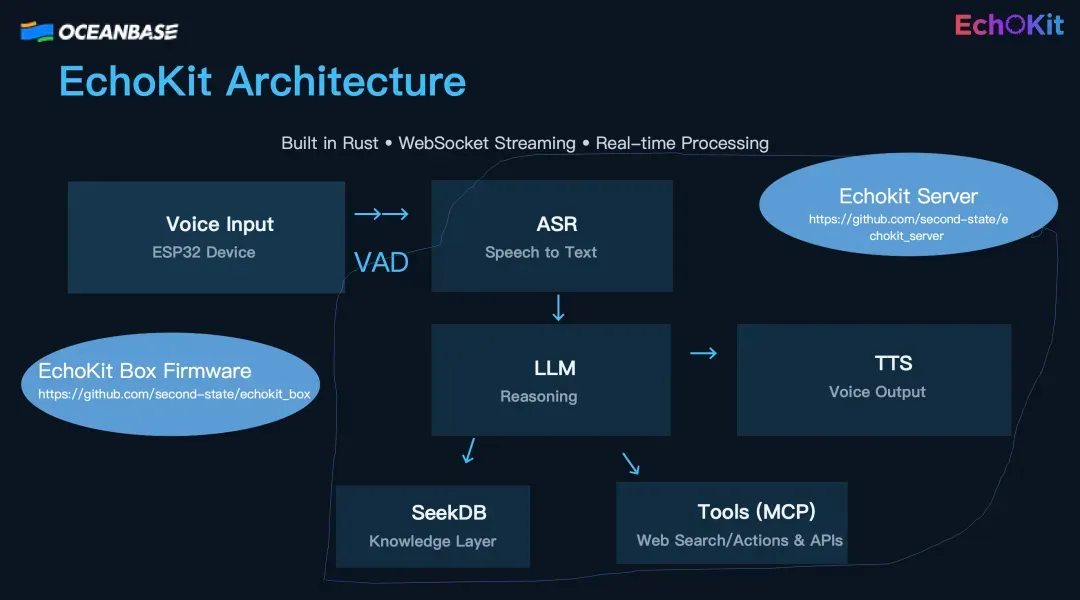
EchoKit’s technical architecture is designed fairly cleanly, and the entire processing flow can be divided into several key steps.
First is the voice input and detection stage. The user provides voice input through an ESP32 voice device flashed with the EchoKit firmware. A very important technique at this stage is VAD — Voice Activity Detection. Its job is to determine when the user starts speaking and when they finish, so as to accurately detect sentence boundaries. This feature looks simple, but it’s crucial to the voice interaction experience. If detection is inaccurate, it will either cut off your speech or wait too long before starting to process.
The second step is speech recognition, i.e. ASR (Automatic Speech Recognition). EchoKit uses Whisper by default — an open-source speech recognition model from OpenAI that works very well. But the flexibility here is that you can fully replace it with other open-source ASR models. For instance, if you’re developing for a specific language scenario, you can choose a model specially optimized for that language. The example mentioned in the talk was Korean: if you’re a Korean developer, you can replace Whisper with a model that recognizes Korean better. This kind of flexibility is hard for cloud services to provide.
The third step is language model processing, i.e. the LLM stage. This step is the brain of the whole pipeline, responsible for understanding the user’s intent and deciding how to respond. At this stage, the system autonomously decides whether external tools need to be called. For example, if the user asks a question that requires real-time information, the system might decide to search the web. If the user’s question involves information in the knowledge base, the system will call seekdb to perform a database query. EchoKit also supports MCP (Model Context Protocol) tool calling — a standardized tool-calling protocol that lets the AI assistant invoke various external tools and services.
The final step is speech synthesis, i.e. TTS (Text-to-Speech). The system converts the generated text into voice output for the user. This likewise supports multiple TTS engines, and you can choose a low-latency open-source TTS model. The talk mentioned that Qwen recently released a relatively low-latency TTS model — new models like this can all be integrated. More interestingly, EchoKit also supports voice cloning, which we’ll cover in detail later.
The whole architecture’s design philosophy is modularity and replaceability. Every stage can be adjusted and optimized to your needs, and this flexibility is the core value of the framework.
The Role OceanBase seekdb Plays
Within EchoKit’s architecture, OceanBase seekdb was chosen as the knowledge base solution, and there are solid reasons for this choice.
First is the latency issue. For voice interaction, response speed is the key to user experience. If you ask a question and the system takes several seconds to answer, the experience is terrible. seekdb’s query response speed is very fast, which is critical for real-time voice interaction. When a user asks a question that requires querying the knowledge base, the system can quickly retrieve the relevant information from seekdb and then generate a response, with no noticeable latency in the whole process.
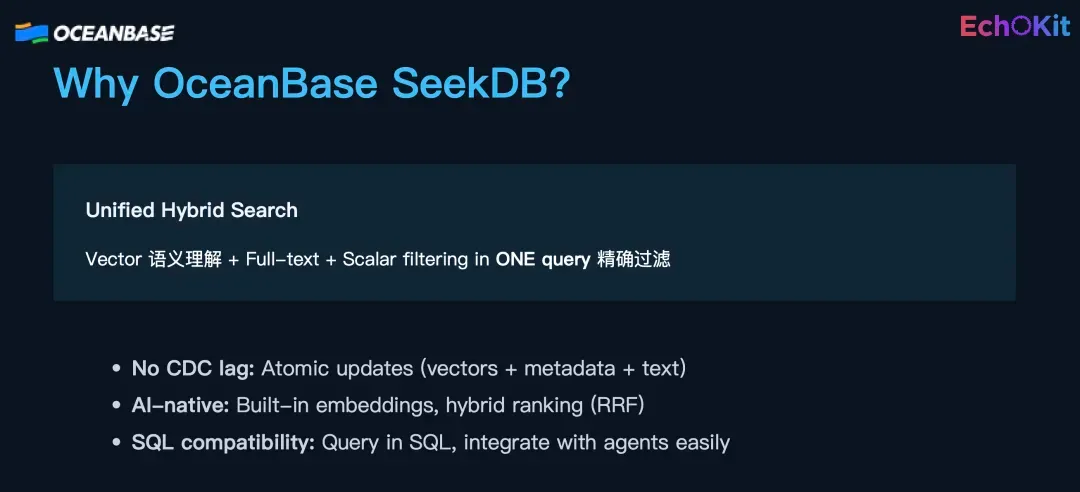
Second is the diversity of search capabilities. seekdb supports multiple search modes, including keyword search, exact search, semantic search, and hybrid combinations of these modes. This capability is very useful in practice. For example, if a user asks “what tech breakthroughs have there been in AI recently,” this question requires several search capabilities working together. The system needs to understand the semantic meaning of “tech breakthroughs,” which is semantic search; it needs to exactly match the keyword “AI,” which is keyword search; and it needs to filter by the “recent” time range, which is exact filtering on metadata. seekdb can combine these search methods to return the most relevant and accurate results.
The third advantage is the built-in Embedding feature. seekdb has built-in embedding, which means you don’t need to deploy a separate embedding service, and the entire vectorization pipeline is simplified. This is very helpful for reducing system complexity and lowering deployment difficulty.
Finally, there’s the semantic hybrid-search ranking capability. seekdb can simultaneously perform semantic matching, keyword matching, and exact metadata filtering, and then comprehensively rank the results. This capability is especially suited to complex knowledge retrieval scenarios. In real applications, a user’s question is often not single-dimensional, and the system needs to understand multiple aspects of the question and then find the best-matching information from the knowledge base.
seekdb can also be invoked as an MCP Server. This means it’s not just a passive database, but can be actively called by an AI assistant as a tool. This design makes the whole system’s architecture more flexible.
Real-World Application Scenarios
To better understand what the combination of EchoKit and OceanBase seekdb can bring, let’s look at a few concrete application scenarios.
The first is revenue monitoring in a finance scenario. Suppose you’re a company manager and you want to quickly understand the company’s financial status via voice. You can speak directly to the voice assistant: “Take a look at our Q4 revenue, and warn me if it’s below target.”
The system’s processing flow goes like this: First, your voice input is converted to text by ASR. Then the LLM understands your intent, knowing you want to query Q4 revenue data and compare it against the target. Next, the system decides to call the revenue API to get the actual revenue figures. At the same time, the system queries seekdb for the Q4 revenue target. With both data points in hand, the system compares them and finds that the actual revenue is below target. Finally, the system generates a voice response via TTS: “Revenue is 12% below target.”
The key to this scenario is that all the data can be kept locally. Your financial data doesn’t need to be uploaded to any cloud service, and the entire query and analysis process is completed on your own device. For enterprises, this means privacy and security are fully protected.
The second scenario is technical information retrieval. Suppose you’re a developer who wants to keep up with the latest tech trends. You ask the voice assistant: “What tech breakthroughs have there been in AI recently?”
This is where seekdb’s hybrid search capability comes into play. The system simultaneously performs semantic matching to understand the concept of “tech breakthroughs”; keyword matching to precisely find content containing keywords like “AI” and “breakthrough”; and metadata filtering to return only information within the “recent” time range. Combining these three search methods ensures the returned results are both relevant and accurate.
The third scenario is personal knowledge management. Many people have their own notes, documents, saved articles, and so on. You can import this content into seekdb and then query it by voice. For example, if you can’t quite remember a point from an article you read before, you can describe it in natural language, and the system can find it for you. And because it’s deployed locally, you don’t have to worry about your notes being uploaded to the cloud.
Deployment and Usage
EchoKit’s deployment process is relatively simple. First, you need to clone the project code from GitHub https://github.com/second-state/echokit_server, and then the main configuration work is concentrated in the config.toml file.
In the configuration file, you need to set up the API configurations for ASR, LLM, and TTS. There’s a lot of flexibility here: you can choose to use local models or cloud APIs. For example, for ASR you can use a local Whisper or a cloud speech recognition service; for LLM you can use a locally deployed open-source model or OpenAI’s API; TTS can likewise be local or in the cloud.
The system offers two working modes. The first is the three-stage mode, i.e. ASR → LLM → TTS processed separately. The advantage of this mode is maximum flexibility — every stage can independently choose its model, and you can load a knowledge base and call tools at the LLM stage. This mode is recommended for scenarios requiring a high degree of customization.
The second is the end-to-end mode, directly using a service like the ChatGPT Live API or the Qwen voice API. The advantage of this mode is greater speed, since a single call completes the whole flow with no extra conversion overhead in between. Correspondingly, though, the degree of customization is lower. You can choose which mode to use based on your needs.
If you want to integrate a knowledge base, you need to configure the seekdb database. You can import your own documents, CSV files, and other data into it. seekdb automatically handles the embedding and indexing, after which you can query this knowledge by voice.
Because EchoKit is written in Rust, it’s very small in size and high in performance overall. This means it can run smoothly even on devices that aren’t particularly powerful. Once deployment is complete, the system can start up quickly and respond very fast.
After the EchoKit server is deployed, you can chat with it on the web https://echokit.dev/chat/ to test whether it’s running successfully.
Next, you can flash the firmware onto your hardware (you can assemble your own ESP32 or buy a device we’ve already flashed https://echokit.dev/), enter your server URL on the setup page, and start talking with your voice box! And if you want to clone your own voice, you can also use our voice cloning tool!