A New Way to Tackle "Read Amplification" — Merge-On-Write Tables in OceanBase
Background
Starting with version 4.3.0, OceanBase introduced a columnar storage engine to accelerate AP (analytical) queries, which includes:
- New columnar encoding
- Column pre-aggregation information
- A columnar execution engine
- A vectorized in-memory format
- A new query optimizer that dynamically chooses between the row-store and column-store engines based on rules and cost.
After the columnar engine shipped, OceanBase’s analytical capabilities improved dramatically. It performed well in head-to-head benchmarks against a range of competitors and officially stepped into the HTAP arena.
To save on storage costs and simplify operations for users, OceanBase puts TP and AP workloads in a single system that shares one copy of the data. In real-world scenarios — especially core business systems — there are often large volumes of data updates, and these systems also need to run some real-time analytics on that data. This poses a significant challenge for OceanBase’s analytics engine.
As covered in the course materials for the first session of the Hands-on Camp (Season 3), OceanBase uses an LSM Tree storage architecture: data is stored in tiers, new data is appended to the hottest tier, and only the latest value is recorded. This write pattern is friendly to TP systems (write-heavy, read-light), but because queries use a Merge-On-Read approach, AP analytics suffer when there is a lot of incremental data (read amplification).
To eliminate the performance impact of incremental data on the analytics engine, OceanBase introduced the Merge-On-Write table in version 4.3.5. It splits an update into delete / insert operations written into the incremental data, and at query time processes the incremental and baseline data separately, dramatically improving OceanBase’s real-time analytics in update-heavy scenarios.
Merge-On-Write Table Features
A Look at OceanBase Storage
Let’s start with a quick recap:
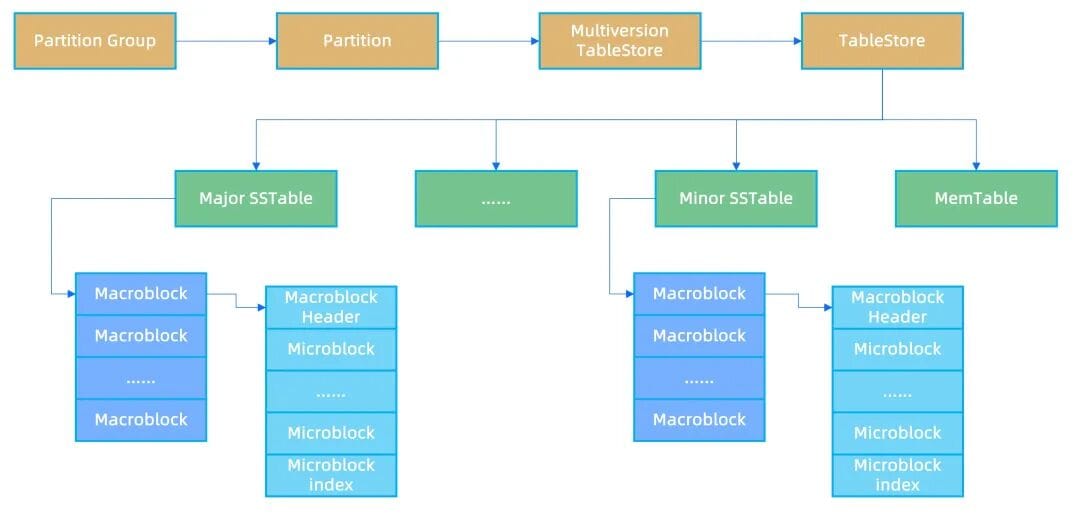
- OceanBase uses an LSM Tree storage architecture. Within each partition of each table, the logical unit of on-disk storage is the SSTABLE. Each tier of the LSM Tree contains one or more SSTABLEs, and the data inside each SSTABLE is sorted by primary key.
- The baseline SSTABLE is also called the Major SSTABLE, and it mainly serves to optimize queries. The baseline SSTABLE is generated by picking a snapshot point and performing a full merge of all data whose commit version falls within that snapshot.
- To optimize write IO, data within an SSTABLE is split into MacroBlocks of a fixed 2MB size. The MacroBlock is the basic unit of write IO for data files.
- To optimize read IO, the data within each MacroBlock is split into MicroBlocks of 16KB each. The MicroBlock is the basic unit of read IO.
Merge-On-Read Table Queries and Their Pain Points
In OceanBase’s current storage architecture, to optimize write performance and save storage space, an incremental SSTABLE only records the primary key and the values of the updated columns.
At query time, to obtain the latest value for a primary key, the engine must read the MemTable, the incremental SSTABLE, and the baseline SSTABLE in order, then fuse the data read from each tier to assemble the complete row. This process of fusing data at query time is called Merge-On-Read.
Merge-On-Read handles point lookups by primary key well, but it is less friendly to range queries. When primary keys overlap and intersect across the SSTABLE tiers, the rows emitted by each tier’s SSTABLE must be fused and deduplicated using a loser tree (a min/max heap). As a result, the execution engine can only evaluate pushed-down predicates and projections row by row, and overall processing performance is not high.
In the current version, OceanBase has made quite a few optimizations to this approach. For example, during a query it can dynamically determine whether the data in a given SSTABLE’s MacroBlock/MicroBlock intersects with data in other SSTABLEs. If a MacroBlock or MicroBlock’s primary keys do not intersect with those of other blocks, those keys exist only within that block, so the loser tree can be skipped and only that SSTABLE needs to be scanned.
Note: it’s fine if you don’t follow the paragraph above.
The gist is that OceanBase’s storage engine has some implementation-level optimizations to mitigate the read amplification problem.
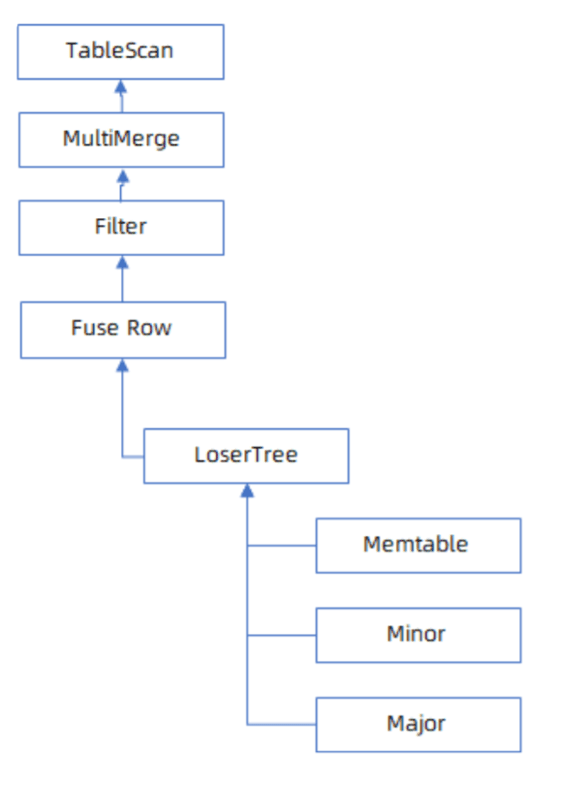
Even after the single-sided scan optimization is implemented in the Merge-On-Read query flow, AP capability does improve somewhat, but when there is a lot of incremental data — especially when primary keys overlap heavily between the incremental and baseline data — overall query performance is still affected to some degree.
The Merge-On-Write Table Query Flow
Unlike merge-on-read, merge-on-write does a better job of solving the query performance problem that arises after a large number of updates to the baseline data.
To avoid hurting query performance, merge-on-write moves the work of applying updates into the write phase. A common industry practice is to mark a delete bitmap on the old rows and then append the new rows at the tail. At query time, you only need to read the original data and the corresponding delete bitmap to dedup rows with the same primary key and obtain the latest values.
OceanBase drew on this classic industry approach and added a merge-on-write table type, moving some of the hot merge work from query time into the write module.
However, given that HTAP workloads involve large update volumes and that OceanBase has to support fairly complex business scenarios — maintaining multi-version information for every snapshot point — maintaining the multi-version information for a delete bitmap would be quite a challenge. On the data side, OceanBase already has a fairly mature MVCC multi-version management mechanism.
So OceanBase made some improvements to the merge-on-write design. On write, an updated row rewrites the update into a delete + insert: the update reads out the old value, fuses it, and inserts the full set of columns of the latest row into the memtable (the “mini” in the figure below), and every row records its commit version information.
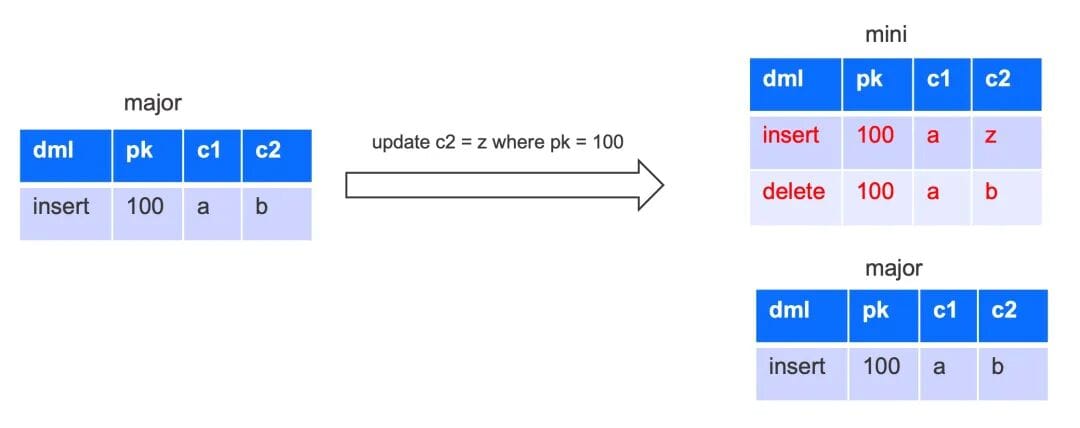
In the query process of an OceanBase merge-on-write table, the incremental data and the baseline data are split into two separate parts, rather than being placed into a single loser tree for comparison as before.
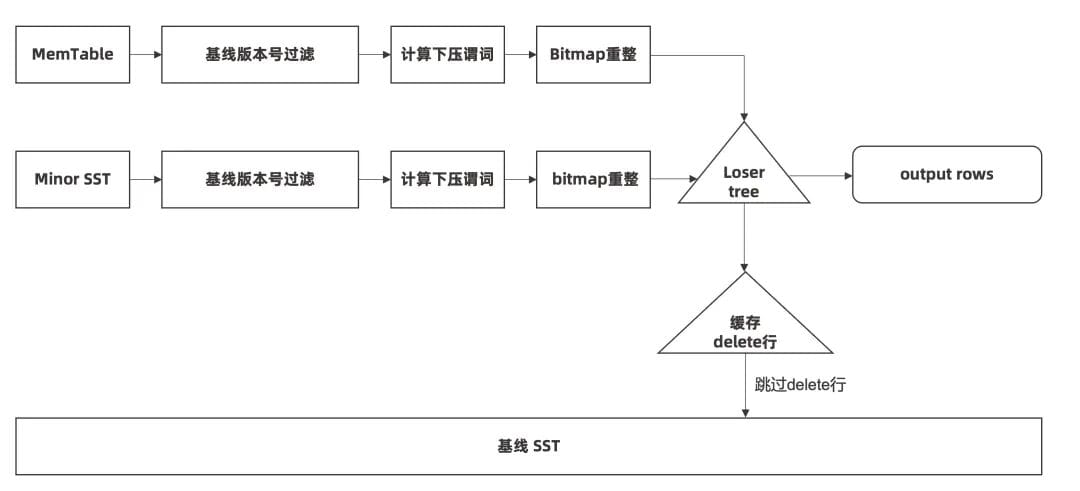
When scanning, the engine first scans the incremental data whose commit version number is greater than the baseline, evaluates pushed-down predicates, and then performs the projection.
If, during projection, the engine finds that the incremental data has modified the baseline data, it caches the corresponding update information and skips the matching primary-key rows when scanning the baseline. The main optimizations over the original query flow are:
- The incremental part stores full-column information, so pushed-down predicates can be evaluated up front;
- The incremental and baseline data are no longer in a single loser tree, so once the incremental data has been filtered by pushed-down predicates, the number of times the baseline has to skip duplicate rows drops sharply, greatly improving the batch-processing capability of both incremental and baseline data.
Note:
It’s fine if you don’t follow the long passage above.
The gist is this: in an MOW table, the memtable no longer stores only the primary key and the updated columns as before — it stores all columns of the latest row. To a certain extent, this reduces the implementation complexity of merging incremental and baseline data at query time, enabling better query optimization.
Experimental Data for Merge-On-Write Tables
The main differences between an OceanBase merge-on-write table and a merge-on-read table are:
- On write, an update is decomposed into delete + insert, and the inserted row writes the latest values of all columns.
- Previously, because the incremental part was not backfilled with old values, pushed-down predicates could not be evaluated in advance; the filter condition could only be computed after fusing data from all tiers. With all columns written, the incremental part can now evaluate the filter condition directly.
- Previously, querying the incremental and baseline data used a single loser tree, which weakened the baseline’s batch-processing capability when primary keys intersected or overlapped. Once these two parts are split in the query flow, the baseline only performs batch primary-key deduplication when delete rows remain after filtering — greatly enhancing the baseline’s batch-processing capability.
Note:
It’s fine if you don’t follow the long passage above. Because it involves low-level internals, don’t be intimidated, and there’s no need to spend time digging into it.
The two short sections that follow — “Applicable Scenarios” and “How to Use” — are the key takeaways this lesson wants you to grasp (the good stuff is always the most concentrated)~
We’ll skip the detailed experimental data here. We recommend heading to the “Learn While You Practice” section at the end of this article to get it through the online hands-on experience~
Applicable Scenarios for Merge-On-Write Tables
Merge-on-write tables are suited to HTAP and AP-style analytical scenarios. They are not recommended for TP scenarios, because the incremental data of a merge-on-write table records the full row after query fusion, which hurts update efficiency and storage space.
When a workload has a large number of data updates and needs to run complex real-time analytical queries, you can specify the table type as merge-on-write.
How to Use Merge-On-Write Tables
In OceanBase, you can specify merge_engine = delete_insert to use a merge-on-write table. It takes effect in version 4.3.5.3 and later.
Here are the specific usage methods:
- Specify it when creating the table.
1 | create table table_name xxx |
- merge_engine = delete_insert : uses the merge-on-write write and query mode;
- If merge_engine is not specified, or merge_engine = partial_update is specified, the previous partial-column-update flow is used — that is, the merge-on-read mode.
- Usage example:
1 | // Create a pure columnar table whose update model is merge-on-write |
- Specify it in a tenant configuration item.
- If you don’t want to change your business code, OceanBase also supports specifying a default merge_engine for new tables in a tenant.
- The tenant configuration item only takes effect when the CREATE TABLE statement does not explicitly specify a merge_engine. If the CREATE TABLE statement explicitly specifies the table’s merge_engine, parsing follows the format specified in the statement.
1 | // Make merge_engine = delete_insert the default for user-created tables |
Looking Ahead
The incremental data of a merge-on-write table contains the full-row information. When generating the incremental SSTABLE, for frequently queried columns we can generate skip index pre-aggregation information in the middle tier of the SSTABLE (see: Column Skip Index Attribute[1]).
Note:
Once skip index is added, OceanBase’s AP performance can sit right down at the table and arm-wrestle pure-AP databases like StarRocks.
When processing incremental data, we can prune the accessed data based on the skip index, just like the baseline data. When the MacroBlocks and MicroBlocks accessed in an incremental SSTABLE can be pruned via skip index, overall query performance can improve by orders of magnitude.
The adaptive addition of skip index for incremental SSTABLEs will be released publicly in the next version, so stay tuned~ (Word from Hanhui and Puhua is that in the next version, performance will be several times faster again on top of where it is now. Never mind — best not to leak this secret ahead of time.)
What’s More?
If the OceanBase version you’re currently running is older than 4.3.5, you can consider using the more traditional approach of adjusting the table mode to alleviate the storage engine’s read amplification problem.
For the specific method, see this article on the OceanBase community WeChat account — “How to Tackle Storage Engine Read Amplification in OceanBase?”.
Q & A
Finally, here we record the questions readers raised in the technical chat group after reading, along with the replies from group members:
Q: Under an LSM Tree architecture, if I keep updating a non-primary-key field c1 with different values, does the efficiency of select c1 from tab keep getting slower as the updates pile up?
A: Before a compaction, yes — if you keep updating, in theory it will keep getting slower.
Q: But I see that OB always adds the latest new value at the head of the change chain on the trans node. Why would it get slower over time?
A: Because each modification only records the changed data. If you only change c1, it only records the latest value of c1. But a query often needs to read many columns, and reading the data requires merging multiple result sets. That’s just how LSM Tree reads work — it’s not unique to OB.
Q: I get why querying other columns is slow. What I don’t understand is why querying just the c1 column also gets slower.
A: If it’s just a get (e.g., going through the primary key), it isn’t affected. The buffer table targets slow scan queries. If there are a lot of intermediate multi-version rows or delete rows, the scan has to skip a lot of invalid rows. The more invalid rows it skips, the slower the query.
If you have any questions about the content of this article, feel free to leave a comment and ask. The editor will reply at the first opportunity! (Not limited to MOW tables and buffer tables — any other question related to OceanBase is welcome. We’ll tell all we know, and hold nothing back~)
Commercial Break
0x00. Learn While You Practice — Outstanding Results!
The online hands-on link for the MOW table performance improvement in the Hands-on Camp: “Delete-Insert Storage Engine”[2].
- Test results in a typical production environment: a merge-on-write table delivers a 5x or greater query performance improvement over a merge-on-read table.
- This experiment includes some time-consuming operations such as importing data (roughly 100 seconds). You can copy all the SQL statements from the lab document into the lab environment on the right and run them all at once, then read the article below while you wait for the final results.
- The lab environment runs a small-scale test on a pure columnar table, so the performance difference in this test may not be as pronounced (though 2–3x should still hold; to ensure accuracy, we recommend repeatedly running the final performance-comparison SQL in the lab environment and taking the average). Only at larger data scales or under higher concurrency (production) does the advantage of a merge-on-write table truly show.
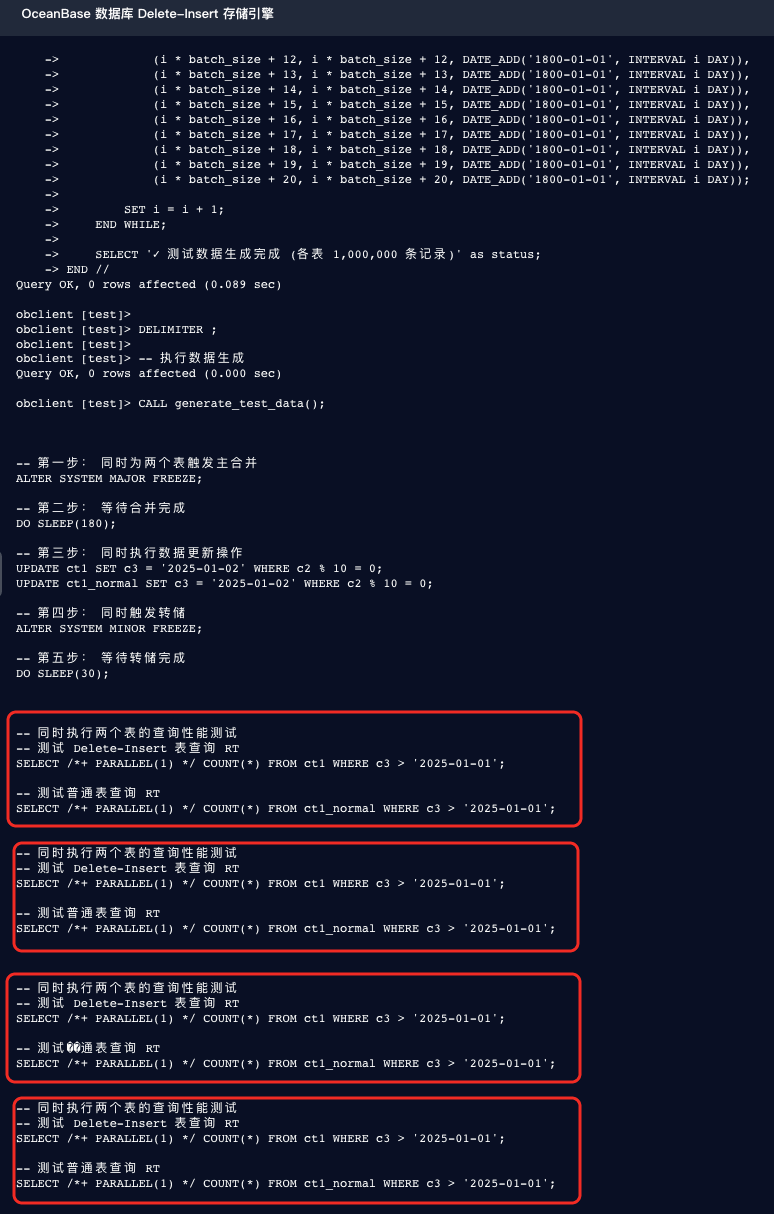
- Don’t take the docs at face value — practice is the only way to find the truth.
- As of 2025.10.22, the syntax for creating an MOW table in the OceanBase official documentation “Create Table”[3] is as follows:
1 | CREATE TABLE table_name column_definition |
- The WITH COLUMN GROUP in the syntax looks like a required option for creating an MOW table, so it seems that only columnar tables and hybrid row-column tables can have the MOW attribute set.
- Give it a try: remove WITH COLUMN GROUP xxx and see whether you can also set the MOW attribute on a pure row-store table.
- You can also try changing the two original CREATE TABLE statements in the lab environment into pure row-store tables, then compare the performance improvement of a row-store MOW table over an ordinary row-store table (run the query multiple times and take the average) to see whether it reaches the 5x-or-more improvement that the master Puhua claims.
1 | CREATE TABLE ct1 ( |
The editor’s guess:
Because row-store tables generally have worse query performance than columnar tables, if a row-store table can have the MOW attribute set, the magnitude of the improvement will most likely be even more significant than for a columnar table. (In other words: fast progress comes from a low starting point~ 🤣)
You can verify this fellow’s guess by testing in the lab environment.
If it’s wrong, think about why it’s wrong.

- Post-lesson quiz: [DBA Hands-on Camp] Merge-On-Write Tables[4]. In the Season 3 Hands-on Camp activities, every post-lesson exercise you pass automatically earns 10 community points and one lottery entry. The lottery gives you a chance to win physical gifts or larger point rewards.
Tips:
- You need to log in to your OceanBase account first to initialize the lab environment on the right side of the screen.
- In the lab environment, you can do whatever you want. Don’t feel limited by the lab manual on the left side of the screen — feel free to let your imagination run and try whatever interests you, or verify any questions you have about the OceanBase official docs, as well as your own guesses.
- We encourage you, as you learn OceanBase, to make full use of the lab environments provided on the online hands-on page to experience any new OceanBase features that interest you.
References
[1] Column Skip Index Attribute: https://www.oceanbase.com/docs/common-oceanbase-database-standalone-1000000003577906
[2] “Delete-Insert Storage Engine”: https://www.oceanbase.com/demo/delete-insert-engine
[3] “Create Table”: https://www.oceanbase.com/docs/common-oceanbase-database-standalone-1000000003577967
[4] [DBA Hands-on Camp] Merge-On-Write Tables: https://exam.oceanbase.com/pre?did=ha_vN5Zs3SP_5KD378wV1