seekdb 1.2.0 Released: Primary-Standby Disaster Recovery Goes Live, and Full-Database Cloning in Seconds Is Here
Author | Xianlin - Head of seekdb R&D
🌟 Tip: seekdb, used throughout this article, is OceanBase’s open-source AI-native database. You’re welcome to try it at https://github.com/oceanbase/seekdb—we believe it can bring a simpler, more efficient data management approach to your AI application development!
If you’re building AI applications with seekdb, you’ve surely had this worry: what happens if there’s a single point of failure?
The official release of seekdb 1.2.0 puts this concern to rest.
This release brings seekdb’s first high-availability solution—a primary-standby asynchronous replication architecture. On top of that, there’s Fork Database for full-database snapshot cloning, and Diff & Merge, which gives your data Git-like capabilities.
These three capabilities each solve a different problem. Primary-standby solves availability: your business can’t grind to a halt just because one machine goes down. Fork Database solves efficiency: in AI scenarios, data version management can’t still be stuck at mysqldump speeds. Diff & Merge solves controllability: data changes can’t be a black box—developers need to know exactly what changed and whether it can be rolled back.
Primary-standby is the one everyone cares about most, and it’s the heaviest-hitting part of this release, so let’s start there.

Primary-Standby: The First High-Availability Solution
Anyone who has used a standalone database understands the pain of a single point of failure. seekdb 1.2.0 offers a solution: a primary-standby asynchronous replication architecture.
Architecture Design: Elegant, Practical, Evolvable
seekdb’s primary-standby solution adopts an asynchronous replication architecture in maximum performance mode. This choice was carefully considered.
While synchronous replication guarantees zero data loss, the cost is that every write must wait for the standby to acknowledge, which causes a noticeable performance hit. For AI application scenarios, much of what gets written is vector data, knowledge base documents, and conversation records—data whose real-time consistency requirements aren’t as stringent as financial transactions. Asynchronous replication strikes a pragmatic balance between performance and reliability.
The entire architecture uses the gRPC framework for RPC communication—a mature, efficient, cross-language choice. As the primary runs, it continuously produces incremental logs; the standby pulls these logs over the network and replays them, keeping its data in sync with the primary.
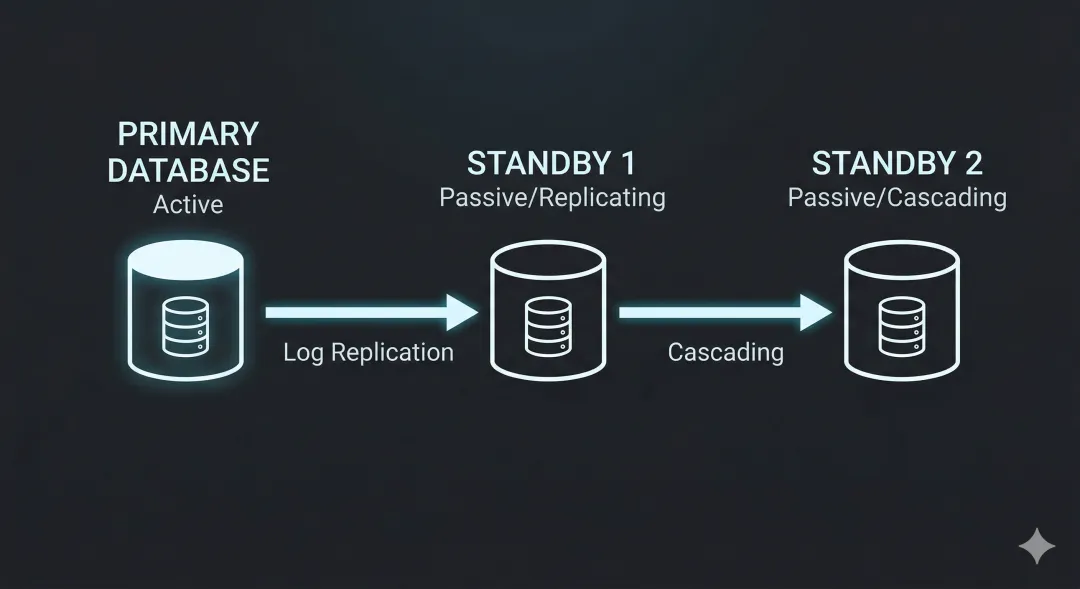
The architecture diagram looks roughly like this: the primary is on the left, continuously serving read and write requests; the standby is on the right, connecting to the primary over gRPC to pull logs; and if you need stronger disaster recovery, you can attach yet another standby behind the standby, forming a cascading architecture.
There are a few points worth highlighting in this design.
First is asynchronous standby setup. You can set up a standby at any moment, without stopping the primary. What does that mean? It means you can quietly add a standby after a business peak, without coordinating any “maintenance window.” The setup process is elegant too: first copy a baseline of the data, then sync the incremental logs—the impact on the primary throughout is negligible.
Second is the loosely coupled design. The standby knows where the primary is and actively pulls logs from it, but the primary doesn’t need to know the standby exists—it just minds its own business. This design brings two immediate benefits: the primary’s performance is completely unaffected by the number of standbys, and it naturally supports a one-primary-multiple-standby topology. Add as many standbys as you like—the primary couldn’t care less.
Third is cascading standby support. What if your standby wants a standby of its own? No problem—seekdb supports a cascading architecture from primary to standby 1 to standby 2. This is especially useful in cross-data-center and cross-region disaster recovery scenarios.
Two Switchover Modes: Lossy and Lossless, Each With Its Own Use
The core value of a high-availability architecture is the ability to quickly switch to the standby and keep serving when the primary runs into trouble. seekdb offers two switching modes for different scenarios.
Switchover: lossless switching. This is performed while the primary is still alive. The typical scenario is planned maintenance: you need to upgrade the primary’s version, or the machine hosting the primary needs patching. The primary is still running normally, so you run the switchover command, and the system first checks whether the primary and standby logs are fully in sync. Once it confirms there’s no data loss, it swaps the roles. The whole process loses zero data—all the business sees is a brief connection interruption.
Even more thoughtfully, seekdb also provides a switchover verify command, letting you run a “dry run” before the actual switch. It checks whether all switching conditions are met without actually making any changes. This is extremely important for production environments—you can surface potential problems ahead of time, rather than scrambling during the real switchover.
Failover: lossy switching. This is the emergency switch performed when the primary has already gone down. The server crashed, the network dropped, the process died—the primary can no longer serve, and the standby needs to take over urgently. Failover doesn’t check whether the primary and standby logs are fully in sync, because the primary is already unreachable; it simply promotes the standby to become the new primary.
Lossy switching may mean a small amount of data loss—those transactions that were committed on the primary but hadn’t yet been synced to the standby. But for most scenarios, losing a few seconds of data is far better than having the entire business down for hours. It’s a pragmatic trade-off.
At this point, you might ask: besides disaster recovery, what else can a standby do? Can it help share the query load?
It can, and that’s one of a standby’s key values. The standby provides read-only service, so you can route some reporting queries and analytics tasks to it, easing the burden on the primary. But one thing to note: because replication is asynchronous, the standby’s data may lag slightly behind the primary—typically a delay of milliseconds to seconds. For most query scenarios, this lag is acceptable; but if your business has extremely high real-time requirements, you’ll need to factor this in.
So can vector indexes be queried normally on the standby? In version 1.2.0, standby read support for vector indexes isn’t yet complete—this is a known limitation that later versions will improve. If your application relies heavily on vector queries, we currently recommend running them primarily on the primary.
Another common question: after a switchover, does the application need to change its connection string? Currently, yes. After the switch completes, the new primary’s IP address changes, so the application needs to update its connection configuration. In practice, you can simplify this with DNS, a VIP, or a connection proxy, and future versions will consider providing a more automated solution.

Fork Database: Data Version Management for the AI Era
If primary-standby solves the “can’t go down” problem, Fork Database solves the “can’t be slow” problem.
Anyone building AI applications knows this feeling well. You’re debugging a RAG application, your knowledge base has hundreds of thousands of documents, you’ve run one version that didn’t work well, and you want to roll back to a previous state to try different parameters. What’s the traditional approach? Either make a backup in advance, or export and re-import with mysqldump. With even a moderately large dataset, a few hours just vanish.
You’re running A/B tests and need two identical copies of the data to run different algorithms. You’re training a model, and each experiment needs an independent data snapshot. You’re doing AI Coding, letting an LLM modify the data in your database, but you want to keep an original version in case it gets messed up.
These scenarios share one thing in common: you need to create copies of your data quickly and cheaply.
seekdb 1.1.0 supported Fork Table, which can quickly clone a single table. Version 1.2.0 upgrades this capability to the full-database level. With a single command, the entire database is cloned in an instant—all tables, all data, all relationships, fully preserved.
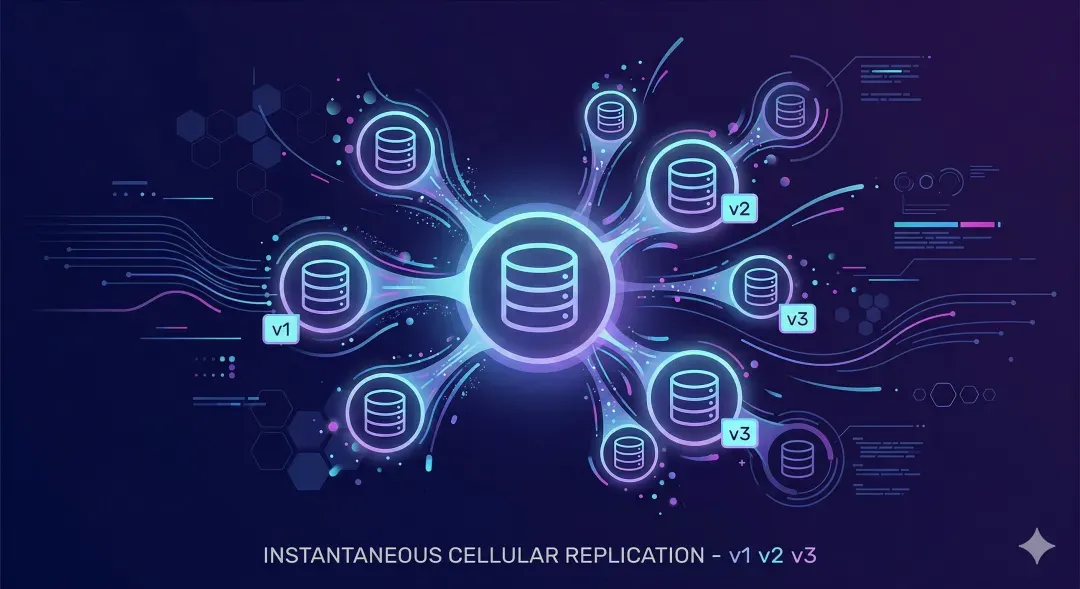
“Instant” here is no exaggeration. The time a Fork takes has nothing to do with data volume—whether the source database is 1GB or 100GB, it completes in seconds. The principle behind it is the Copy-on-Write mechanism: the target database produced by a Fork initially just holds references to the source database’s data, and only when you actually write does it copy the portion of data being modified.
Even better is the database-level atomic snapshot. Fork Database picks a consistent snapshot moment, and all tables in the target database share this same snapshot version. This means multi-table joins and foreign key constraints remain logically consistent after the Fork. You can confidently perform any operation on the target database without worrying about data inconsistency.
This capability is especially valuable in AI scenarios. Knowledge base version management becomes effortless: Fork a version before every major update, and roll back anytime if results are poor. A/B test data preparation goes from hours to seconds. Data snapshots for model training no longer require copying a full dataset every time. Multi-branch conversations for AI Agents can each have their own independent data context.
The same source database can be Forked multiple times, each producing an independent target database that doesn’t affect the others. You can Fork out dev, test, and staging environments and tinker however you like, without affecting the source database.

Diff & Merge: Giving Data Git-Like Capabilities
Fork Database lets you quickly create copies of your data, but what happens after you finish editing a copy? What changed? Should it be merged back? How do you merge it?
The coding world settled on a standard answer long ago: Git. Branch, diff, merge, pull request—developers can use this workflow with their eyes closed. But what about the data world? Most of the time it’s still in its raw state—you don’t know what changed, you can’t say for sure whether it can be rolled back, and comparing the differences between two versions means writing your own scripts.
seekdb 1.2.0 introduces Diff & Merge, letting data be managed just like code.
The workflow is intuitive: first Fork a copy, make various changes on the copy, then use Diff to compare the differences between the two sides, and finally use Merge to merge the changes back (if you decide you want to).
Diff tells you: how many records were added, how many were modified, how many were deleted, and the specific change for each one. Merge supports multiple strategies: full overwrite, merge additions only, merge modifications only, skip deletions, and so on.
The core problem this capability solves is: turning data changes from “unobservable and hard to control” into “observable and controllable.”
- Observable: what changed is clear at a glance—no guessing, no comparing database export files.
- Auditable: every change is traceable—who changed what, and when.
- Reversible: you can verify repeatedly before merging; if you find a problem, just don’t merge and you’re done.
- Collaborative: multiple people can work in parallel on different Forks and merge them together at the end.
For AI applications, this capability is especially practical. RAG knowledge base updates can be validated on a Fork first—merge if the results are good, discard if not. The memory of different AI Agent conversation branches can evolve independently and be merged when needed. A data cleaning pipeline can treat each step as a branch and finally Merge them into clean data.

Final Thoughts
Back to the question we opened with: what happens if there’s a single point of failure?
seekdb 1.2.0’s answer is a full combination punch. Primary-standby gives you disaster recovery, so your business won’t be fully paralyzed by the failure of a single machine. Fork Database makes data version management lightweight, so you no longer spend huge amounts of time on backup and restore. Diff & Merge makes data changes controllable, so you know exactly what changed and whether to roll back.
This is a key step for seekdb to move from “developer-friendly” to “production-ready.”
If you’re building AI applications with seekdb, this release is worth a serious look. And if you haven’t used it yet, now is a great starting point—it still keeps its lightweight, easy-to-use nature, and you can get it running locally with just pip install pyseekdb, but it now also has the high-availability capabilities production environments require.
AI-native databases are moving from “usable” to “delightful,” from “developer-friendly” to “production-ready.”
PS: If you find seekdb helpful, please give it a ⭐ on GitHub—it really helps the project!
Learn More
Welcome to join the open-source community Discord.
Take quality community courses