Getting Started with Scala
A First Look at Scala
This chapter introduces the basics of getting started with Scala.
The Scala Interpreter
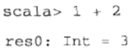
- Variable
- Colon and type
- Equals sign
- Result
When invoking Scala on multiple files, you must compile them first.

But scalac is rather slow. It’s recommended to use fsc, which starts a background process that scans jar files. When you invoke fsc, it only submits the source code to the background process for compilation.

Variable Definitions
- val, similar to Java’s final variable
- var, a non-final variable
Function Definitions
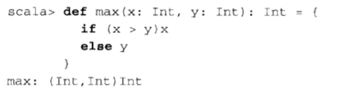
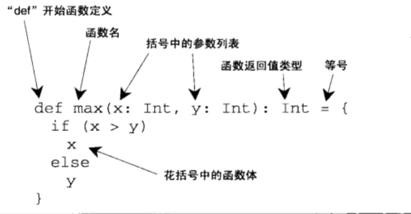
If the function’s result type can be inferred, you don’t need to write it out.
If the function body has only one line, you don’t need to write the curly braces.
Unit represents the void type.
Scala Scripts
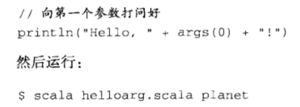
Loop Statements
- while
- foreach
1 | args.foreach(arg => println(arg)) |
is equivalent to
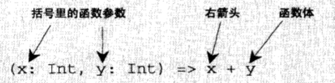
1 | args.foreach((arg: String) => println(arg)) |
If the function statement has only one line and takes a single parameter, you can abbreviate the parameter.
1 | args.foreach(println) |
for syntax:
Arrays
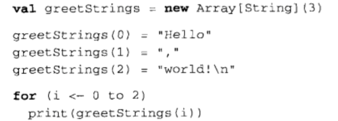
Consider for (i <- 0 to 2). There is a principle: if a method takes only one parameter and the method’s return value has a receiver, you can omit the dot and parentheses when calling it. So it is equivalent to for (i <- 0.to(2)).
Here greetStrings designates an array variable, so it cannot be reassigned to another variable, but its internal contents can be reassigned.
greetString(0) is equivalent to greetString.apply(i).
Any application of a value parameter to an object (when directly passing one or more value parameters) is converted into a call to the apply method.
When assigning to something with parentheses containing one to several parameters, the compiler automatically calls the object’s update function, invoking it on the parameters inside the parentheses and the object on the right-hand side of the equals sign.
1 | greetStrings(0) = "hello" |
is converted into
1 | greetStrings.update(0, "hello") |
It can also be written even more concisely:

is equivalent to

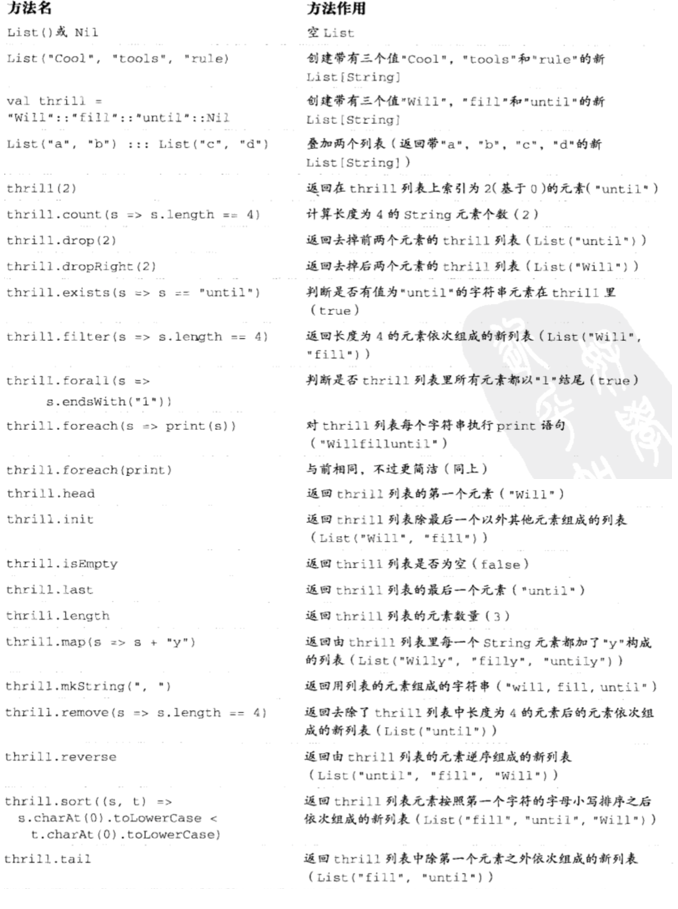
List
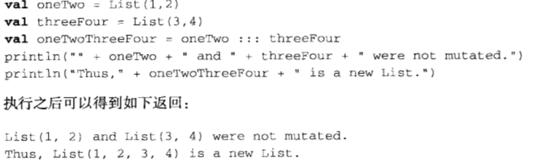
scala.List differs from Java’s java.util.List: once created it is immutable, and its internal elements are immutable as well.
::: implements the prepend feature.
:: is pronounced “cons.” It adds a new element to the front of the list, and it is a right-associative operator.
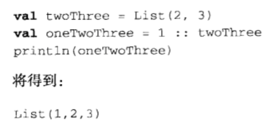
The following produces the same result as above. Nil is shorthand for the empty list.

Lists have no append operation.
The reason is that as the list grows, the time taken by append also grows, whereas the :: operation takes constant time.
If you want to perform an append operation:
- Call ::, then call reverse
- Use ListBuffer
list is the list of functions; List indexing is 0-based.
Tuple
A Tuple is also an immutable object, but unlike List, it can contain elements of different types.
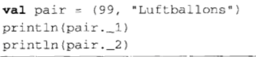
Tuple indexing is 1-based:
1 | 99 |
Why 1-based? Because for statically typed tuples in other languages such as Haskell/ML, 1 is the tradition.
You cannot use pair(0), because pair(0) is pair.apply(0), but apply cannot return different types for a single function, so this operation isn’t allowed.
Set
A set is divided into mutable sets and immutable sets.
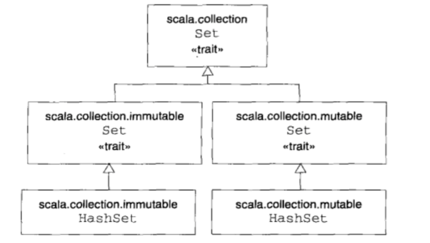
Scala’s trait is similar to Java’s interface.
Implementing a Java interface is called mixing in a trait in Scala.
The default is an immutable set.
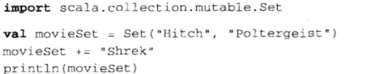
For example:

When you perform the += operation, you actually create a new set.
If you need a mutable set, you must specify that it is a mutable set.
Map
A map is also divided into mutable maps and immutable maps; the immutable map is the default.
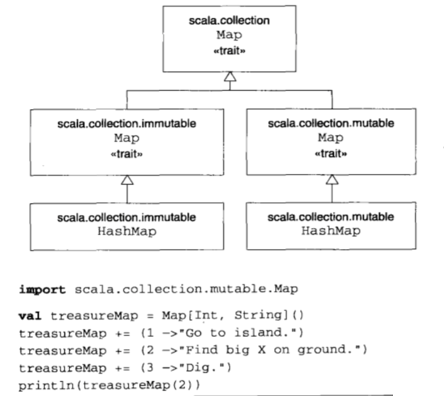
Any object in Scala can call the -> function, which returns a two-element tuple containing the key-value pair.

Side Effects
In Scala there is a kind of behavior often called a side effect: behavior that returns no value is called a side effect. It implies that repeated execution of the function does not produce a definite result.
There is a way to execute solely for the side effect:
1 | def add(b: Byte): Unit = sum += b |
can be rewritten as
1 | def add(b: Byte) {sum += b} |
Remove the type and the =, and wrap it in curly braces.
Also, because any type can be converted to Unit, when a function’s result is some type such as String but the function’s return type is specified as Unit, the result is discarded.

This situation can easily lead users into errors: for example, the user actually wants a return value but forgets to write the =, which causes the function to return no result.
Semicolon ;
When a line has only one statement, you don’t need a semicolon; when there are multiple statements, you must use semicolons.
1 | val s = "hello"; println(s) |
But note that Scala places the operator at the end of the line.
1 | x + |
is equivalent to (x+y+z), but if it is
1 | x |
then it becomes 3 separate statements.